
Nano Banana Pro Jewelry Product Photo Prompts
Create higher-fidelity jewelry photo concepts with Nano Banana Pro using protected geometry, material-specific light, controlled reflections, scale cues, and detail review.
Quick answer
For a real jewelry item, use a sharp reference and protect stone count, setting, prong positions, chain links, proportions, metal color, finish, and hallmarks. Add one lighting design and one background change at a time, then inspect every repeated and reflective detail at full resolution.
Who this guide is for
Jewelry brands, makers, photographers, and creative teams developing catalog backgrounds, campaign concepts, social crops, and lighting directions for rings, earrings, necklaces, watches, and small accessories.
Recommended model
| Use case | Recommended model | Why |
|---|---|---|
| This workflow | Nano Banana Pro in image-to-image mode for real pieces | Its higher-fidelity reference workflow is the better fit when small geometry, material boundaries, and controlled surface detail matter more than fast bulk ideation. |
AIBase is an independent creative platform. Model names are shown only to identify supported underlying technologies and workflow choices.
Prompt template
Use the uploaded jewelry image as the exact product reference. Preserve [item type], [stone count and cut], [setting and prongs], [chain or clasp geometry], [dimensions and proportions], [metal color and finish], [engraving or hallmark zone], and [orientation]. Change only [background, support, crop, or lighting]. Set: [surface]. Lighting: [key, fill, and highlight behavior]. Camera: [macro or catalog angle]. Keep reflections controlled and contact shadows plausible. No extra stone, missing prong, fused link, altered setting, false sparkle, changed metal, invented engraving, readable new text, logo, claim, or watermark.
Step-by-step workflow
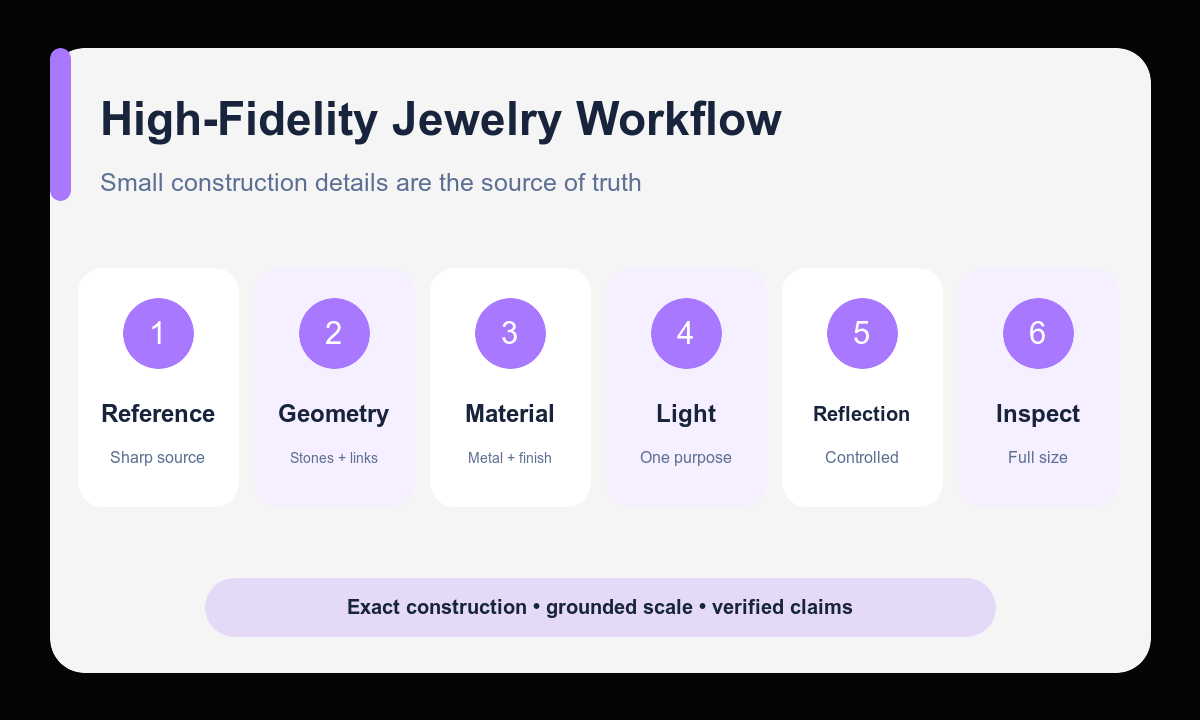
- Photograph the real piece sharply from the intended angle with clean edges and visible small construction details.
- List the non-negotiable geometry, materials, finish, marks, and scale before writing aesthetic instructions.
- Choose one background and one lighting purpose, such as catalog clarity or campaign atmosphere.
- Generate a first pass with camera and product orientation locked to the source.
- Inspect stone count, settings, links, symmetry, reflections, color, scale, and contact shadows at full size.
- Correct one defect at a time and route the final image through product, merchandising, and disclosure review.
Example prompt variants
- Keep the exact oval stone, four-prong setting, narrow yellow-gold band, proportions, and orientation; place the ring on warm ivory paper with a soft macro side light and one controlled rim highlight; minimal catalog crop.
- Keep the exact pendant shape, stone spacing, chain links, clasp, silver finish, and scale; place it on dark charcoal velvet with a gentle diagonal light that reveals texture without clipping reflections.
- Keep the exact pair of hoop earrings, hinge geometry, diameter, thickness, and rose-gold color; arrange both on pale travertine with a clean overhead camera, diffused light, and empty right-side copy area.
Quality checklist
- Stone count, cut, prongs, links, clasps, symmetry, and proportions match the source.
- Metal color and finish remain consistent across highlights, shadows, and reflections.
- Scale cues and contact shadows make the piece feel physically grounded.
- No engraving, hallmark, gemstone property, certification, or claim was invented.
- The final file has been checked at full size against the real product or approved reference.
Mistakes to avoid
- Using high sparkle or luxury language instead of protecting construction details.
- Combining a new angle, new setting, new background, and new lighting design at once.
- Missing duplicated stones, fused chain links, asymmetric settings, or clipped reflections.
- Treating generated material appearance as proof of gemstone, metal, or certification claims.
Related AIBase pages
- Create jewelry imagery with Nano Banana Pro
- Follow the high-fidelity image workflow
- Compare Nano Banana Pro and GPT Image 2
Practical next step
Open the most relevant AIBase generator, run one narrow prompt first, and save the best result before adding more constraints. The fastest way to improve output quality is to compare one variable at a time: subject, camera, background, lighting, then final polish.