
Nano Banana Pro Smart Thermostat Campaign Product Photo Prompts
Create reference-led smart thermostat campaign scenes while preserving exact housing, display, controls, mounting, sensors, compatibility, and verified energy claims.
Quick answer
Use exact product-revision references for the thermostat front, side, backplate, wall mount, controls, sensor openings, display bezel, finish, included accessories, and installed scale. Generate the room as context, but composite a real approved device plate and real interface capture when the screen matters. Keep HVAC compatibility, wiring, voltage, setup, automation behavior, privacy, rebates, savings, certifications, and availability in verified editable copy.
Who this guide is for
Smart-home brands, HVAC retailers, installers, ecommerce teams, utilities, and agencies creating product-detail heroes, launch campaigns, retail displays, and room-scene concepts.
Recommended model
| Use case | Recommended model | Why |
|---|---|---|
| This workflow | Nano Banana Pro image-to-image for reference-led smart thermostat concepts | Multiple authorized references can anchor small device and mounting details while the surrounding interior is explored separately from technical and energy claims. |
AIBase is an independent creative platform. Model names are shown only to identify supported underlying technologies and workflow choices.
Prompt template
Use the uploaded authorized [thermostat SKU, revision, color] references as exact product truth. Create a text-free [installed wall hero / close product detail / neutral room context] at a source-supported angle. Preserve exact housing silhouette and depth, bezel, display size and off-state reflection, dial or button count, seams, sensor and vent openings, indicator zones, backplate visibility, wall clearance, mounting orientation, finish, scale, shadows, and camera perspective. No invented screen UI, temperature, schedule, alert, wire, sensor, accessory, compatibility, savings, energy badge, certification, rebate, logo mutation, word, number, person, or watermark.
Step-by-step workflow
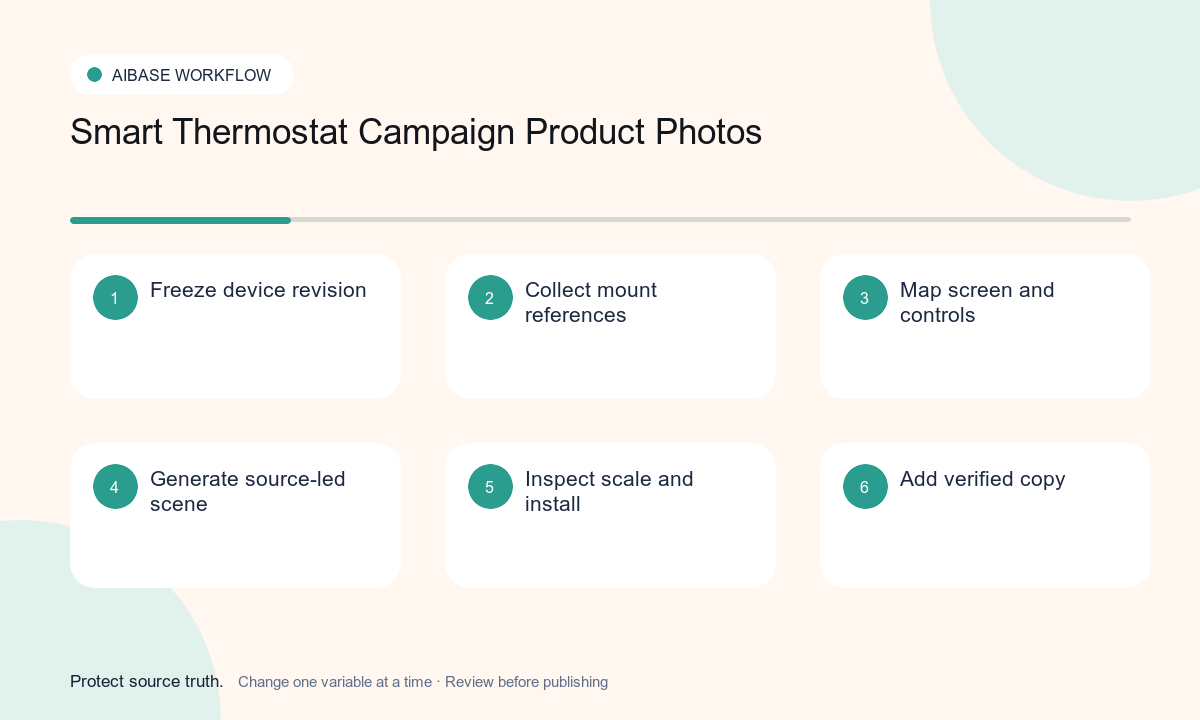
- Freeze SKU, revision, dimensions, display, controls, sensors, backplate, wiring requirements, included parts, compatibility, certifications, privacy, warranty, markets, and claim evidence.
- Collect authorized front, side, rear, mount, packaging, installed, finish, scale, off-screen, and approved UI references for the exact revision.
- Choose one documented camera angle and map housing, display, controls, openings, wall contact, fasteners, clearances, reflections, and shadows.
- Generate an off-screen room concept first; composite the approved device plate and real interface capture when product accuracy is commercially important.
- Inspect geometry, mounting, wall intersection, scale, screen bezel, reflections, control count, sensor openings, shadows, room plausibility, and crop against references.
- Add verified compatibility, wiring, setup, automation, privacy, energy, rebate, certification, price, availability, disclosure, and CTA in editable layers.
Example prompt variants
- Approved round matte-black thermostat installed on warm white plaster, preserve exact diameter, depth, bezel, dial ring, sensor opening, off-screen reflection, wall contact, scale, and shadow; no UI or temperature.
- Authorized rectangular white thermostat in a calm hallway crop, preserve corner radius, screen proportion, lower sensor slots, side seam, backplate edge, finish, and mounting height; no wire or compatibility claim.
- Studio macro of the approved thermostat and documented trim plate, preserve exact plate dimensions, screw-cover zones, device fit, materials, edge gaps, and soft neutral shadow; no accessory beyond the approved set.
Quality checklist
- SKU, revision, housing, dimensions, screen, controls, sensors, vents, backplate, mounts, included parts, finish, and scale match authorized references.
- Wall contact, clearances, perspective, reflections, shadows, display bezel, button count, and installation orientation are physically coherent.
- No generated screen or room implies unsupported temperature control, learning behavior, remote access, compatibility, privacy, savings, rebate, or certification.
- Technical specifications, real UI, setup, compatibility, privacy, energy evidence, price, warranty, and CTA remain verified editable content.
- References, prompts, composites, product and HVAC review, claims approval, market versions, expiry, and rollback remain traceable.
Mistakes to avoid
- Generating a polished thermostat screen that shows modes, temperatures, schedules, or alerts the real product does not support.
- Hiding the backplate, inventing wiring, changing sensor openings, or placing the device at an impossible wall depth.
- Using a comfortable room scene as evidence of energy savings, indoor-air quality, compatibility, or automatic behavior.
- Embedding rebate, certification, savings percentage, privacy promise, price, or setup guidance in generated pixels.
Related AIBase pages
Practical next step
Open the most relevant AIBase generator, run one narrow prompt first, and save the best result before adding more constraints. The fastest way to improve output quality is to compare one variable at a time: subject, camera, background, lighting, then final polish.