
Wan 2.7 Product Rotation Video Prompts From One Image
Create product rotation candidates with Wan 2.7 by anchoring geometry, choosing object-turntable or camera-orbit motion, controlling reflections, and reviewing unseen surfaces.
Quick answer
Choose either a stationary camera with the product rotating on a turntable or a stationary product with the camera orbiting—never both in the first prompt. A single image cannot prove hidden surfaces, so protect visible geometry and treat newly revealed details as concepts until checked against additional real views.
Who this guide is for
Ecommerce, product design, and social teams creating rotation concepts, feature-reveal shots, launch loops, or briefs for products with clear silhouettes and available multi-angle references.
Recommended model
| Use case | Recommended model | Why |
|---|---|---|
| This workflow | Wan 2.7 in image-to-video mode | Its flexible short-duration and aspect-ratio options make it useful for testing restrained rotation candidates that can later be trimmed, verified, and finished in an editor. |
AIBase is an independent creative platform. Model names are shown only to identify supported underlying technologies and workflow choices.
Prompt template
Use the uploaded product image as the identity reference. Keep [silhouette, dimensions, color, materials, controls, seams, label or logo zones, base contact, and background] stable. Motion mode: [product rotates on a fixed vertical turntable axis while camera stays locked] OR [product stays fixed while camera makes one slow arc]. Travel: [degrees], [direction], [constant speed], [duration]. Maintain constant scale, horizon, exposure, shadow direction, and physically consistent reflections. End on [front, three-quarter, or loop-friendly angle]. No simultaneous object and camera rotation, wobble, scale pulse, floating base, changing geometry, invented port, new label, background drift, speed ramp, text, or watermark.
Step-by-step workflow
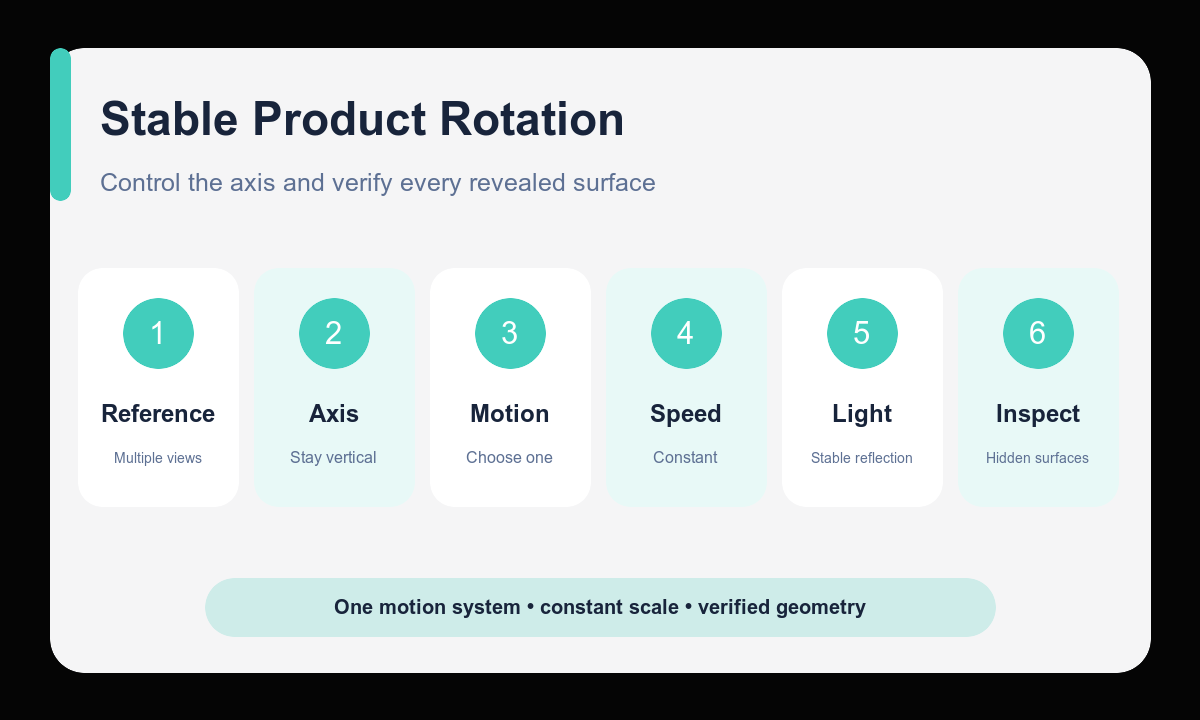
- Collect front, side, rear, and detail references whenever the final clip must represent a real product.
- List silhouette, dimensions, controls, seams, materials, print zones, base contact, and forbidden inventions.
- Choose one motion system: turntable rotation or camera orbit.
- Set axis, direction, travel, constant speed, duration, camera height, and ending angle.
- Compare every revealed surface with approved reference views and reject invented geometry.
- Trim and stabilize the best candidate in an editor, then verify the final loop or endpoint at delivery size.
Example prompt variants
- Keep the exact compact speaker silhouette, grille pattern, top controls, graphite color, and base contact; product rotates 90 degrees clockwise on a hidden turntable over six seconds; camera locked at product height, soft studio light, end on right three-quarter view.
- Keep the exact sneaker profile, sole pattern visible in source views, laces, panels, colors, and pedestal; product stays fixed while camera makes one slow 45-degree left-to-right arc; constant scale and white sweep.
- Keep the exact cosmetic jar proportions, lid seam, glass tint, label zone, and stone surface; jar rotates 60 degrees counterclockwise at constant speed; locked macro camera, stable side highlight, finish on clean front label zone.
Quality checklist
- Only one motion system is active and the vertical axis remains stable.
- Scale, camera height, horizon, contact shadow, exposure, and background do not pulse or drift.
- Visible and newly revealed surfaces match approved product references.
- Reflections move consistently with material, light, camera, and rotation.
- The ending angle or edited loop is stable, intentional, and free from invented details.
Mistakes to avoid
- Rotating both the product and camera and creating unreadable relative motion.
- Requesting a full unseen rear view from one reference and trusting invented features.
- Leaving axis, travel, speed, direction, or ending angle unspecified.
- Ignoring floating contact, reflection reversals, scale pulses, or hidden-surface drift.
Related AIBase pages
- Create a product rotation with Wan 2.7
- Follow the Wan 2.7 image-to-video workflow
- Build vertical product video prompts
Practical next step
Open the most relevant AIBase generator, run one narrow prompt first, and save the best result before adding more constraints. The fastest way to improve output quality is to compare one variable at a time: subject, camera, background, lighting, then final polish.