
Wan 2.7 Seamless Loop Video Prompts for Social Backgrounds
Create loop-friendly Wan 2.7 video backgrounds by controlling cyclical motion, a locked camera, stable composition, consistent lighting, and matching endpoints.
Quick answer
The most reliable loop candidates use a stable camera and one repeating motion whose final state can return naturally to the opening state. Prompt for consistent exposure and composition, then finish the loop in an editor because a generated clip is not guaranteed to join perfectly by itself.
Who this guide is for
Social teams, event designers, streamers, web creators, and ecommerce marketers building ambient backgrounds, subtle product motion, texture loops, and vertical or square visual beds for added copy.
Recommended model
| Use case | Recommended model | Why |
|---|---|---|
| This workflow | Wan 2.7 for flexible short loop candidates | Its text- and image-to-video workflow, multiple aspect ratios, and adjustable short durations make it useful for exploring restrained cyclical motion before editorial loop finishing. |
AIBase is an independent creative platform. Model names are shown only to identify supported underlying technologies and workflow choices.
Prompt template
Create a loop-friendly [duration] [aspect ratio] clip using [reference image or scene]. Keep [composition anchors], [subject shape], [background], [light], and [copy-safe zone] stable. Animate only [one cyclical motion] that begins at [start state], completes one smooth cycle, and returns toward the same state by the final frame. Camera locked [or one repeatable motion]. Constant exposure and color. No cut, transition, zoom jump, new object, shape drift, flicker, readable text, logo, or sudden speed change. End composition should closely match the opening for editorial looping.
Step-by-step workflow
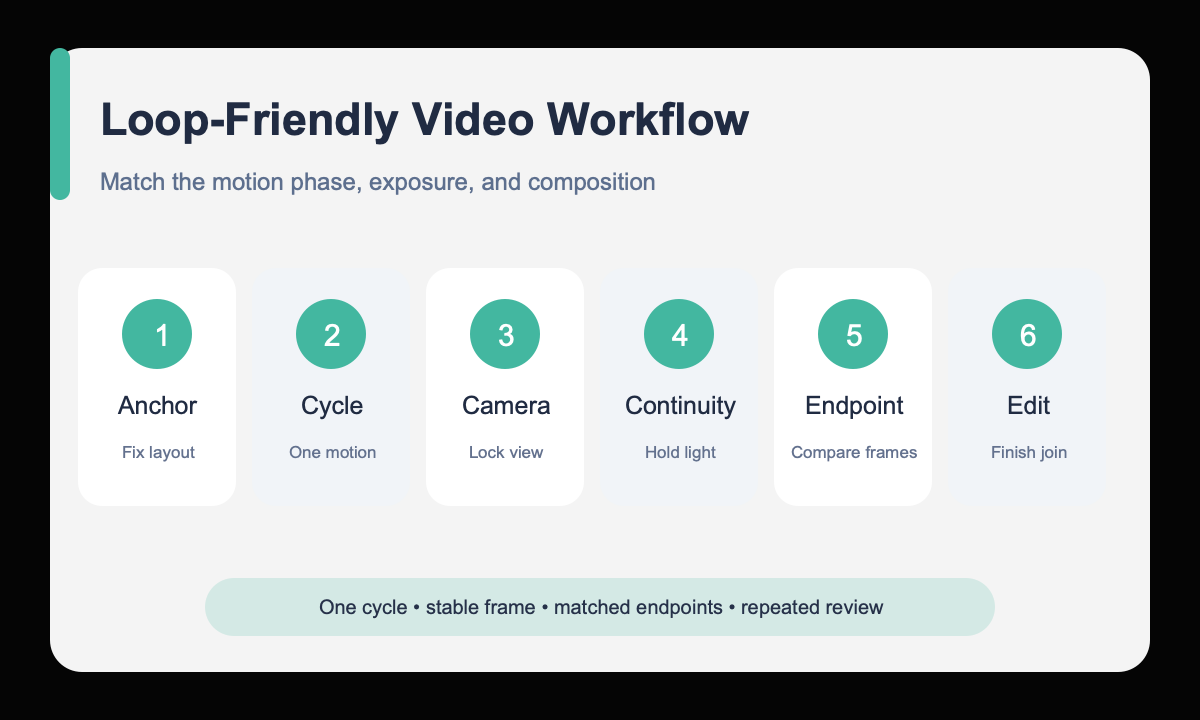
- Choose a motion with a natural cycle, such as rotation, breathing light, drifting steam, swaying fabric, or moving reflection.
- Define the fixed composition anchors and reserve a calm area if copy will be added later.
- Use a locked camera unless the camera path itself can return cleanly to the start.
- Prompt for one full motion cycle with constant light, color, subject shape, and background.
- Compare the first and last frames for position, brightness, scale, and phase.
- Trim, crossfade, time-remap, or ping-pong the best candidate in an editor and inspect the join repeatedly.
Example prompt variants
- Six-second square loop candidate, ceramic cup fixed on a dark table, one thin ribbon of steam curls upward and returns to a similar shape, locked camera, constant warm side light, empty left copy zone.
- Eight-second 9:16 loop candidate, translucent fabric panel makes one gentle forward-and-back sway, product pedestal remains fixed, locked camera, steady cool studio light, no new folds or objects.
- Four-second 16:9 loop candidate, abstract metal surface with one slow circular reflection sweep returning near its opening position, no camera movement, constant exposure, clean center area for a title overlay.
Quality checklist
- The animation contains one identifiable cycle with no competing motion.
- First and last frames closely match in composition, exposure, color, scale, and motion phase.
- Subject geometry, background objects, textures, and copy-safe zones remain stable.
- There is no flicker, speed jump, cut, camera bump, or new element at the join.
- The edited loop has been watched through several repetitions at delivery size.
Mistakes to avoid
- Assuming the generation itself will always create a frame-perfect seamless join.
- Choosing a one-way action such as breaking, pouring out, or walking away.
- Combining subject motion, camera motion, changing light, and background motion.
- Checking only one playback instead of repeated loops and endpoint frames.
Related AIBase pages
- Create a loop-friendly clip with Wan 2.7
- Follow the Wan 2.7 image-to-video workflow
- Create vertical social video prompts
Practical next step
Open the most relevant AIBase generator, run one narrow prompt first, and save the best result before adding more constraints. The fastest way to improve output quality is to compare one variable at a time: subject, camera, background, lighting, then final polish.