
GPT Image 2 Gift Card Delivery Confirmation Background Prompts
Create text-free gift-card delivery confirmation backgrounds while keeping recipient, value, channel, timing, redemption, support, and live delivery state in trusted UI.

Quick answer
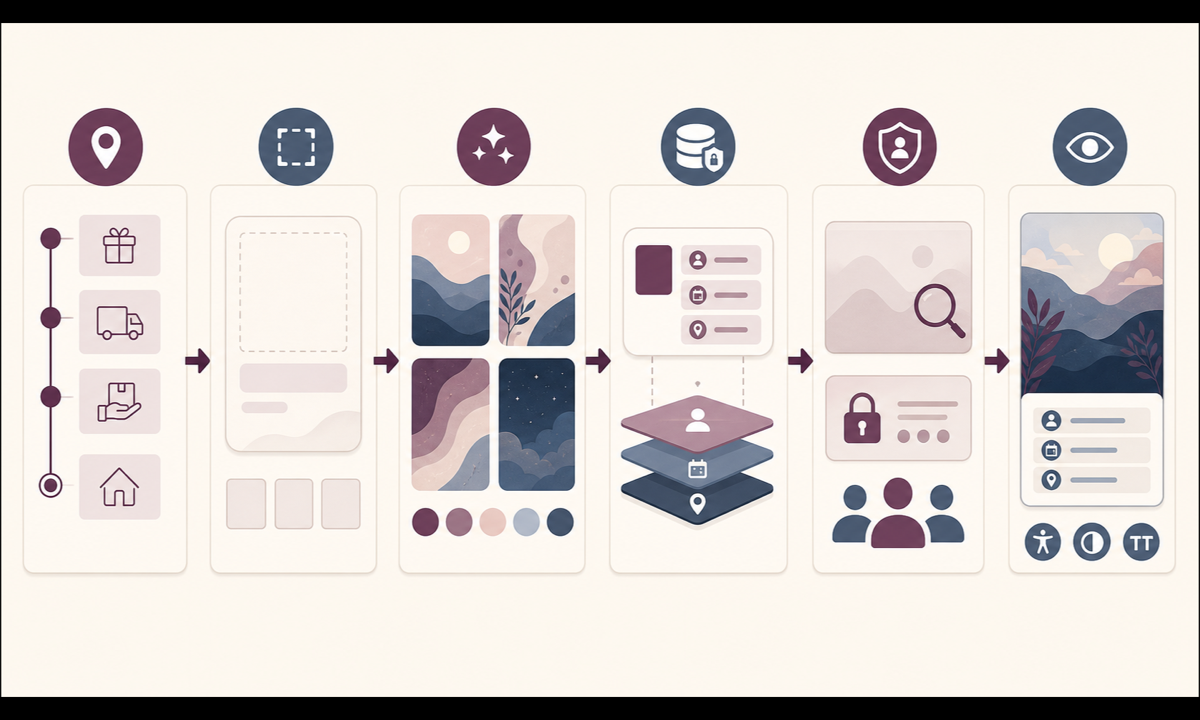
Generate only a restrained decorative background with protected zones for trusted delivery content. Render recipient identity, delivery channel, masked destination, gift value, currency, send time, scheduled time, delivery state, redemption instructions, resend controls and support from commerce and messaging systems. The generated image must not contain a gift code, receipt, delivered badge or visual guarantee that the recipient opened or redeemed the gift.
Who this guide is for
Ecommerce product teams, gift-card programs, lifecycle designers, payment operations, support teams and agencies building purchase, account, email and app confirmation states.
Recommended model
| Use case | Recommended model | Why |
|---|---|---|
| This workflow | GPT Image 2 for text-free gift-delivery card background concepts | It can explore polished responsive compositions while every financially meaningful, private and time-sensitive detail remains editable product UI. |
AIBase is an independent creative platform. Model names are shown only to identify supported underlying technologies and workflow choices.
Prompt template
Create a text-free decorative background for a [web / mobile / email] gift-card delivery confirmation card. Reserve clear zones for status heading, recipient and masked destination, value, delivery channel and timing, redemption explanation, resend or edit actions, support and legal note. Use [restrained celebratory palette] with subtle folded-paper layers and accessible contrast. No gift code, barcode, QR code, envelope address, person, inbox, checkmark badge, receipt, currency, amount, date, time, delivered claim, opened claim, word, number, logo or watermark.
Step-by-step workflow
- Define purchase, scheduled, queued, sent, delivered, bounced, delayed, canceled, refunded, opened and redeemed states with authoritative owners and permitted customer language.
- Map required recipient, masked destination, value, currency, sender, channel, schedule, timezone, status explanation, resend, edit, refund, support, privacy and legal zones.
- Generate calm text-free background variants with useful safe areas; reject imagery that looks like a gift code, receipt, inbox proof or delivery guarantee.
- Populate current status and actions from payment, order, email or messaging events with appropriate uncertainty and privacy masking.
- Test scheduled sends, timezone edges, bounced addresses, blocked messages, duplicate sends, recipient edits, cancellation, refund, partial outages, localization and image blocking.
- Review with payments, gift-card operations, privacy, support, accessibility and localization owners; expire the visual when the status contract changes.
Example prompt variants
- Wide confirmation-card background with two quiet folded-paper arcs framing a large central live-content zone, muted plum and cream, no envelope, checkmark, value or text.
- Mobile card background with a restrained ribbon-like curve outside recipient and status zones, no gift box, code, address, date, badge or pseudo-text.
- Email header background with soft layered color fields and a clear lower support area, no inbox, message bubble, receipt, confetti, currency or word.
Quality checklist
- Recipient, masked destination, sender, value, currency, channel, schedule, timezone, delivery state and available actions match authoritative events.
- Generated pixels contain no code, address, amount, date, time, receipt, delivered, opened, redeemed or guarantee cue.
- Resend, edit, cancel, refund, support, privacy and error paths are prominent, editable and permission-aware.
- Layouts remain usable across locales, mobile, desktop, dark mode, image blocking and assistive technology.
- Status contract, prompt, output, event mapping, accessibility evidence, approvals, publication and rollback remain traceable.
Mistakes to avoid
- Embedding the gift code, recipient address, amount or schedule in a generated image.
- Showing a checkmark or opened gift as proof when the messaging provider reports only acceptance or send completion.
- Using celebration that obscures a bounce, delay, cancellation, refund or recipient correction path.
- Treating payment success, message delivery, recipient opening and gift redemption as the same state.
Related AIBase pages
Practical next step
Open the most relevant AIBase generator, run one narrow prompt first, and save the best result before adding more constraints. The fastest way to improve output quality is to compare one variable at a time: subject, camera, background, lighting, then final polish.