
Nano Banana Pro Ghost Mannequin Prompts for Apparel Product Photos
Create ghost mannequin apparel concepts with Nano Banana Pro while preserving garment shape, seams, fabric, color, closures, and truthful front-to-back construction.

Quick answer
Use consistent front, back, and interior reference photos; protect the garment’s silhouette, length, seams, closures, fabric, color, and construction; then remove only the mannequin and reconstruct only the hidden collar or opening from visible evidence. Reject any result that changes fit, adds symmetry, smooths texture, or invents interior details.
Who this guide is for
Fashion ecommerce teams, apparel photographers, retouchers, and catalog managers preparing consistent invisible-mannequin listing images from authorized garment references.
Recommended model
| Use case | Recommended model | Why |
|---|---|---|
| This workflow | Nano Banana Pro in image-to-image mode | The reference-led, high-fidelity workflow suits controlled apparel edits where material texture and construction details must remain more important than stylistic reinvention. |
AIBase is an independent creative platform. Model names are shown only to identify supported underlying technologies and workflow choices.
Prompt template
Use the uploaded authorized front, back, and interior garment photos as exact construction references. Create one clean ghost-mannequin product image at [front/back/three-quarter] view. Keep the exact silhouette, shoulder width, sleeve shape, hem length, drape, asymmetry, seams, darts, pockets, buttons, zipper, collar, lining, fabric weave, color, pattern scale, and natural wrinkles. Remove only the mannequin, pins, and supports. Reconstruct only the hidden [collar/neck/opening] from visible reference evidence. Neutral [white/light gray] background, even catalog light, centered crop, soft natural interior depth. No body, skin, hanger, changed fit, inflated volume, invented seam, extra pocket, mirrored pattern, recolor, texture smoothing, readable fake label, text, or watermark.
Step-by-step workflow
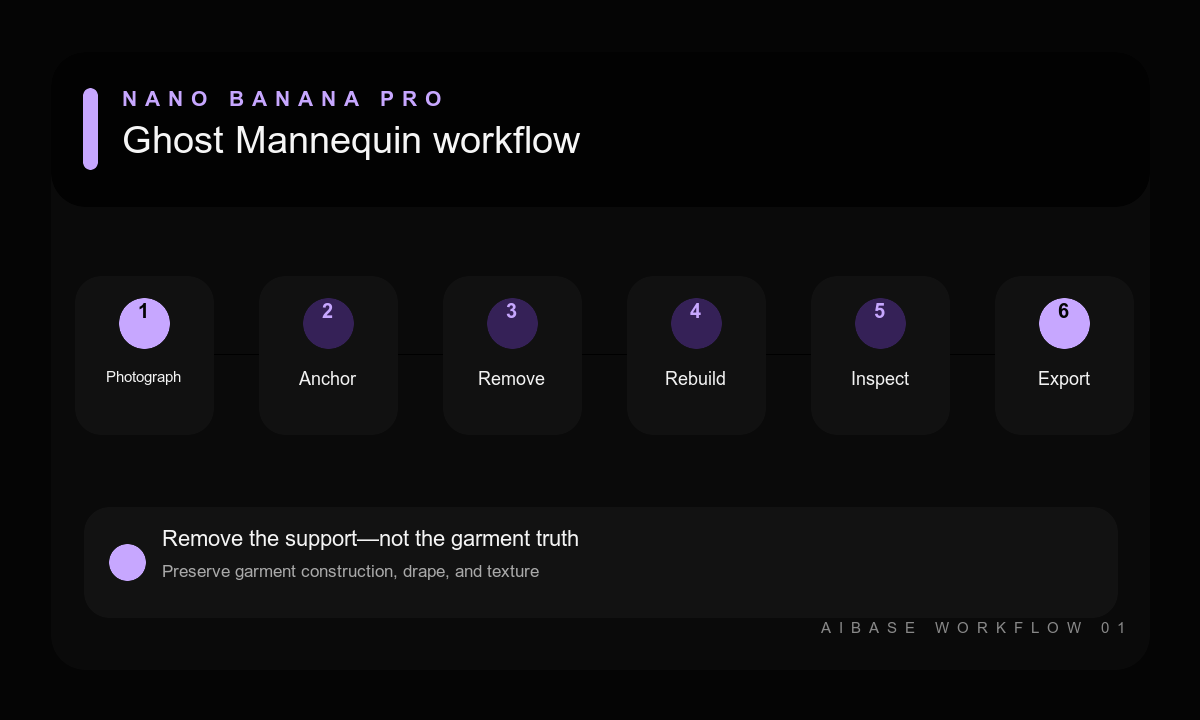
- Photograph the garment on the mannequin from a fixed camera position, then capture the back and hidden interior areas separately.
- List protected construction details, measurements, fabric behavior, color references, and any intentional asymmetry.
- Mask or describe the mannequin as the only removal target and specify the exact view and catalog crop.
- Reconstruct one hidden opening at a time using the interior reference rather than an imagined garment structure.
- Compare the result with every source at full size, checking pattern alignment, seams, closures, drape, and color.
- Use verified source pixels or manual retouching for labels and critical construction, then export a consistent catalog set.
Example prompt variants
- Front ghost view of the exact cream linen shirt; keep dropped shoulders, seven buttons, patch pocket, curved hem, weave, and natural sleeve creases; remove mannequin only and reconstruct the inside collar from the supplied detail photo.
- Back ghost view of the exact navy cycling jacket; keep reflective panel locations, rear pockets, elastic hem, zipper line, raglan seams, and fabric sheen; even gray background, no body shape or added symmetry.
- Three-quarter ghost view of the exact floral wrap dress; keep print scale and placement, waist tie route, neckline overlap, sleeve volume, hem length, and asymmetric drape; no mirrored flowers or tightened waist.
Quality checklist
- Silhouette, proportions, hem, sleeves, drape, fit cues, and intentional asymmetry match the garment.
- Seams, pockets, closures, pattern placement, lining, and reconstructed interior are source-supported.
- Fabric weave, sheen, wrinkles, thickness, and color remain realistic and consistent.
- No mannequin, skin, hanger, pin, clipping edge, hollow-body artifact, or floating section remains.
- Front, back, and detail exports use consistent scale, light, background, and crop.
Mistakes to avoid
- Using only one front photo and asking the model to invent the hidden collar or back construction.
- Requesting a perfect symmetrical shape that erases real drape and garment asymmetry.
- Letting texture cleanup change knit, weave, print scale, distressing, or color.
- Approving an attractive image without comparing seams, pockets, closures, and hem to the SKU.
Related AIBase pages
- Edit apparel with Nano Banana Pro
- Use the Nano Banana Pro high-fidelity workflow
- Create apparel detail infographic concepts
Practical next step
Open the most relevant AIBase generator, run one narrow prompt first, and save the best result before adding more constraints. The fastest way to improve output quality is to compare one variable at a time: subject, camera, background, lighting, then final polish.