
Seedream 5.0 Lite Comparison Table Section Background Prompts
Generate fast text-free backgrounds for comparison-table sections while keeping products, criteria, prices, features, evidence, dates, and methodology in accessible page content.

Quick answer
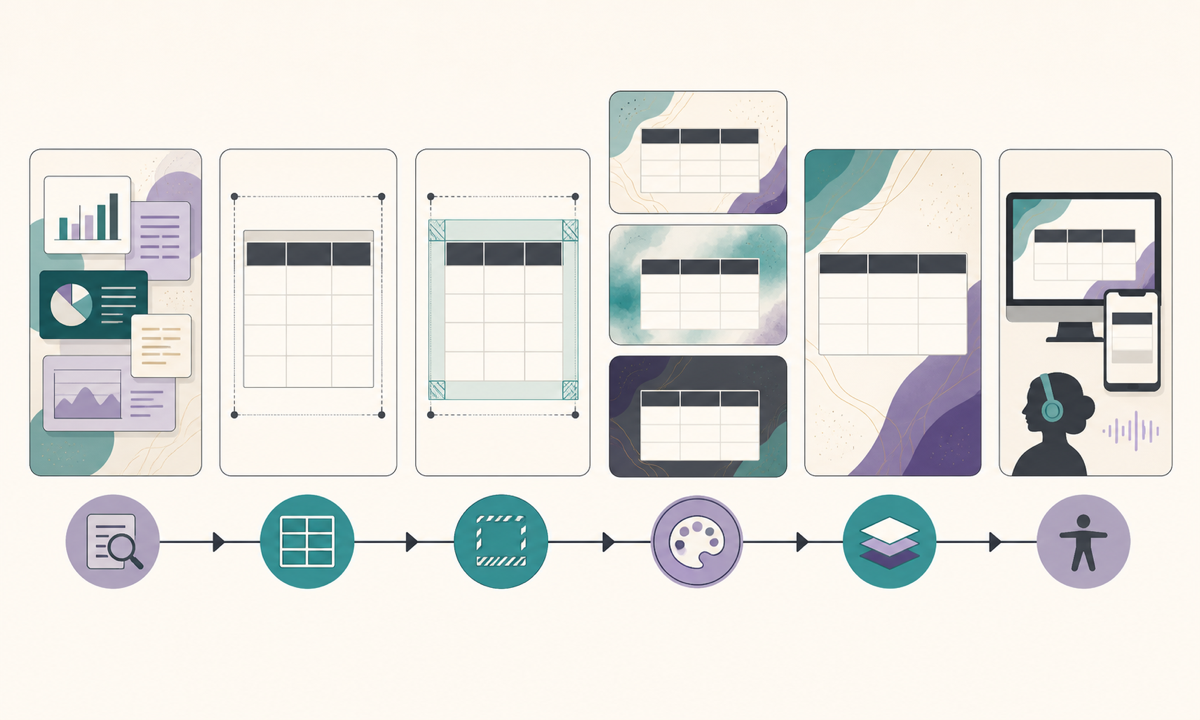
Use Seedream 5.0 Lite for a low-detail, text-free background that supports a real HTML comparison table without signaling a winner. Define products, versions, criteria, market, price basis, evidence, methodology, research date, conflicts, and update owner first. Keep every name, feature, check, limitation, price, citation, disclosure, and control in semantic page content; the generated layer should remain decorative and optional.
Who this guide is for
SaaS marketers, ecommerce publishers, product educators, affiliates, and design teams building versus pages, plan tables, buying guides, migration pages, and model comparisons.
Recommended model
| Use case | Recommended model | Why |
|---|---|---|
| This workflow | Seedream 5.0 Lite for fast low-detail comparison-section background exploration | Rapid variants help test density, palette, and crop around a table, while factual comparisons and accessible interaction remain fully authored outside the image. |
AIBase is an independent creative platform. Model names are shown only to identify supported underlying technologies and workflow choices.
Prompt template
Create a text-free background for the comparison-table section of a [SaaS / ecommerce / AI model] page. Composition [quiet top transition, uninterrupted low-contrast table field, subtle side framing, mobile-safe center], visual language [balanced geometry, palette, material], equal weight across all options. No product, competitor likeness, logo, interface, table, row, column, card, checkmark, cross, winner cue, trophy, podium, ranking, score, rating, price, feature icon, chart, statistic, citation, word, letter, number, pseudo-text, or watermark.
Step-by-step workflow
- Freeze the reader question, included options, exact versions, market, audience, criteria, definitions, evidence sources, price basis, methodology, research date, conflicts, and update owner.
- Design the semantic table first with caption, row and column headers, scope notes, citations, caveats, keyboard behavior, mobile strategy, and no-image presentation.
- Map protected zones around the real table and set a strict detail budget so decoration cannot look like data, controls, selected cells, or a preferred option.
- Generate several text-free backgrounds with equal visual weight and test each behind realistic longest-locale content at desktop and mobile widths.
- Add product names, facts, prices, dates, citations, methodology, disclosures, sorting or filtering, and CTA as accessible editable components.
- Review factual parity, legal fairness, accessibility, localization, performance, source links, stale data, corrections, and scheduled revalidation.
Example prompt variants
- Wide pale-sand table-section background with equal indigo and teal edge layers, plain low-contrast center and soft top transition, no cards, checks, columns, numbers, or text.
- Dark comparison section with balanced violet light at both outer edges and an uninterrupted graphite table field, no winner glow, product shape, chart, badge, or interface.
- Mobile comparison background using one neutral vertical paper texture and symmetrical quiet margins, no path, rank, arrow, icon, score, price, or letter.
Quality checklist
- Options, versions, criteria, definitions, markets, prices, evidence, methodology, research date, conflicts, and update owner are explicit and current.
- Background contains no fake table, feature, control, rank, score, winner cue, brand identity, price, statistic, evidence, or readable text.
- Table caption, headers, cells, caveats, citations, disclosure, date, controls, and CTA remain semantic, editable, localizable, and keyboard accessible.
- Desktop, narrow mobile, zoom, high contrast, screen reader, reduced data, and no-image experiences preserve full comparison meaning.
- Brief, source set, prompts, outputs, factual review, accessibility review, publication, revalidation, corrections, and retirement remain traceable.
Mistakes to avoid
- Generating decorative checks, crosses, glowing columns, crowns, or podiums that bias the comparison before users read the evidence.
- Rendering the actual table in pixels and losing accessibility, citation, update, localization, and mobile behavior.
- Comparing different versions, billing periods, regions, or definitions without saying so.
- Using a dense background that lowers contrast, resembles interaction, slows the page, or hides caveats and sources.
Related AIBase pages
Practical next step
Open the most relevant AIBase generator, run one narrow prompt first, and save the best result before adding more constraints. The fastest way to improve output quality is to compare one variable at a time: subject, camera, background, lighting, then final polish.