
Text to Image vs Image to Image for Ecommerce Product Photos
Choose text-to-image or image-to-image for ecommerce product photos based on whether you need concept range, SKU fidelity, controlled edits, or final production accuracy.
Quick answer
Use text-to-image when you need broad visual concepts and no exact SKU must be preserved. Use image-to-image when a real product photo, packaging shape, color, label zone, or composition is the source of truth. Many teams explore with text, then finish selected directions with a verified reference.
Who this guide is for
Store owners, ecommerce marketers, product designers, and creative teams deciding how to create hero concepts, lifestyle scenes, listing variants, background changes, and campaign images without misrepresenting a real SKU.
Recommended model
| Use case | Recommended model | Why |
|---|---|---|
| This workflow | GPT Image 2 or Seedream 5.0 Lite for text-led concepts; Nano Banana 2 or Nano Banana Pro for reference-led edits | The correct route depends first on input truth: GPT Image 2 is exposed as text-to-image, while Nano Banana 2, Nano Banana Pro, and Seedream 5.0 Lite can use image-to-image workflows when a reference must guide the output. |
AIBase is an independent creative platform. Model names are shown only to identify supported underlying technologies and workflow choices.
Prompt template
GOAL: [concept exploration or reference-preserving production]. PRODUCT TRUTH: [features that are verified]. If text-to-image: create a concept for [product category and buyer moment], [camera], [background], [light], and [copy zone]; do not imply an exact SKU. If image-to-image: use the uploaded product as source and keep [silhouette, color, label zone, controls, proportions] unchanged; change only [background, prop, crop, or lighting]. For both: no invented claim, certification, logo, readable packaging copy, extra product, or unsupported feature.
Step-by-step workflow
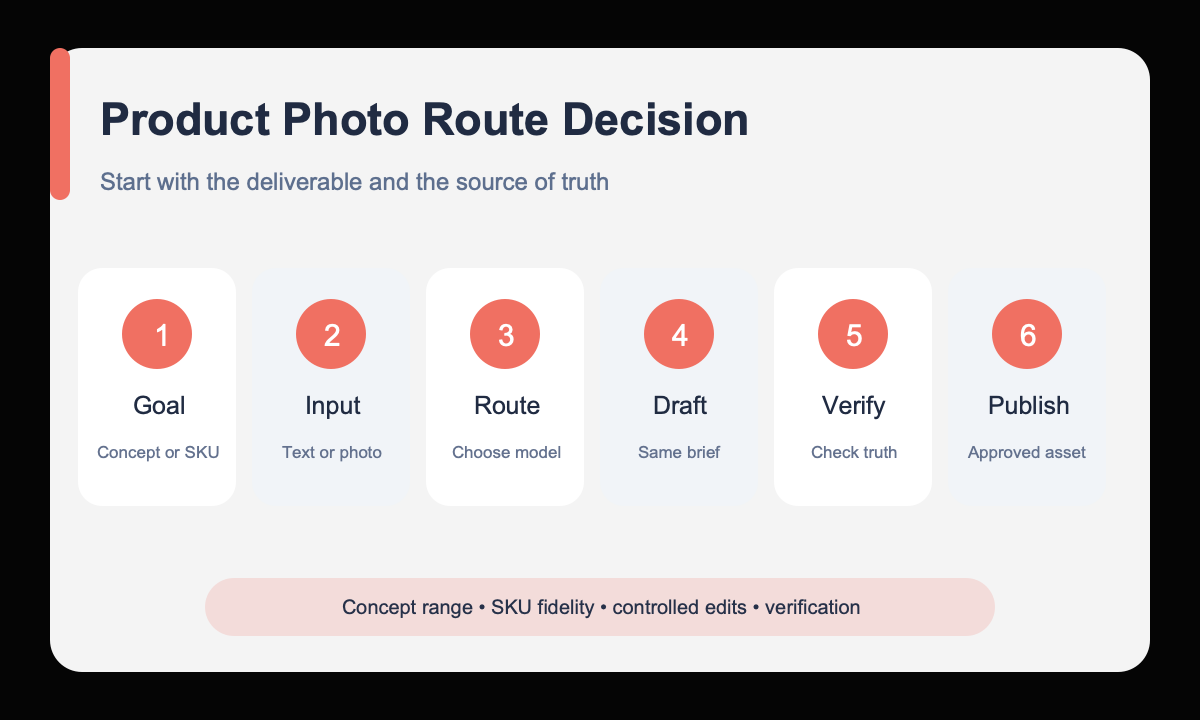
- Define whether the deliverable is a visual concept or a faithful representation of a real sellable product.
- Choose text-to-image when there is no required reference, or prepare a clean reference for image-to-image fidelity.
- Write one brief with the same buyer, placement, aspect ratio, camera, and review criteria.
- Generate broad directions first, then move only the winning direction into a protected reference workflow when needed.
- Compare silhouette, color, labels, controls, scale, materials, shadows, crop, and copy space against product truth.
- Replace or correct generated details in the final production process and obtain the required product or compliance approval.
Example prompt variants
- Text-to-image concept: create a clean homepage hero concept for a compact countertop appliance category, warm modern kitchen, three-quarter crop, morning light, right-side product area and left copy space, no exact brand or claims.
- Image-to-image production draft: keep the uploaded appliance silhouette, controls, color, proportions, and label zone unchanged; replace only the gray studio sweep with a warm modern kitchen counter; match perspective and contact shadow.
- Controlled campaign variant: use the approved product scene as reference; keep product and camera fixed; change only the background accent from pale blue tile to warm cream plaster; preserve light direction and copy zone.
Quality checklist
- The chosen workflow matches concept exploration or SKU fidelity rather than convenience alone.
- Comparisons use the same buyer, placement, aspect ratio, camera, and scoring criteria.
- Reference-led outputs preserve silhouette, color, labels, controls, proportions, and material boundaries.
- Text-led outputs are clearly treated as concepts and do not impersonate an exact product.
- Final imagery contains only verified product features, claims, packaging, and legal content.
Mistakes to avoid
- Using a text-only concept as proof of exact product appearance or behavior.
- Uploading a weak reference and expecting label-level fidelity from image-to-image.
- Comparing workflows with different briefs, crops, and review standards.
- Publishing generated product details before merchandise, brand, and compliance review.
Related AIBase pages
- Explore text-to-image with GPT Image 2
- Edit a product reference with Nano Banana 2
- Use Nano Banana Pro for high-fidelity edits
- Read the ecommerce product photo guide
Practical next step
Open the most relevant AIBase generator, run one narrow prompt first, and save the best result before adding more constraints. The fastest way to improve output quality is to compare one variable at a time: subject, camera, background, lighting, then final polish.