
Best AI Workflow for an Ecommerce Product Photo Shot List
Plan a reusable product photo shot list, then route cleanup, scene concepts, backgrounds, and social motion to the right AIBase-supported models.
Quick answer
Write the shot list before generating: hero, scale, detail, material, included items, use case, colorways, crop extensions, and social motion. Capture real references first. Use Nano Banana 2 for narrow cleanups, GPT Image 2 for text-free concepts, Nano Banana Pro for reference-led scenes, Seedream 5.0 Lite for ratio backgrounds, and Seedance, Wan, or Veo for bounded motion. Keep product facts, claims, price, and inventory in editable layers.
Who this guide is for
Ecommerce brands, marketplace sellers, photographers, and growth teams that need one repeatable system from product truth to listing and social assets.
Recommended model
| Use case | Recommended model | Why |
|---|---|---|
| This workflow | A routed AIBase-supported image and video workflow | Cleanup, concepting, reference fidelity, background families, and motion need different controls; routing each job reduces rework and protects product truth. |
AIBase is an independent creative platform. Model names are shown only to identify supported underlying technologies and workflow choices.
Prompt template
Product shot-list job: [hero / scale / detail / material / included items / use case / colorway / crop extension / social motion]. Product truth: [SKU, dimensions, materials, colorways, parts, care, restrictions, approved claims]. Required references: [front, side, back, macro, packaging, scale cue, authorized lifestyle context]. Output ratio and destination: [specific]. Protected zones: [logo / label / measurement / claim / price / CTA]. Route: Nano Banana 2 for masked cleanup, GPT Image 2 for text-free concepts, Nano Banana Pro for reference-led scenes, Seedream 5.0 Lite for backgrounds, and Seedance / Wan / Veo for one bounded motion. No invented product, feature, claim, text, logo, or watermark.
Step-by-step workflow
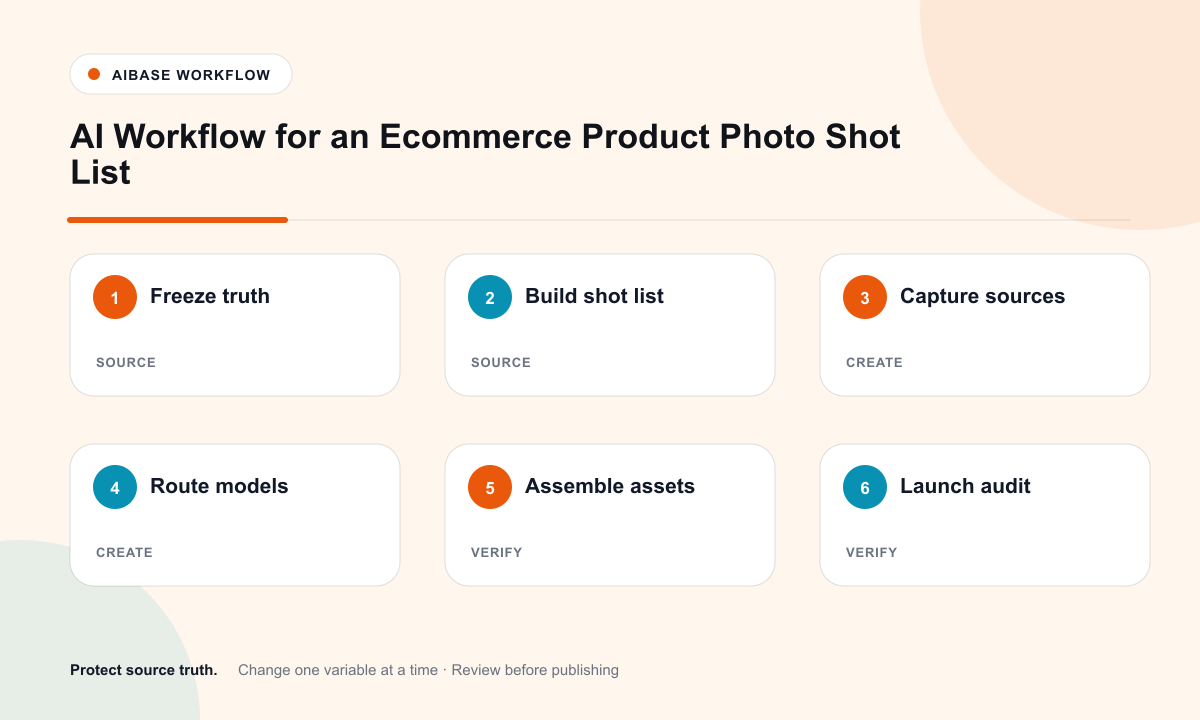
- Build a product truth sheet for every SKU and colorway: dimensions, materials, parts, compatibility, care, safety, claims, and restrictions.
- Define a nine-part shot list: hero, alternate angle, scale, construction detail, material macro, included items, use context, crop-safe background, and social motion.
- Capture sharp references with consistent exposure, white balance, scale cues, and any authorized human or location context.
- Route narrow cleanups to Nano Banana 2, text-free concept exploration to GPT Image 2, and high-fidelity reference scenes to Nano Banana Pro.
- Use Seedream 5.0 Lite for coordinated marketplace, web, email, and social backgrounds; use Seedance, Wan, or Veo for one bounded product or atmosphere motion.
- Composite approved photography, dimensions, materials, warnings, price, availability, captions, and CTA in editable templates.
- Run a launch audit: crops, claim review, accessibility, marketplace rules, links, inventory, playback, analytics, and rollback.
Example prompt variants
- Nano Banana 2 cleanup: remove only the taped cable crossing the approved product surface, reconstruct verified texture, and protect every edge, port, label, and shadow.
- Nano Banana Pro hero scene: place only the approved SKU and included accessories on a quiet plinth, preserving geometry, materials, finish, scale, and setup state.
- Seedream background family: make four ratio-safe neutral backgrounds with a protected central product area and quiet left measurement zone; no text or claims.
- Wan motion: animate one slow authorized product rotation or fabric movement, preserving silhouette, texture, contact shadow, camera, and light.
Quality checklist
- Every SKU, colorway, dimension, material, included item, compatibility fact, and claim is tied to an approved source.
- Each generated image has one job and does not replace required real photography or evidence.
- Backgrounds and scenes remain crop-safe across marketplace, web, email, feed, story, and retail screen ratios.
- Motion shows one plausible action without changing product geometry, material, scale, or function.
- Copy, claims, price, availability, warnings, alt text, links, tracking, approvals, and rollback are editable and tested.
Mistakes to avoid
- Generating an entire catalog before defining the shot list and product truth sheet.
- Using one attractive generated scene as proof of materials, compatibility, safety, or performance.
- Asking one model to do cleanup, staging, infographic layout, and motion in a single prompt.
- Baking claims or prices into pixels so inventory, materials, or compliance changes force a full remaster.
Related AIBase pages
Practical next step
Open the most relevant AIBase generator, run one narrow prompt first, and save the best result before adding more constraints. The fastest way to improve output quality is to compare one variable at a time: subject, camera, background, lighting, then final polish.