
GPT Image 2 vs Seedream 5.0 Lite for Ad Concepts: A Matched Prompt Test
Compare GPT Image 2 and Seedream 5.0 Lite for ad concepts with matched briefs, controlled prompts, scoring for usefulness and fidelity, and an honest production handoff.
Quick answer
Use a matched prompt test instead of choosing from reputation. Give GPT Image 2 and Seedream 5.0 Lite the same audience, message, format, composition, constraints, attempts, and time budget. Score concept relevance, first-glance clarity, controllability, visual quality, crop safety, editability, and production risk, then route work by the result.
Who this guide is for
Performance marketers, creative strategists, agencies, ecommerce teams, and founders deciding which image workflow to use for paid-social concepts, campaign moodboards, product-category ads, and rapid creative testing.
Recommended model
| Use case | Recommended model | Why |
|---|---|---|
| This workflow | Choose per campaign after a matched GPT Image 2 and Seedream 5.0 Lite test | A fair comparison depends on the exact creative job: one workflow may produce a stronger bounded commercial composition while another may be more useful for fast directional range, and the winning route can change by audience, format, and asset type. |
AIBase is an independent creative platform. Model names are shown only to identify supported underlying technologies and workflow choices.
Prompt template
MATCHED AD-CONCEPT TEST for [verified product category or offer]. AUDIENCE: [one segment]. MESSAGE: [one truthful idea]. FORMAT/CROP: [ratio and safe zones]. VISUAL JOB: [hook, problem, context, or resolve]. SUBJECT/SCENE: [same specification]. COMPOSITION/LIGHT/PALETTE: [same rules]. ALLOWED PROPS: [list]. Produce a concept without final text. No exact SKU unless a verified product reference is supplied; no logo, label, price, claim, certification, customer identity, metric, button, extra product, or watermark. Use the same prompt, attempts, time budget, and review threshold for both models.
Step-by-step workflow
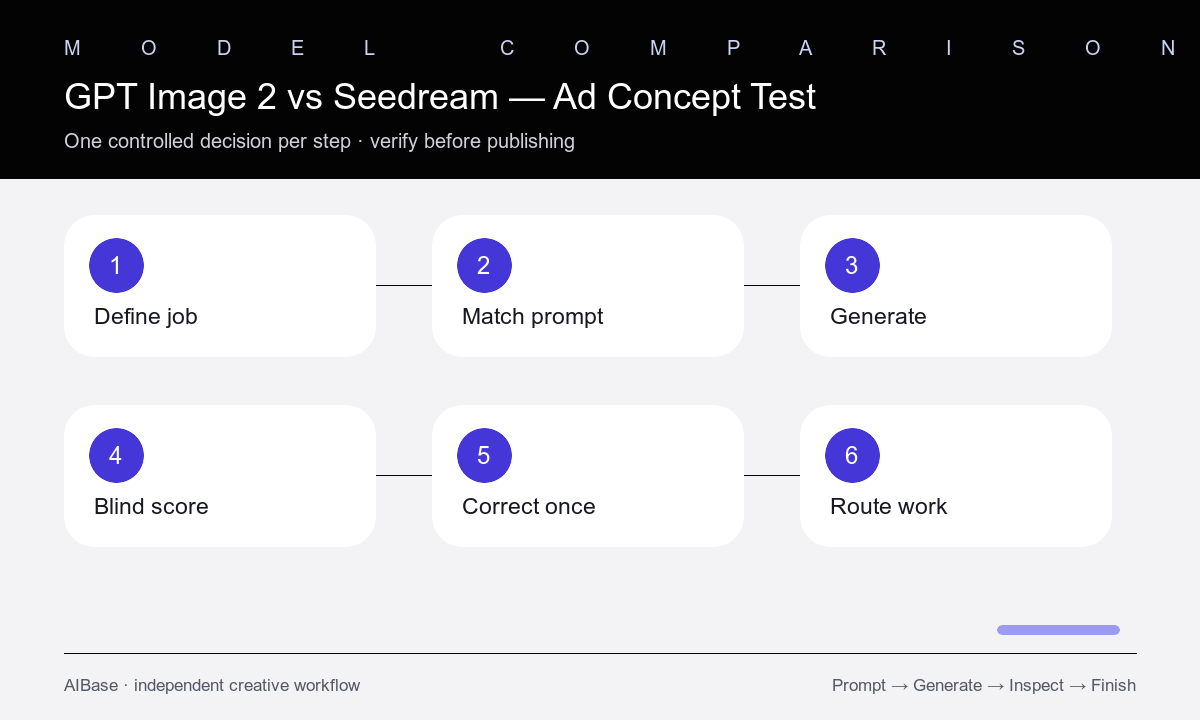
- Define one campaign decision, audience, truthful message, placement, crop, source assets, product-fidelity need, and production deadline.
- Write one model-neutral prompt and a scorecard before generating, with weighted criteria that reflect the actual ad job.
- Run the same number of first-pass attempts in both models without giving either route extra prompt detail, reference quality, or cleanup.
- Blind-score message relevance, first-glance clarity, composition, subject fidelity, controllability, visual quality, crop safety, artifacts, editability, time, and cost.
- Run one correction round on the strongest candidate from each route using the same narrow change, then record how reliably each follows it.
- Choose a route per asset class, composite approved product photography, and add verified copy, logo, CTA, claims, and disclosures in the final design.
Example prompt variants
- Matched square skincare ad concept for busy commuters, one generic unbranded serum bottle beside a fogged transit window clearing into morning light, product lower right, open upper-left copy zone, no text or claim.
- Matched 4:5 productivity-app concept for small agencies, physical desk scene where tangled blank task cards become one clean stack, editorial overhead view, navy and mint palette, safe top copy zone, no interface.
- Matched landscape reusable-bottle campaign concept for weekend hikers, generic bottle on a trail-map edge at sunrise, one pair of gloves as context, product left, calm right copy zone, no environmental claim.
Quality checklist
- Both models receive the same prompt, source assets, ratio, safe zones, attempts, time budget, correction round, and review threshold.
- The scorecard reflects the real ad job and separates concept relevance, fidelity, control, quality, crop safety, editability, time, and cost.
- Reviewers score anonymized outputs before learning the model, and reasons are recorded rather than relying on preference alone.
- Generated concepts do not invent or imply exact products, labels, customers, endorsements, performance, prices, features, or claims.
- The final production file uses approved product pixels, editable brand assets, accurate copy, substantiated claims, CTA, and disclosures.
Mistakes to avoid
- Comparing different prompts, attempt counts, reference inputs, ratios, or cleanup levels and calling the result a model test.
- Choosing the most beautiful image when it does not communicate the audience, message, or placement clearly.
- Declaring one universal winner from a single campaign, subject, or lucky output.
- Publishing a concept without replacing invented product details and adding verified, editable campaign elements.
Related AIBase pages
- Open GPT Image 2
- Open Seedream 5.0 Lite
- Use a reusable ad prompt template
- Create fast Seedream ad variations
Practical next step
Open the most relevant AIBase generator, run one narrow prompt first, and save the best result before adding more constraints. The fastest way to improve output quality is to compare one variable at a time: subject, camera, background, lighting, then final polish.