
HappyHorse Portrait Animation Prompts That Keep the Face Stable
Animate a portrait with HappyHorse using restrained facial motion, locked identity details, simple camera behavior, and midpoint stability checks.
Quick answer
Use a sharp, unobstructed portrait and protect face shape, features, age, hairline, skin tone, wardrobe, framing, and background. Ask for one micro-action, such as a blink, breath, or slight gaze shift, and keep the camera locked until identity stability is proven.
Who this guide is for
Creators, photographers, artists, and campaign teams producing subtle portrait motion concepts from an approved still rather than a performance-heavy character scene.
Recommended model
| Use case | Recommended model | Why |
|---|---|---|
| This workflow | HappyHorse 1.0 in image-to-video mode | The still-led video workflow fits a restrained portrait animation where the supplied identity and composition are the primary constraints. |
AIBase is an independent creative platform. Model names are shown only to identify supported underlying technologies and workflow choices.
Prompt template
Use the uploaded portrait as the exact identity and opening-frame reference. Preserve face shape, eye spacing, nose, mouth, age, skin tone, hairline, hairstyle, wardrobe, jewelry, background, lighting, and crop. Primary micro-action: [one blink, breath, gaze shift, or slight head turn]. Camera: locked [close-up or medium close-up]. Secondary motion: [one subtle hair, fabric, or background movement]. End close to the opening pose. No speaking, lip reshaping, broad expression change, beauty retouching, age shift, face drift, extra people, camera shake, or text.
Step-by-step workflow
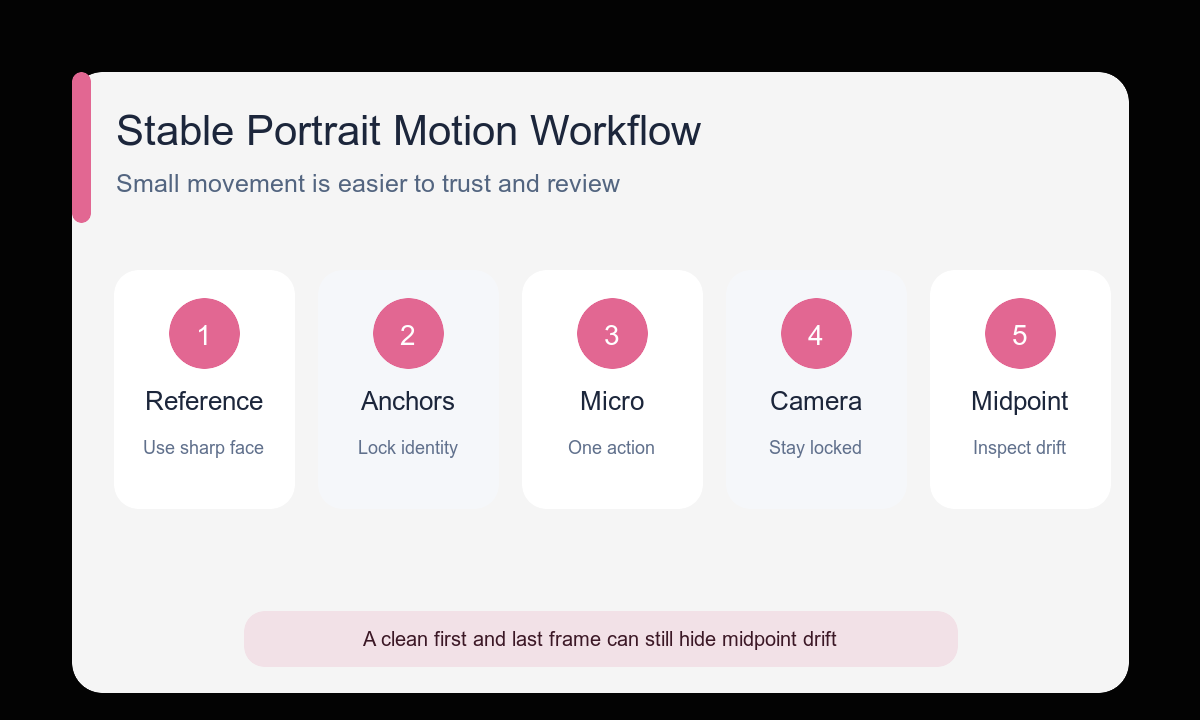
- Choose a high-resolution portrait with visible eyes, mouth, jawline, and hair boundary.
- Write a compact identity anchor block using features visible in the source.
- Start with a blink, breath, or gaze shift before attempting a head turn.
- Keep the camera locked and add only one secondary environmental motion.
- Inspect the opening, quarter, midpoint, three-quarter, and final frames at face level.
- Discard a clip with midpoint drift instead of judging only its clean final frame.
Example prompt variants
- Preserve the exact face, short dark curls, green jacket, warm side light, and chest-up crop; one natural blink and slow breath; locked camera; curtain moves slightly; end on original expression.
- Preserve the exact illustrated face, freckles, red scarf, ink linework, and palette; eyes shift gently toward camera; no head movement; background leaves sway once; end near first frame.
- Preserve the exact older adult’s features, silver hair, glasses, navy shirt, and neutral background; very slight head turn toward window light; locked medium close-up; no smile change or skin smoothing.
Quality checklist
- Face shape, feature spacing, age, skin tone, and hairstyle remain stable.
- The chosen micro-action looks anatomically natural at normal speed.
- Teeth, lips, eyes, glasses, earrings, and hair edges do not morph.
- Camera and background motion remain quieter than the face.
- The midpoint is as usable and recognizable as the opening and ending.
Mistakes to avoid
- Starting with speaking, a large smile, and a dramatic head turn at once.
- Using a blurred, profile-only, or heavily occluded identity reference.
- Adding a large camera orbit while trying to preserve the exact face.
- Reviewing only the first and last frames and missing drift in between.
Related AIBase pages
- Animate a portrait with HappyHorse
- Use the HappyHorse image-to-video guide
- Compare other image-to-video workflows
Practical next step
Open the most relevant AIBase generator, run one narrow prompt first, and save the best result before adding more constraints. The fastest way to improve output quality is to compare one variable at a time: subject, camera, background, lighting, then final polish.