
Nano Banana 2 vs Seedream 5.0 Lite for Social Media Images
Compare Nano Banana 2 and Seedream 5.0 Lite for social media image drafts, reference-based variations, campaign consistency, and production handoff.
Quick answer
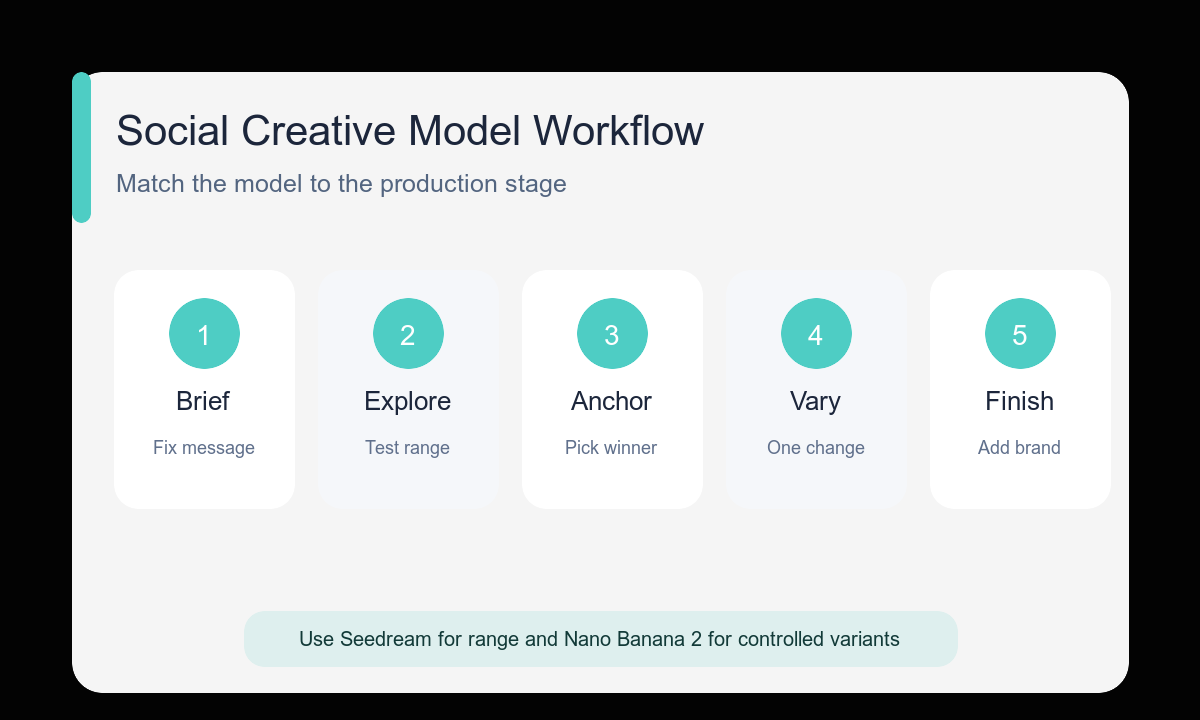
Use Seedream 5.0 Lite when the main need is rapid concept range; use Nano Banana 2 when a chosen reference, subject, or layout must remain recognizable through controlled variations. A practical campaign can use both stages without treating either model as a universal winner.
Who this guide is for
Social media managers, founders, and creative teams choosing a workflow for post backgrounds, ad concepts, recurring characters, product scenes, and campaign variations.
Recommended model
| Use case | Recommended model | Why |
|---|---|---|
| This workflow | Seedream 5.0 Lite for exploration; Nano Banana 2 for controlled reference-based variations | The decision follows the production stage: broad text-led ideation first, then reference-led consistency when the winning direction needs disciplined variants. |
AIBase is an independent creative platform. Model names are shown only to identify supported underlying technologies and workflow choices.
Prompt template
Create a [platform and aspect ratio] social image for [audience] about [single message]. FIXED campaign block: [subject or product], [palette], [layout], [copy zone], [mood]. VARIABLE for this version: [one hook, background, camera, or prop]. Use Seedream 5.0 Lite to explore distinct directions or Nano Banana 2 with the uploaded winner to preserve the fixed block. No readable text, fake logos, unsupported claims, or unrequested objects.
Step-by-step workflow
- Define the platform, audience, message, product truth, and copy-safe zone in one brief.
- Use Seedream 5.0 Lite to explore three meaningfully different visual directions when the concept is open.
- Choose one direction based on feed-size clarity and campaign fit, not detail alone.
- Use the winner as a Nano Banana 2 reference when subject, palette, or layout needs controlled variants.
- Change one variable per batch and score outputs with the same review criteria.
- Add final copy, logos, accessibility text, and channel-specific crops in the design handoff.
Example prompt variants
- Exploration: square social image for freelance designers about calmer project planning, one clean desk object, three distinct visual metaphors, muted green palette, right-side subject, left copy space, no text.
- Controlled variation: use the selected desk image as reference; keep palette, object, lighting, and left copy zone; change only the background from studio wall to home-office shelf; preserve crop.
- Campaign extension: use the selected product scene as reference; keep bottle shape, lower-right placement, beige palette, and upper caption zone; change only the seasonal prop from dry leaves to soft linen.
Quality checklist
- The chosen model matches exploration or consistency rather than name preference.
- Every image serves the same audience, message, and platform crop.
- Exploration outputs are genuinely different; variation outputs preserve the fixed block.
- Subjects and products remain readable at feed size with usable copy space.
- Final text, logos, claims, and exports come from approved design assets.
Mistakes to avoid
- Comparing models with different prompts, formats, or audiences.
- Using reference-based iteration before selecting a clear concept.
- Expecting rapid ideation and exact campaign consistency from the same uncontrolled batch.
- Calling one attractive output a winner without checking mobile crop and copy space.
Related AIBase pages
- Create with Nano Banana 2
- Create with Seedream 5.0 Lite
- Use the social media prompt template
- Build controlled Seedream ad variations
Practical next step
Open the most relevant AIBase generator, run one narrow prompt first, and save the best result before adding more constraints. The fastest way to improve output quality is to compare one variable at a time: subject, camera, background, lighting, then final polish.