
Nano Banana Pro Handbag Campaign Prompts That Preserve the Bag
Build handbag campaign concepts with Nano Banana Pro while protecting silhouette, construction, leather grain, hardware, straps, colorway, and approved product truth.
Quick answer
Use approved front, side, back, base, interior, strap, and hardware references, then lock the bag construction before describing the campaign scene. Generate the environment and lighting around the verified design; if panels, gussets, handles, closures, stitching, hardware, or proportions drift, use an approved packshot composite rather than publishing a substitute product.
Who this guide is for
Handbag brands, accessories retailers, ecommerce studios, fashion marketers, and agencies producing launch concepts, seasonal banners, material stories, lookbooks, and social campaign directions.
Recommended model
| Use case | Recommended model | Why |
|---|---|---|
| This workflow | Nano Banana Pro image-to-image | Detailed reference-led generation can explore premium environments and lighting while a strict product-truth checklist protects complex construction and materials. |
AIBase is an independent creative platform. Model names are shown only to identify supported underlying technologies and workflow choices.
Prompt template
Use the uploaded authorized handbag references as exact product truth. Create a [hero/material/story] campaign image in [scene], [camera angle and crop], with [lighting and mood]. Preserve the exact silhouette, width-to-height-depth proportions, panel and gusset construction, base, corners, flap or zipper, handle count and attachment, strap length and hardware, pocket placement, seam path, stitch spacing, edge paint, leather or fabric grain, lining, feet, clasp, zipper pull, metal finish, colorway, logo size and placement, and wear state. Keep the bag physically supported and fully readable. Do not reshape, inflate, flatten, mirror, open a closed compartment, add or remove straps, pockets, seams, hardware, charms, logos, text, contents, hands, or claims; do not change material or color.
Step-by-step workflow
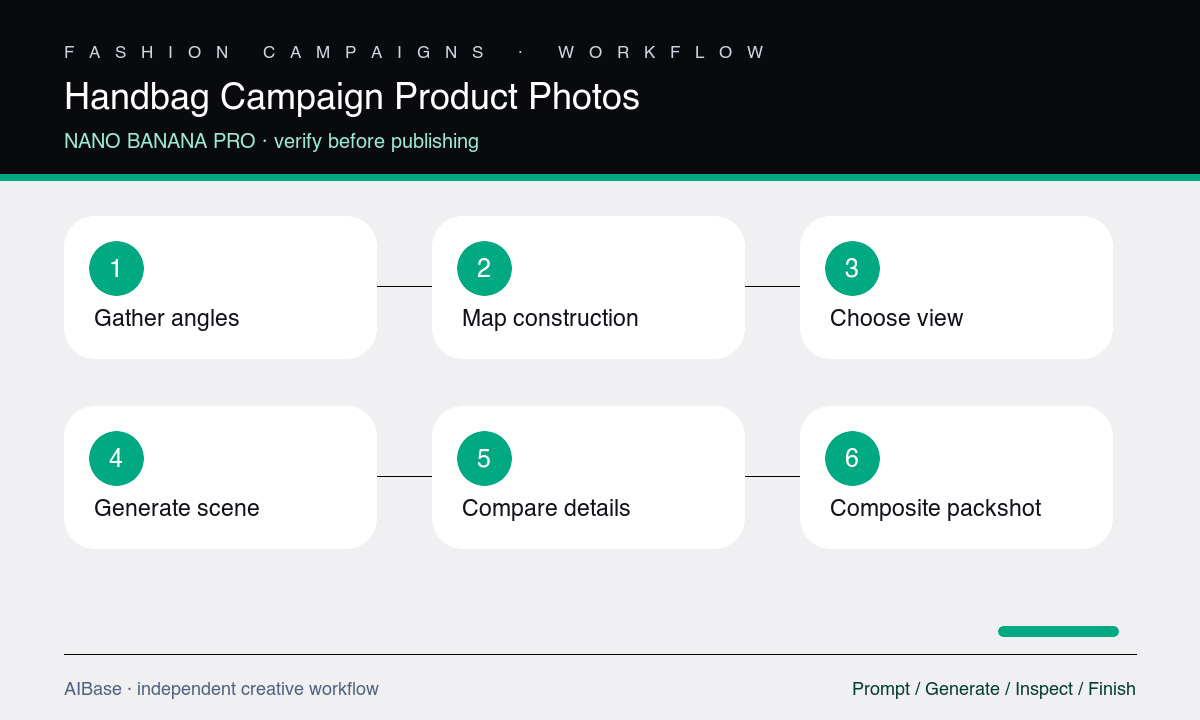
- Collect approved multi-angle references and record dimensions, panel map, gussets, closures, handles, straps, pockets, seams, materials, hardware, colorway, branding, and included accessories.
- Choose one campaign job and a camera view supported by the references; avoid asking the model to invent an unseen interior, base, or back panel.
- Place protected construction and repeated counts before scene direction, then begin with a simple support surface and restrained light.
- Generate a first pass and compare silhouette, proportion, panel boundaries, handles, strap attachments, closures, stitching, and hardware at equal scale.
- Add the selected environment only after product structure passes, and check contact, shadow, reflections, material response, and crop again.
- Composite approved product photography into the generated scene whenever the campaign asset is meant to represent the exact purchasable SKU.
Example prompt variants
- Approved structured top-handle bag on a pale limestone plinth, front three-quarter view, narrow warm side light, preserve exact trapezoid silhouette, handle attachments, flap, clasp, gussets, feet, seams, leather grain, and colorway.
- Wide retail banner with the approved shoulder bag resting on folded neutral paper, exact side profile and strap drop, cool diffuse studio light, empty right copy zone, preserve zipper, pocket, edge paint, hardware finish, and logo zone.
- Material macro of the approved bag corner, showing verified pebbled leather, seam path, edge paint, base structure, and metal foot under grazing light, no altered grain, stitching, hardware, or invented embossed text.
Quality checklist
- Silhouette, proportions, panel map, gussets, base, corners, handles, straps, pockets, closures, seams, and repeated counts match approved references.
- Leather or fabric grain, lining, edge paint, stitching, metal finish, colorway, logo, and wear state remain consistent across visible surfaces.
- The bag is physically supported with coherent contact shadow, weight, perspective, highlights, and reflections rather than floating or collapsing.
- No unseen compartment, accessory, charm, branding, text, feature, capacity, or material claim has been invented.
- The final crop and approved composite accurately represent the purchasable SKU on the linked product page.
Mistakes to avoid
- Using one front photo to request a rotating three-quarter campaign view that exposes unknown side, base, or back construction.
- Calling for softer, more luxurious, or cleaner design language that silently changes leather grain, structure, seams, or hardware.
- Ignoring handle count, strap attachment, zipper path, pocket placement, and mirrored hardware because the overall silhouette looks close.
- Publishing a generated bag as the exact SKU when an approved packshot composite is available and more truthful.
Related AIBase pages
- Open Nano Banana Pro image-to-image
- Create footwear campaign concepts
- Create luxury watch campaign concepts
- Compare Nano Banana Pro and GPT Image 2
Practical next step
Open the most relevant AIBase generator, run one narrow prompt first, and save the best result before adding more constraints. The fastest way to improve output quality is to compare one variable at a time: subject, camera, background, lighting, then final polish.