
Nano Banana Pro Luxury Watch Campaign Prompts for Accurate Product Scenes
Build luxury watch campaign concepts with Nano Banana Pro prompts that protect case geometry, dial details, hands, materials, reflections, straps, and approved product truth.
Quick answer
Use an approved watch pack shot as the product anchor and generate the campaign environment around it. Lock the case, bezel, crown, dial, indices, hands, complications, crystal, bracelet, clasp, finishing, color, and camera before describing the surface and light; composite verified typography and claims afterward.
Who this guide is for
Watch brands, authorized retailers, creative directors, ecommerce studios, photographers, and agencies preparing campaign moodboards, launch key art, retail banners, and preproduction lighting directions.
Recommended model
| Use case | Recommended model | Why |
|---|---|---|
| This workflow | Nano Banana Pro image-to-image | A high-fidelity reference-led workflow fits scenes where small construction details and distinct polished, brushed, crystal, leather, and luminous materials must remain consistent with an approved product source. |
AIBase is an independent creative platform. Model names are shown only to identify supported underlying technologies and workflow choices.
Prompt template
Use the uploaded authorized watch image as the exact product reference. Preserve case diameter and shape, lug geometry, bezel, crown and pushers, dial layout, indices, hands and their verified time, date and complications, crystal, bracelet or strap, clasp, engraving zones, metal color, polished and brushed finishing, perspective, and product scale. Place it in [campaign environment] on [surface], camera [angle and lens feel], with [key light], [fill], and [controlled reflection cards]. Leave [region] open for editable copy. Change only the environment and physically plausible reflected light. No invented logo, dial text, hallmark, jewel count, water-resistance cue, movement view, feature, certification, price, extra crown, distorted bracelet link, impossible reflection, dust-free claim, or watermark.
Step-by-step workflow
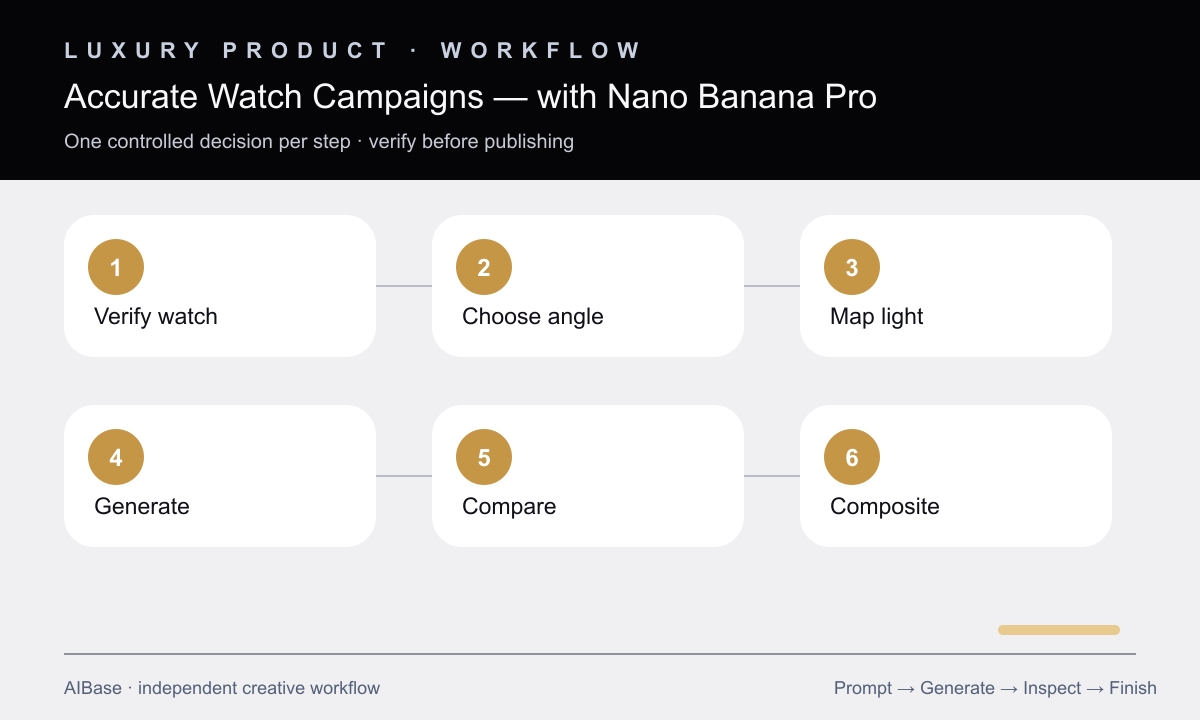
- Create a product-truth sheet from approved front, profile, clasp, caseback, and strap references, including the exact dial state permitted for the campaign.
- Choose one visual job and one camera angle: frontal dial clarity, three-quarter case architecture, profile thinness, strap material, or wrist-scale context.
- Map where polished and brushed surfaces should catch light, and design reflection cards deliberately instead of asking for generic dramatic lighting.
- Generate environment and lighting concepts with all watch components locked, keeping logos, dial typography, prices, and technical claims out of the generated layer.
- Compare at full size against the truth sheet for case proportions, hand count, index spacing, crown placement, date window, links, clasp, engravings, reflections, and color.
- Composite approved product pixels and editable brand assets when exact fidelity is required, then complete legal, rights, color, retouching, and channel-crop review.
Example prompt variants
- Three-quarter stainless-steel sports watch on dark slate, narrow cool edge lights defining brushed case sides and polished bezel, subtle dawn gradient behind, product right and copy-safe space left, preserve exact dial and bracelet.
- Frontal dress watch campaign, warm ivory stone and one soft arch shadow, restrained overhead-left light, verified leather strap and dial remain exact, generous upper-right copy area, no invented engraving or text.
- Macro chronograph detail using the supplied authorized crop, preserve pushers, crown, subdial count, indices, hands, date, crystal edge, and finishing; add only controlled black reflection cards and a charcoal studio background.
Quality checklist
- Case, bezel, lugs, crown, pushers, dial, indices, hands, date, complications, crystal, bracelet or strap, clasp, and scale match approved references.
- Polished, brushed, ceramic, crystal, leather, rubber, and luminous materials remain distinct with coherent reflection geometry.
- The watch displays only an approved dial state and no invented logo, text, hallmark, movement, feature, rating, price, or certification.
- Background props and shadows establish positioning without implying unsupported heritage, expedition, precision, durability, or ownership.
- The final campaign file uses verified product and brand assets where precision matters and passes full-size, thumbnail, crop, rights, and legal review.
Mistakes to avoid
- Prompting a luxury watch from text alone and treating plausible-looking invented dial details as the real product.
- Using dramatic highlights that merge polished edges, erase brushed grain, or create impossible crystal reflections.
- Ignoring hand positions, date windows, crown count, subdial spacing, bracelet links, and clasp construction during review.
- Letting background cues imply technical performance, provenance, endorsements, or occasions the approved campaign cannot support.
Related AIBase pages
- Open Nano Banana Pro image-to-image
- Create jewelry product-photo concepts
- Build luxury product video prompts
- Compare Pro and GPT Image 2 for product images
Practical next step
Open the most relevant AIBase generator, run one narrow prompt first, and save the best result before adding more constraints. The fastest way to improve output quality is to compare one variable at a time: subject, camera, background, lighting, then final polish.