
Nano Banana Pro Footwear Campaign Prompts That Preserve Shoe Design
Create footwear campaign concepts with Nano Banana Pro while protecting silhouette, sole geometry, materials, stitching, colorways, logos, pairs, and approved product truth.
Quick answer
Start from approved multi-angle shoe references, choose one campaign shot, and explicitly lock the last, sole, panels, eyelets, laces, stitching, materials, colorway, and branding. Generate the environment around the product, not a prettier substitute shoe, and route failed geometry back to compositing or photography.
Who this guide is for
Footwear brands, ecommerce studios, designers, retailers, and agencies building launch concepts, colorway stories, lookbook scenes, retail banners, and preproduction boards from an approved shoe design.
Recommended model
| Use case | Recommended model | Why |
|---|---|---|
| This workflow | Nano Banana Pro image-to-image | Footwear scenes demand detailed material and lighting control, but the model should be used as a reference-led campaign workflow with product truth verified against approved sources. |
AIBase is an independent creative platform. Model names are shown only to identify supported underlying technologies and workflow choices.
Prompt template
Use the uploaded authorized [left/right/pair] shoe references as product truth. Create a [campaign shot] in [scene] with [camera and crop], [lighting], and [brand-safe mood]. Preserve the exact toe shape, last proportions, collar height, tongue, heel counter, outsole thickness and tread edge, midsole profile, panel boundaries, perforations, eyelet count and spacing, lace path, stitching, material grain, colorway, logo size and placement, left-right orientation, wear state, and included accessories. Keep the shoe fully visible and physically grounded. Do not redesign, mirror, stretch, smooth, simplify, add or remove panels, alter the sole, change materials or colors, invent branding, text, performance claims, extra footwear, or a human foot.
Step-by-step workflow
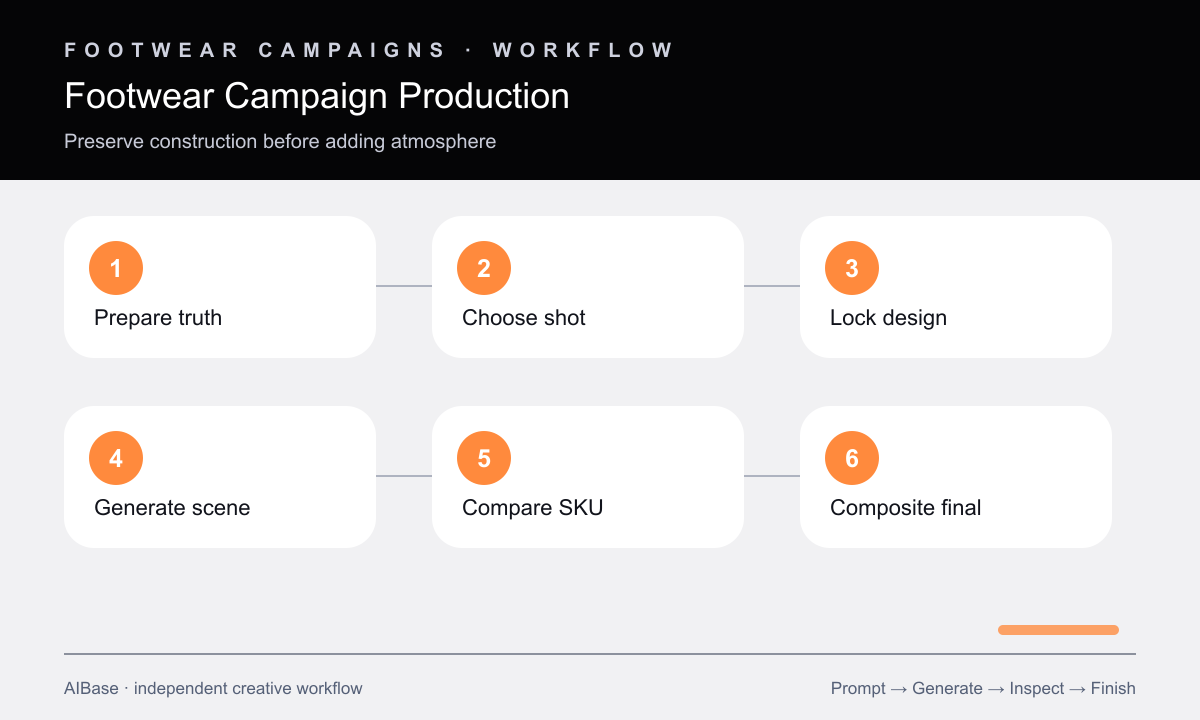
- Prepare approved side, three-quarter, heel, top, and outsole references plus a truth sheet for geometry, construction, materials, color, branding, and accessories.
- Choose one shot job—clean hero, on-foot concept, material macro, environmental story, or retail banner—and define the required view and crop.
- Write protected shoe details before scene direction, including left-right orientation and every repeated count reviewers can verify.
- Generate a simple grounded scene first, then inspect silhouette and construction before adding props, motion cues, or dramatic lighting.
- Compare at full size against each reference, checking toe, heel, sole, eyelets, laces, stitching, logo, pair consistency, shadow, and materials.
- Composite approved product photography into the generated environment when exact SKU representation is required.
Example prompt variants
- Approved trail shoe pair on a restrained wet-stone plinth, low three-quarter camera, cool dawn rim light, preserve exact lug edge, toe guard, mesh panels, lace count, heel tabs, colorway, and left-right construction.
- Single approved leather sneaker for a wide retail banner, side profile on warm recycled-paper layers, soft directional studio light, empty right copy zone, preserve sole profile, panel seams, leather grain, eyelets, laces, and logo.
- Material-detail campaign crop of the approved running shoe upper, macro side lighting across verified knit and bonded overlays, preserve weave direction, seam path, eyelet spacing, color boundaries, and visible midsole edge.
Quality checklist
- Toe, last, heel, outsole, midsole, panel map, eyelets, laces, stitching, and left-right orientation match the approved SKU.
- Material grain, colorway, logo, included accessories, and wear state remain accurate under the campaign lighting.
- The shoe is physically grounded with plausible scale, perspective, contact shadow, reflections, and no merged pair.
- No invented feature, performance claim, outsole technology, collaboration mark, text, or product variant appears.
- Final exact-product advertising uses an approved source or composited product layer and documented reviewer sign-off.
Mistakes to avoid
- Providing only one oblique reference and expecting the workflow to infer hidden heel, outsole, or medial-side construction.
- Prioritizing dramatic lighting while sole thickness, toe box, eyelet count, or pair orientation drifts.
- Using make it more premium instructions that silently replace real materials and construction with a different shoe.
- Publishing a campaign concept as an exact SKU image without product-level comparison and approval.
Related AIBase pages
- Open Nano Banana Pro image-to-image
- Create apparel ghost mannequin images
- Build furniture catalog room scenes
- Compare Nano Banana Pro and GPT Image 2
Practical next step
Open the most relevant AIBase generator, run one narrow prompt first, and save the best result before adding more constraints. The fastest way to improve output quality is to compare one variable at a time: subject, camera, background, lighting, then final polish.