
Nano Banana Pro Jewelry Clasp Detail Prompts for Product Pages
Create reference-led clasp, chain, and closure detail visuals while preserving metal finish, geometry, hallmarks, and stone-setting truth.
Quick answer
Use approved macro references of the exact clasp, chain gauge, jump rings, lobster mechanism, spring, bail, and hallmark. Nano Banana Pro can build a cleaner product-page scene, but every closure part, metal finish, stone setting, and visible mark must remain identical to source. Keep purity, weight, gemstone identity, durability, and sizing claims in editable verified copy.
Who this guide is for
Jewelry makers, independent studios, marketplaces, and product-page teams who need consistent closure and construction details across catalog images.
Recommended model
| Use case | Recommended model | Why |
|---|---|---|
| This workflow | Nano Banana Pro for high-fidelity jewelry-reference detail scenes | It can follow multiple product references closely enough to explore presentation while protecting small mechanical and material details. |
AIBase is an independent creative platform. Model names are shown only to identify supported underlying technologies and workflow choices.
Prompt template
Use the uploaded authorized jewelry references as exact product truth. Create a [macro / three-quarter / flat-lay] detail scene for the [clasp / chain / closure / bail] of the [SKU and metal color]. Preserve exact mechanism type, part count, spring, latch, loop, chain gauge, link shape, solder joints, jump-ring alignment, thickness, bevels, polishing, brushed texture, plating edge, stone setting, prongs, visible hallmark, and source-supported wear. Use [surface and lighting], realistic reflections, and a quiet area for editable specifications. No redesigned clasp, extra stone, changed metal, invented hallmark, purity claim, weight, durability promise, sizing claim, text, logo, or watermark.
Step-by-step workflow
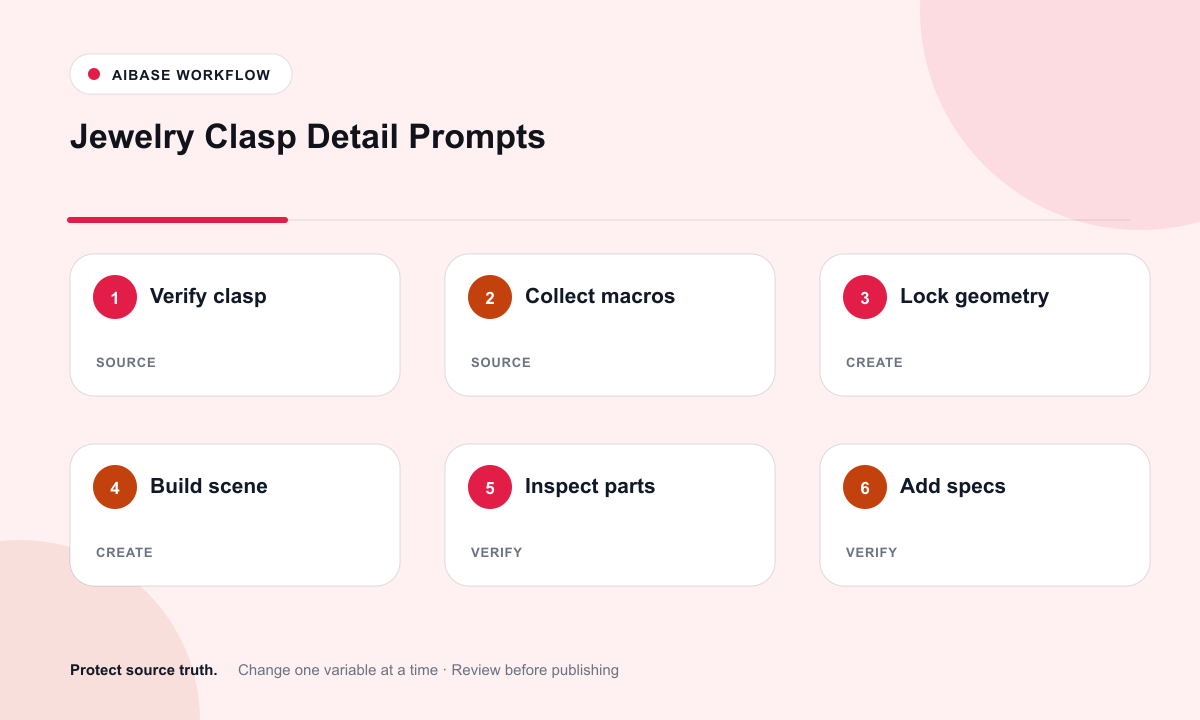
- Freeze SKU, metal or plating, chain gauge, clasp mechanism, stones, hallmark, measurements, weight, care, and approved claims.
- Capture or collect authorized macro references for the closed clasp, open mechanism, chain link, bail, stamp, and worn scale cue.
- Generate one composition at a time from the references, asking only for scene, surface, camera, and lighting changes.
- Inspect at full zoom for part count, mechanism continuity, link alignment, hallmark integrity, reflections, and stone settings.
- Composite verified size, weight, metal, gemstone, care, and compatibility copy in editable product-page layers.
- Retest crops and claims whenever the SKU, clasp supplier, plating, stone source, or sizing chart changes.
Example prompt variants
- Macro lobster-clasp scene on pale suede: preserve latch curve, spring lever, jump-ring orientation, chain gauge, polished bevels, and tiny hallmark; no invented stamp or purity claim.
- Three-quarter flat-lay of a bolt-ring clasp and final chain links on brushed steel: preserve link geometry, solder points, matte finish, and real micro-scratches; no text or durability promise.
- Secure clasp and bail detail for a pendant on a neutral acrylic block: preserve bail opening, jump-ring count, setting, prongs, and stone position; no extra stone or metal color change.
Quality checklist
- Clasp mechanism, part count, orientation, chain gauge, and closure state match approved macro references.
- Metal color, polish, brushed texture, plating edge, stones, settings, and visible marks remain source-supported.
- Reflections reveal form without hiding defects or creating an unsupported sparkle or perfection claim.
- Purity, weight, gem identity, sizing, care, and durability appear only in verified editable copy.
- References, output, claim review, approvals, and SKU revision history remain traceable.
Mistakes to avoid
- Letting the model merge chain links, duplicate jump rings, or redesign the clasp for beauty.
- Generating a plausible hallmark, purity stamp, certification, or gemstone identity that the source does not verify.
- Retouching real scratches or plating wear in a way that misrepresents condition.
- Using one generic closure image across multiple SKUs with different mechanisms or gauges.
Related AIBase pages
Practical next step
Open the most relevant AIBase generator, run one narrow prompt first, and save the best result before adding more constraints. The fastest way to improve output quality is to compare one variable at a time: subject, camera, background, lighting, then final polish.