
Wan 2.7 Jewelry Sparkle Video Prompts from a Product Photo
Animate restrained jewelry sparkle from an authorized product photo with Wan 2.7 prompts that preserve stones, settings, metal, reflections, camera, and honest product representation.
Quick answer
Treat sparkle as a moving reflection, not a particle effect. Lock the jewelry and camera, identify two or three physically plausible highlight paths on verified facets or polished edges, and animate brief glints that brighten, travel a short distance, and fade without changing the stone, setting, metal, or product value.
Who this guide is for
Jewelry retailers, designers, catalog studios, marketplaces, resellers, and social teams turning an approved ring, necklace, earring, or bracelet photo into a short hero loop or detail clip.
Recommended model
| Use case | Recommended model | Why |
|---|---|---|
| This workflow | Wan 2.7 image-to-video | A reference-led workflow fits subtle light motion when the product geometry should remain fixed and the only desired change is a controlled glint, tiny turn, or reflection sweep. |
AIBase is an independent creative platform. Model names are shown only to identify supported underlying technologies and workflow choices.
Prompt template
Use the uploaded authorized jewelry product photo as the exact first-frame and product reference. Preserve every stone's count, shape, cut appearance, size, color, clarity appearance, facet layout, setting, prong, bezel, chain link, clasp, metal color, polish, engraving zone, silhouette, scale, camera, crop, background, shadow, and reflection. Camera [locked or one minimal move]. Animate only [number] brief physically plausible light glints: each begins on [verified facet or polished edge], travels [short path and direction], peaks softly, and fades within [time]. No starburst particles, magical glow, new stone, changing stone size or color, missing prong, metal morph, extra chain link, rotation unless specified, fire effect, valuation cue, certification, text, logo, or watermark.
Step-by-step workflow
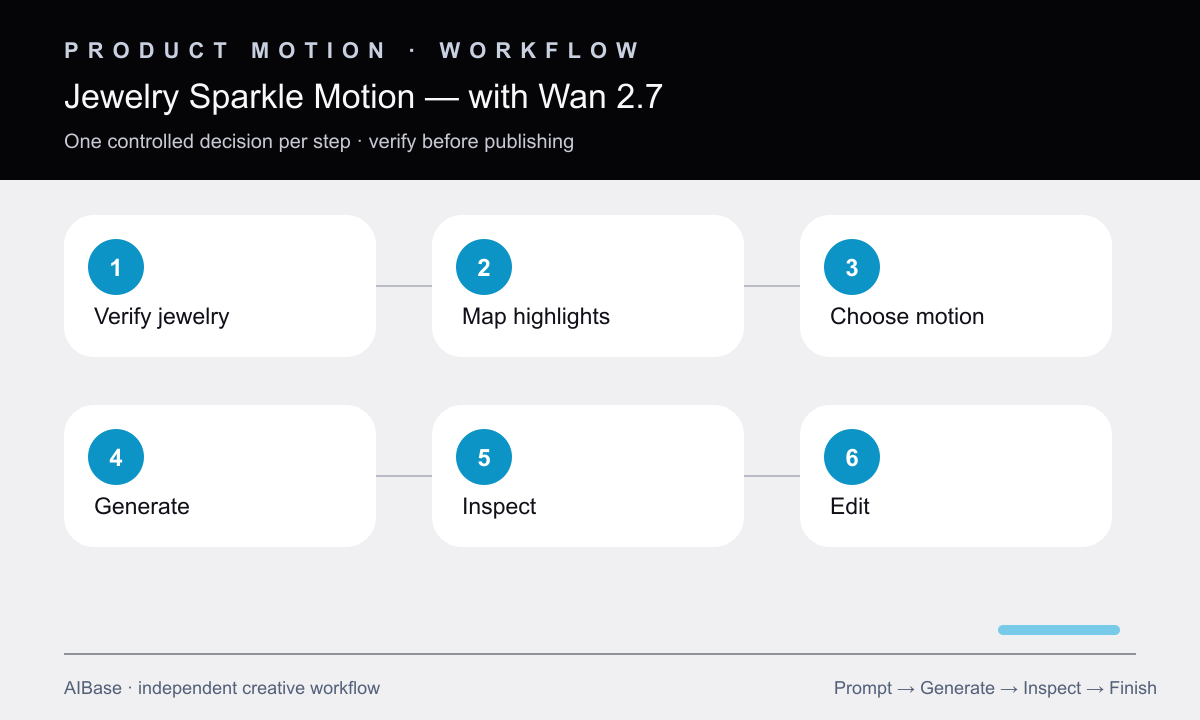
- Verify the source and product record, including stone count and appearance, setting construction, metal color, chain or clasp, dimensions, engraving zones, and permitted descriptive language.
- Mark highlight candidates that already face the light or could plausibly catch a moving reflection; keep glints away from hidden or matte surfaces.
- Choose one motion family: locked-camera light sweep, minimal product turn, or shallow macro push, and do not combine them in the first pass.
- Generate a short clip with no particles or environmental movement, then inspect the jewelry outline and each stone, prong, link, clasp, reflection, and contact point frame by frame.
- Reject clips where glints become solid stars, stones multiply, settings melt, metal changes color, the chain crawls, or sparkle implies an unsupported grade or treatment.
- Trim the cleanest motion, add approved product copy and licensed audio in post, and retain the source image and product record for final merchandising review.
Example prompt variants
- Five-second square solitaire-ring loop, camera locked, one small glint crosses the verified crown facets from upper left to center and fades, preserve stone, prongs, band, metal color, reflection, and shadow exactly.
- Six-second vertical pendant detail, very slow macro push-in while two restrained highlights travel along separate polished pendant edges, chain and clasp remain still, no star particles or stone changes.
- Five-second landscape bracelet hero, a softbox reflection sweeps once across the verified top links from left to right, camera locked, preserve link count, spacing, clasp, finish, scale, background, and floor contact.
Quality checklist
- Stone count, shape, appearance, setting, prongs, bezels, links, clasp, metal, engraving zones, silhouette, scale, and crop match the approved source.
- Every glint begins on a plausible facet or polished edge, follows the light direction, remains brief, and fades without becoming a particle or star graphic.
- Jewelry remains rigid and grounded with no crawling chain, breathing metal, missing setting, changing reflection, floating contact, or unintended rotation.
- The motion does not imply a stone grade, authenticity, treatment, rarity, value, certification, or performance beyond verified product information.
- The chosen loop passes full-speed, slow-motion, first/last-frame, thumbnail, rights, product-record, and merchandising review.
Mistakes to avoid
- Prompting lots of sparkle and receiving decorative star particles unrelated to the real lighting or facets.
- Combining a full turntable, camera orbit, swinging chain, moving background, and multiple glints in one short generation.
- Overlooking added stones, lost prongs, changing link counts, metal-color shifts, or an invented clasp because the sparkle draws attention away.
- Using enhanced sparkle as evidence of gem grade, authenticity, brilliance, value, or certification.
Related AIBase pages
- Open Wan 2.7
- Create jewelry product-photo prompts
- Build product rotation videos
- Create seamless product loops
Practical next step
Open the most relevant AIBase generator, run one narrow prompt first, and save the best result before adding more constraints. The fastest way to improve output quality is to compare one variable at a time: subject, camera, background, lighting, then final polish.