
Seedream 5.0 Lite Ecommerce Sale Banner Background Prompts
Generate sale-banner background directions with Seedream 5.0 Lite by reserving copy zones, controlling product stages, palette, depth, texture, and responsive crops.
Quick answer
Generate the background and product stage without final promotional text. Define the banner size, exact empty copy zone, product placement zone, palette, texture, and depth, then add verified offer copy, dates, price, and legal language in a design tool.
Who this guide is for
Ecommerce marketers, store operators, and designers producing homepage heroes, collection banners, sale-event backgrounds, email headers, and paid-social adaptations that need fast visual directions.
Recommended model
| Use case | Recommended model | Why |
|---|---|---|
| This workflow | Seedream 5.0 Lite for rapid background exploration | Its fast image workflow is useful for testing several layout, color, and seasonal directions before the approved background moves into a controlled production composition. |
AIBase is an independent creative platform. Model names are shown only to identify supported underlying technologies and workflow choices.
Prompt template
Create a background-only ecommerce sale banner for [campaign and audience], [aspect ratio]. Reserve a clean [left/right/center] copy-safe zone covering about [percentage] of the canvas with low contrast and no objects. Place an empty product stage at [position] sized for [product category]. Visual direction: [palette], [material or abstract form], [seasonal cue], [depth], and [light]. Keep edges crop-safe for [desktop/mobile/social variants]. No words, letters, numbers, price, percentage, badge, logo, product, fake UI, watermark, or busy detail behind the copy zone.
Step-by-step workflow
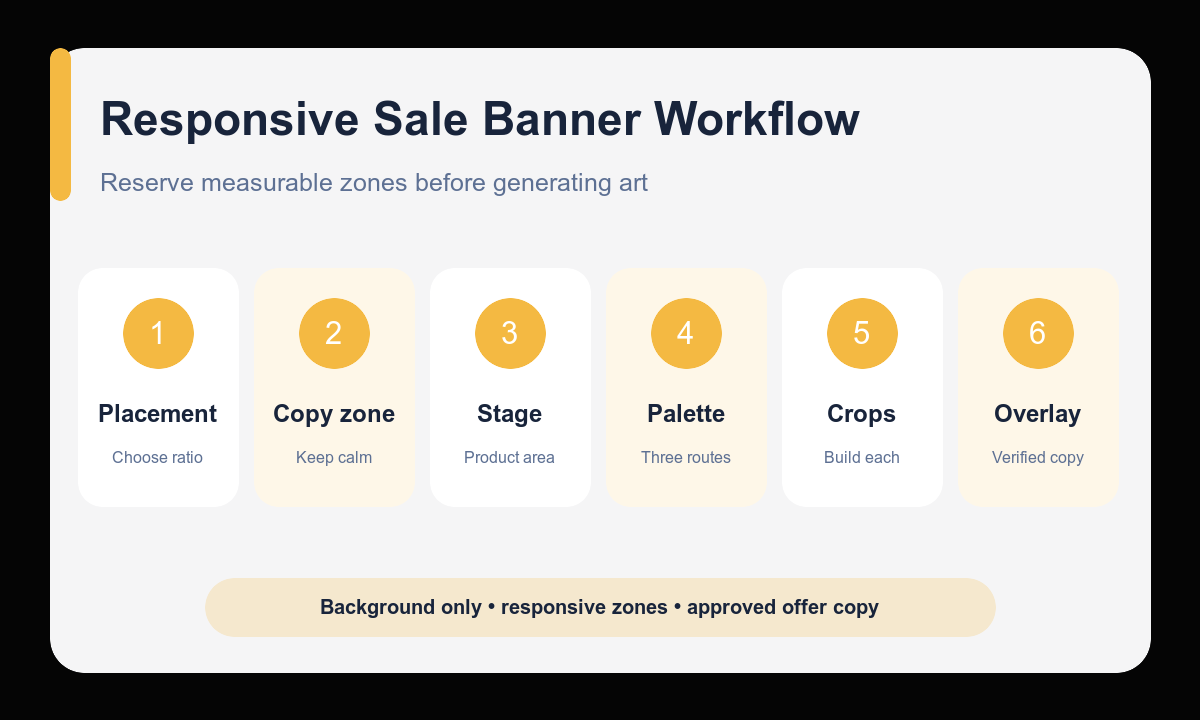
- List the final placements and choose the primary banner ratio before generating art.
- Draw the copy zone and product zone as percentages so the composition has measurable constraints.
- Create three distinct visual directions by changing palette and material language, not the offer itself.
- Select one direction and generate each responsive crop intentionally rather than using blind center cropping.
- Composite approved product photography and add verified copy, price, dates, terms, and buttons in a design tool.
- Test desktop and mobile readability, contrast, crop safety, loading size, and legal completeness before launch.
Example prompt variants
- Background-only 16:9 summer sale hero, clean left 42 percent copy zone, empty low pedestal on right for footwear, sun-washed coral and sand palette, soft paper arches, shallow shadows, no text or product.
- Background-only 3:1 electronics promotion banner, calm center-left copy zone, empty graphite platform on right, deep navy gradient with one cobalt light ribbon, precise modern depth, no numbers, badge, logo, or device.
- Background-only 4:5 beauty event creative, clean upper third for headline, empty lower-center product stage, pearl cream and muted rose palette, translucent fabric curve and soft window light, no words or packaging.
Quality checklist
- Copy and product zones remain calm, measurable, and usable at the intended crop.
- The background supports the campaign mood without implying an unverified offer.
- Desktop, mobile, email, and social versions preserve hierarchy rather than rely on one crop.
- Final text, prices, dates, terms, buttons, and products are added from approved sources.
- Contrast, safe areas, file size, and readability pass final placement checks.
Mistakes to avoid
- Asking the image model to render final sale percentages, dates, or legal copy.
- Filling every area with decorative objects and leaving no functional copy zone.
- Generating one wide image and assuming it will crop safely to every channel.
- Publishing a promotional background before adding verified offer details and required terms.
Related AIBase pages
- Draft a sale banner background with Seedream 5.0 Lite
- Create social ad variations
- Build carousel background prompts
Practical next step
Open the most relevant AIBase generator, run one narrow prompt first, and save the best result before adding more constraints. The fastest way to improve output quality is to compare one variable at a time: subject, camera, background, lighting, then final polish.