
Seedream 5.0 Lite Email Preference Center Banner Prompts
Generate calm, text-free preference-center banners while keeping subscription choices, consent status, legal copy, and controls real and accessible.
Quick answer
Generate only a quiet decorative banner with a protected headline and form region. Build topics, frequency options, consent state, save action, unsubscribe-all route, confirmation, privacy notice, and account identity as real accessible interface elements. The image must not look like a selected checkbox, successful save, required consent, or hidden unsubscribe control.
Who this guide is for
Lifecycle marketers, CRM teams, privacy owners, SaaS designers, and ecommerce brands refreshing email preference or unsubscribe pages.
Recommended model
| Use case | Recommended model | Why |
|---|---|---|
| This workflow | Seedream 5.0 Lite for fast responsive banner families | The page needs lightweight ratio variants and low visual density, while consent and subscription behavior must stay in real application controls. |
AIBase is an independent creative platform. Model names are shown only to identify supported underlying technologies and workflow choices.
Prompt template
Create a text-free responsive banner background for an email preference center serving [audience]. Mood: calm, respectful, low pressure. Visual motif: [balanced layers / adjustable rhythm / open pathway]. Reserve a wide headline zone at [position], a plain form-safe region below, and a quiet confirmation area. Palette: [specific] with low contrast behind controls. No word, letter, number, envelope icon, checkbox, toggle, button, selected state, success badge, warning, account detail, email address, logo, offer, urgency, dark pattern, interface replica, or watermark.
Step-by-step workflow
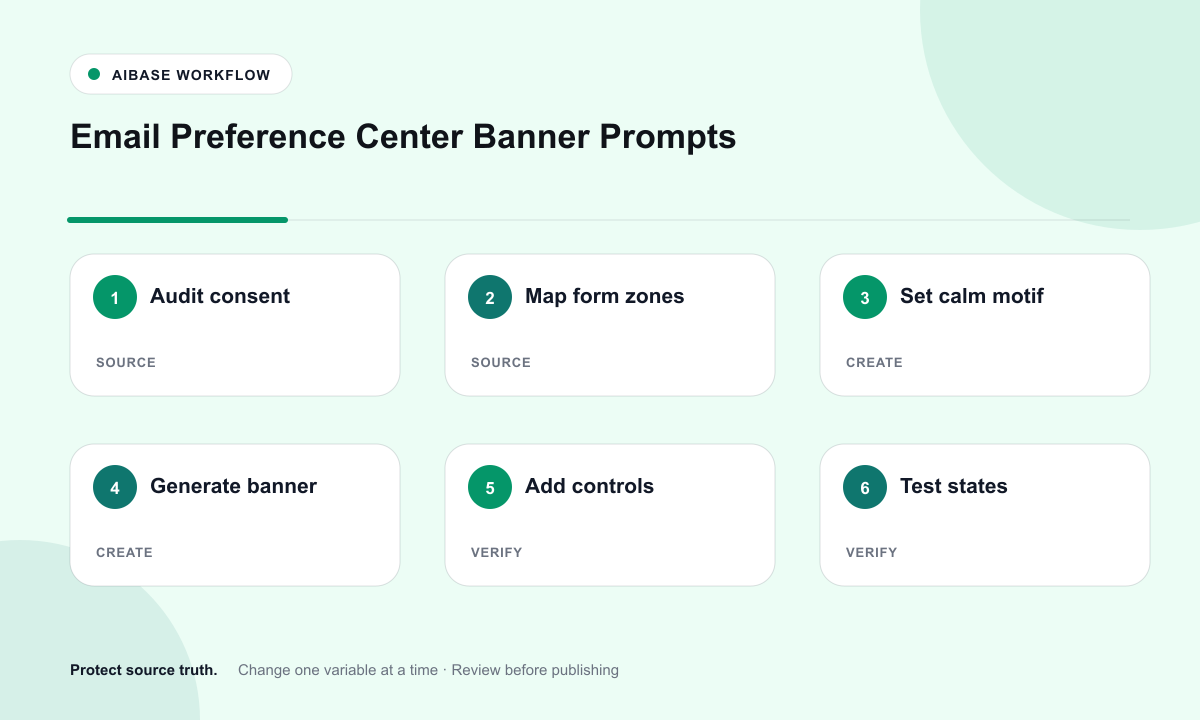
- Audit subscription topics, frequency choices, consent basis, regional rules, account states, confirmation behavior, retention, and suppression logic.
- Map desktop and mobile zones for headline, explanation, controls, save, unsubscribe-all, privacy link, identity context, and confirmation.
- Define a calm motif and generate text-free banners with low detail behind the real form and controls.
- Implement real labeled checkboxes or toggles, current state, keyboard focus, validation, save feedback, and an equally clear unsubscribe route.
- Test authenticated and tokenized links, expired links, long translations, screen readers, keyboard-only use, error states, preference persistence, and suppression timing.
- Version the banner with the preference schema and re-review it whenever topics, consent language, or processing behavior changes.
Example prompt variants
- Wide preference-center banner with balanced sage and cream layers, quiet left headline zone and blank lower form band, no envelope, switch, checkmark, word, or logo.
- Mobile-safe background of soft cobalt arcs opening around a plain central column, no button shape, selected state, notification, or text.
- Minimal unsubscribe confirmation background with one gentle horizon of warm gray and pale blue, large clean message zone, no celebration, pressure cue, offer, badge, or interface.
Quality checklist
- Topics, frequency, consent basis, current state, unsubscribe behavior, privacy links, and confirmation match the live system.
- Generated art contains no fake control, selected state, success message, urgency, offer, account data, or deceptive interaction cue.
- Labels, controls, save, unsubscribe, errors, and confirmations are semantic, keyboard accessible, localizable, and screen-reader clear.
- Background crops preserve form contrast and hierarchy on desktop, tablet, mobile, zoomed text, and dark system settings.
- Prompt, asset, preference schema, legal review, accessibility test, save test, suppression test, approval, and rollback are documented.
Mistakes to avoid
- Generating pretty checkboxes or toggles that users mistake for functional controls.
- Making save visually dominant while hiding or weakening the unsubscribe-all option.
- Embedding consent copy in pixels where it cannot be translated, read by assistive technology, or corrected.
- Publishing without testing expired links, state persistence, suppression timing, keyboard flow, and mobile zoom.
Related AIBase pages
Practical next step
Open the most relevant AIBase generator, run one narrow prompt first, and save the best result before adding more constraints. The fastest way to improve output quality is to compare one variable at a time: subject, camera, background, lighting, then final polish.