
Seedream 5.0 Lite Etsy Listing Background Prompts for Handmade Products
Draft Etsy listing backgrounds with Seedream 5.0 Lite prompts for handmade-product context, crop consistency, honest scale, clean props, and reusable listing sets.
Quick answer
Use Seedream 5.0 Lite to explore simple background directions, not to replace evidence of the real handmade item. Start from verified product dimensions and materials, generate a low-clutter setting with honest scale, then composite the approved product photo and add accurate text outside the generated pixels.
Who this guide is for
Etsy sellers, handmade brands, small studios, and ecommerce designers creating cohesive listing backgrounds, seasonal scene directions, thumbnail tests, and lifestyle context for jewelry, ceramics, candles, stationery, textiles, and gifts.
Recommended model
| Use case | Recommended model | Why |
|---|---|---|
| This workflow | Seedream 5.0 Lite | Its fast drafting workflow is useful for comparing several simple scene directions before investing time in a final composite or physical product shoot. |
AIBase is an independent creative platform. Model names are shown only to identify supported underlying technologies and workflow choices.
Prompt template
Create a clean [square/landscape] background concept for an Etsy listing featuring a real [handmade product category] that will be composited later. Setting: [surface and simple context]. Leave a natural product area measuring about [relative frame size] with correct scale cues. Props: only [one or two relevant props]. Lighting: [soft consistent direction]. Palette: [colors]. No product, hand, text, logo, price, shipping badge, claim, extra craft item, measurement, watermark, or busy pattern.
Step-by-step workflow
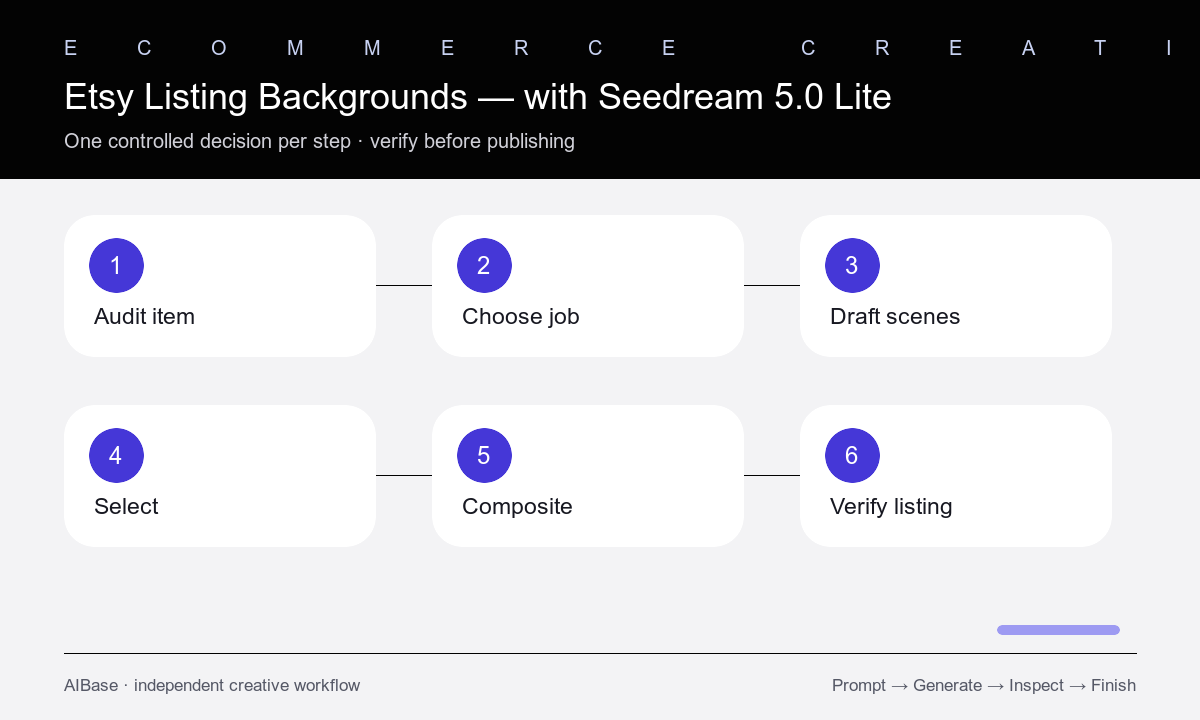
- Audit the real product’s dimensions, materials, color, finish, edges, transparency, shadow needs, and any variations buyers must see.
- Choose one listing-image job: clean thumbnail, scale context, gift context, material detail, color option, or seasonal lifestyle scene.
- Draft three low-clutter backgrounds with the same crop and product zone while changing only surface, palette, or lighting.
- Select the background that supports the item without implying included props, false size, different materials, or an unavailable variation.
- Composite the approved product photo with matched perspective, light direction, contact shadow, edge quality, and realistic scale.
- Review the full listing sequence for truthful representation, thumbnail clarity, consistent crops, accessibility, and marketplace requirements.
Example prompt variants
- Square listing background for a handmade ceramic mug, pale linen surface, warm plaster wall, one folded neutral napkin far behind, soft window light from left, empty centered product zone, no mug or text.
- Square background for minimalist silver earrings, light gray stone surface, one small dried leaf at frame edge, cool diffused daylight, close product zone with believable jewelry scale, no jewelry or box.
- Landscape gift-context background for a hand-poured candle, warm oak shelf, blurred kraft-paper ribbon in rear corner, gentle evening light, open left product zone, no candle, flame, label, or message.
Quality checklist
- The approved product photo remains the source of truth for shape, color, material, craftsmanship, variations, and included items.
- Perspective, scale cues, light direction, color temperature, contact shadow, reflections, and edges match the product.
- Props and settings do not imply extras, size, use, personalization, safety, sustainability, or availability that cannot be verified.
- The product remains clear at thumbnail size and the listing set uses consistent crop, palette, and background hierarchy.
- All titles, dimensions, prices, processing times, shipping details, claims, and disclosures are accurate and editable outside the image.
Mistakes to avoid
- Generating a lookalike product instead of compositing verified photography of the item buyers will receive.
- Adding too many styled props so the handmade product becomes small or visually ambiguous.
- Using background scale cues that make the item appear larger or smaller than its real dimensions.
- Showing props, packaging, personalization, colors, or materials that are not included or available.
Related AIBase pages
- Open Seedream 5.0 Lite
- Create fast Seedream prompt drafts
- Plan ecommerce product photos
- Build Pinterest product backgrounds
Practical next step
Open the most relevant AIBase generator, run one narrow prompt first, and save the best result before adding more constraints. The fastest way to improve output quality is to compare one variable at a time: subject, camera, background, lighting, then final polish.