
Wan 2.7 Lipstick Cap Removal Product Video Prompts
Animate authorized lipstick packshots into clean Wan 2.7 cap-removal loops while preserving tube geometry, finish, bullet shape, shade, and label accuracy.
Quick answer
Use the highest-resolution authorized lipstick packshot as the first frame and animate only one cap action: lift, twist, or remove. Protect tube height, diameter, cap seam, finish, bullet shape, shade, logo placement, and label copy. Generate a short loop, then add shade name, claims, price, captions, and CTA in post.
Who this guide is for
Beauty brands, cosmetics retailers, marketplace sellers, and social teams turning approved lipstick packshots into product detail loops or paid-social hooks.
Recommended model
| Use case | Recommended model | Why |
|---|---|---|
| This workflow | Wan 2.7 | The image-to-video workflow keeps the approved product still as the anchor while adding one compact packaging motion for detail pages and social clips. |
AIBase is an independent creative platform. Model names are shown only to identify supported underlying technologies and workflow choices.
Prompt template
Use the uploaded authorized lipstick packshot as the exact first frame. Preserve tube height, diameter, cap shape, seam, matte or gloss finish, metal accent, bullet shape and shade, label boundary, logo placement, and background. Animate only [cap lift / quarter twist / clean removal] over [4-5 seconds] with [speed]. Keep [top or bottom] caption-safe. Do not change shade, texture, product amount, label copy, ingredients, claims, hands, background, word, number, logo, or watermark.
Step-by-step workflow
- Confirm SKU, shade, finish, bullet shape, cap mechanism, label artwork, claims, and marketplace rules.
- Choose a straight-on or three-quarter packshot with sharp cap seam, label, and bullet visible.
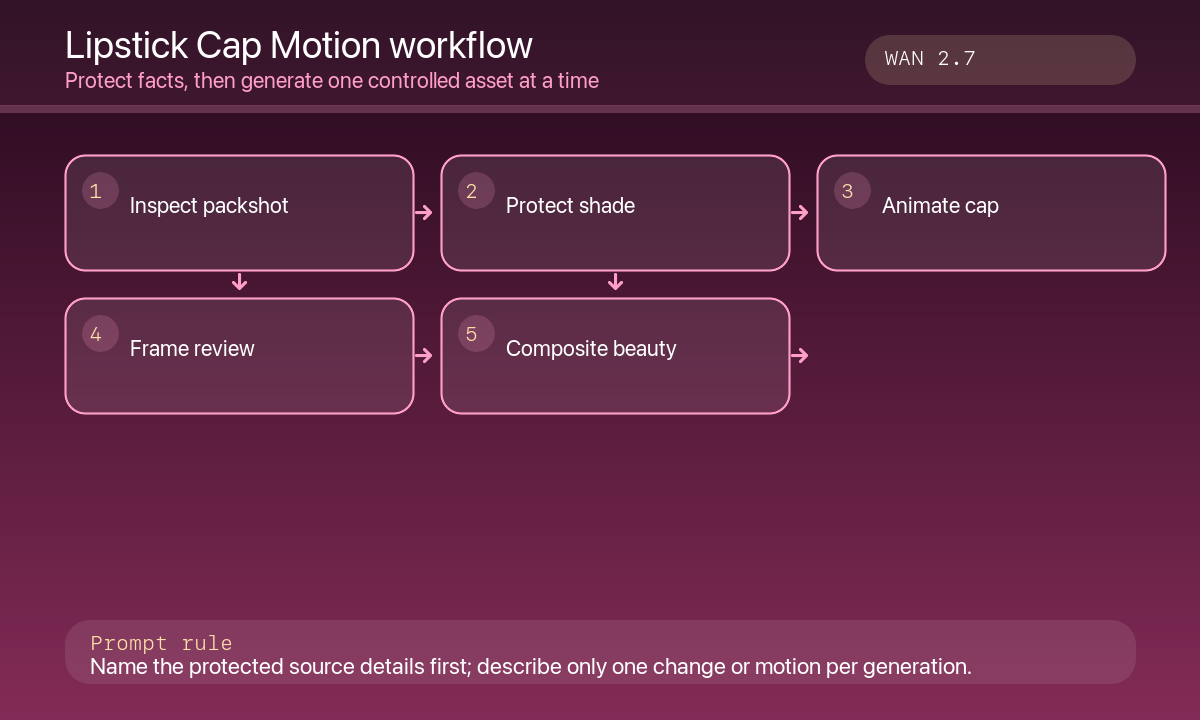
- Animate one motion only; keep camera, product position, lighting, and reflection stable.
- Review cap path, seam alignment, tube symmetry, bullet edge, shade constancy, and specular highlight at full speed and frame-by-frame.
- Generate 9:16, 1:1, and 16:9 variants from suitable source crops rather than cropping one master blindly.
- Composite editable shade name, verified claims, price, captions, CTA, and accessibility text in post.
Example prompt variants
- Four-second detail loop: the exact matte cap lifts straight up and returns once, preserve gold ring, bullet edge and rose shade; no hand, text, swatch, or background change.
- Five-second vertical clip: the authorized cap twists one quarter turn and lifts slightly, product centered and top caption space clear; no label morph or shade shift.
- Four-second comparison-safe clip: two approved shades remain in place while only the front cap lifts once; no invented swatch, skin, ingredient claim, or word.
Quality checklist
- Tube, cap, bullet, finish, shade, logo, and label remain identical to the approved SKU.
- Motion follows the real cap mechanism and returns to a stable end frame.
- No missing product, extra component, invented swatch, skin result, or claim appears.
- Required shade, ingredient, safety, and pricing information remains editable and accurate.
- Crops, loop seam, captions, playback weight, analytics, and marketplace rules are tested.
Mistakes to avoid
- Changing the cap into a magnetic, twist, or pull mechanism that does not match the product.
- Letting the bullet melt, elongate, or shift shade during motion.
- Adding a hand or skin swatch that implies a cosmetic result.
- Embedding ingredient, SPF, cruelty-free, shade, or price claims in generated pixels.
Related AIBase pages
Practical next step
Open the most relevant AIBase generator, run one narrow prompt first, and save the best result before adding more constraints. The fastest way to improve output quality is to compare one variable at a time: subject, camera, background, lighting, then final polish.