
GPT Image 2 LinkedIn Ad Creative Prompts for B2B Campaign Concepts
Plan clearer LinkedIn ad concepts with GPT Image 2 prompts for one audience, one problem, feed-safe composition, editable copy space, and honest B2B claims.
Quick answer
A useful LinkedIn ad visual communicates one B2B problem or outcome before the viewer reads the post. Prompt for a simple subject, recognizable work context, strong focal area, and a low-detail copy zone, but add the approved headline, proof, logo, and CTA later in a design tool.
Who this guide is for
B2B marketers, SaaS founders, demand-generation teams, agencies, and content designers producing sponsored posts, webinar promos, research-report ads, product launches, and retargeting creative.
Recommended model
| Use case | Recommended model | Why |
|---|---|---|
| This workflow | GPT Image 2 | It is a practical text-to-image option for exploring bounded commercial concepts, metaphors, work settings, compositions, and campaign moods before typography and verified brand assets are assembled separately. |
AIBase is an independent creative platform. Model names are shown only to identify supported underlying technologies and workflow choices.
Prompt template
Create a LinkedIn sponsored-content image concept for [B2B audience] about [one verified problem or outcome]. Visual idea: [literal work scene or simple metaphor]. Composition: [square or landscape], one clear focal subject, calm low-detail copy zone in [region], feed-readable contrast, professional but specific mood. Palette: [colors]. Include no text, logo, interface screenshot, metric, customer identity, certification, badge, button, or watermark. Avoid generic handshake, glowing brain, random dashboard, and crowded office imagery.
Step-by-step workflow
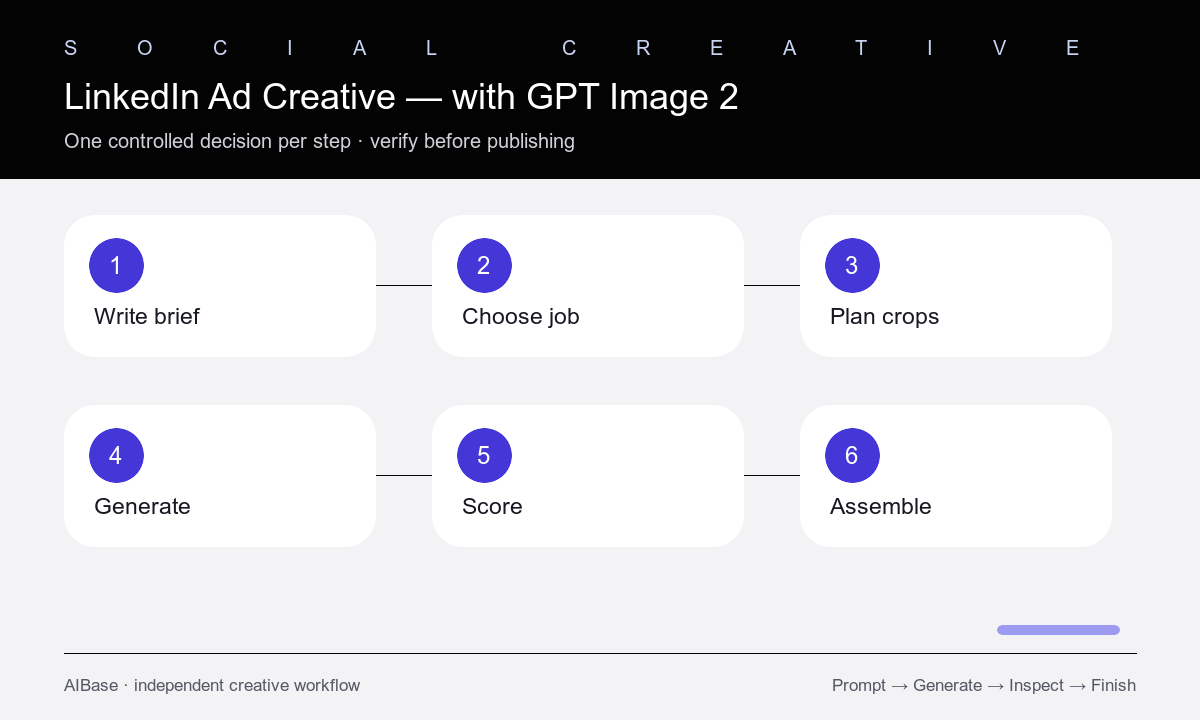
- Write the campaign truth first: audience, one pain or outcome, funnel stage, offer, approved proof, and desired action.
- Choose one visual job: stop the scroll, make the problem recognizable, frame the offer, or signal the category.
- Sketch the final square and landscape crops, including safe areas for headline, logo, proof, and CTA that will be added later.
- Generate three concepts that vary only the visual metaphor or work setting while keeping audience, message, palette, and layout fixed.
- Score first-glance clarity, distinctiveness, brand fit, crop safety, copy space, plausibility, and the risk of implying unsupported results.
- Assemble approved typography, logo, screenshot, metrics, customer marks, CTA, and accessibility text in the final design file.
Example prompt variants
- Square B2B operations ad concept, one neatly labeled workflow card emerging from a desk covered in tangled blank paper strips, confident editorial photography, dark navy and warm white, clear upper-left copy zone, no words.
- Landscape webinar ad concept for finance leaders, small team reviewing one clean physical planning board in a real meeting room, natural side light, calm analytical mood, open right-side copy area, no screens or text.
- Square security-report ad concept, layered translucent shields around one simple server cabinet in a restrained studio scene, credible technical mood, charcoal and cobalt palette, empty lower band for copy, no logos or claims.
Quality checklist
- The image maps to one specific audience and campaign message without relying on generated text.
- The focal idea remains understandable at mobile feed size and survives both planned crops.
- Copy, logo, screenshots, metrics, customer marks, claims, and CTA remain editable and verified outside the generated image.
- People, workplaces, devices, and metaphors look plausible and do not imply customers, endorsements, or measured outcomes.
- The final ad has accessible contrast, descriptive alt text, brand review, claim substantiation, and placement-safe dimensions.
Mistakes to avoid
- Prompting for an entire finished ad with headline, logo, metric, screenshot, and button baked into pixels.
- Using generic B2B clichés that do not connect to the audience’s actual job or problem.
- Testing different messages and layouts simultaneously, making creative performance impossible to interpret.
- Allowing a generated chart, interface, customer logo, or result to appear as real evidence.
Related AIBase pages
- Open GPT Image 2
- Use the social media prompt template
- Build broader ad creative prompts
- Compare GPT Image 2 with Nano Banana Pro
Practical next step
Open the most relevant AIBase generator, run one narrow prompt first, and save the best result before adding more constraints. The fastest way to improve output quality is to compare one variable at a time: subject, camera, background, lighting, then final polish.