
Veo 3.1 Pro Luxury Product Commercial Prompts
Plan polished luxury product commercial shots with Veo 3.1 Pro using product anchors, material-focused motion, disciplined camera paths, and edit-ready endings.
Quick answer
Luxury is communicated through restraint: one product truth, one material behavior, one controlled light event, and one precise camera move per shot. Use a reference when product identity matters, then verify geometry, branding, claims, and physical behavior before publication.
Who this guide is for
Premium ecommerce, beauty, jewelry, accessories, homeware, and launch teams creating hero-shot concepts, material studies, campaign mood films, and previsualization for polished commercials.
Recommended model
| Use case | Recommended model | Why |
|---|---|---|
| This workflow | Veo 3.1 Pro for selected high-fidelity hero shots | The higher-quality text- and image-to-video route fits final shot concepts where surface detail, deliberate motion, and visual continuity matter more than rapid bulk exploration. |
AIBase is an independent creative platform. Model names are shown only to identify supported underlying technologies and workflow choices.
Prompt template
Use the uploaded [product image] as the identity reference. Keep [silhouette], [materials], [color], [controls], [label or logo placement], and [scale] unchanged. Luxury shot purpose: [one product truth]. Set: [minimal environment]. Material event: [one reflection, condensation, fabric, liquid, or mechanical action]. Lighting: [one motivated change]. Camera: [one precise path, lens feel, and speed]. End on [stable hero frame with copy-safe area]. Duration [4/6/8 seconds], [aspect ratio]. No redesign, extra product, invented feature, readable new copy, unsupported claim, cut, transition, or camera shake.
Step-by-step workflow
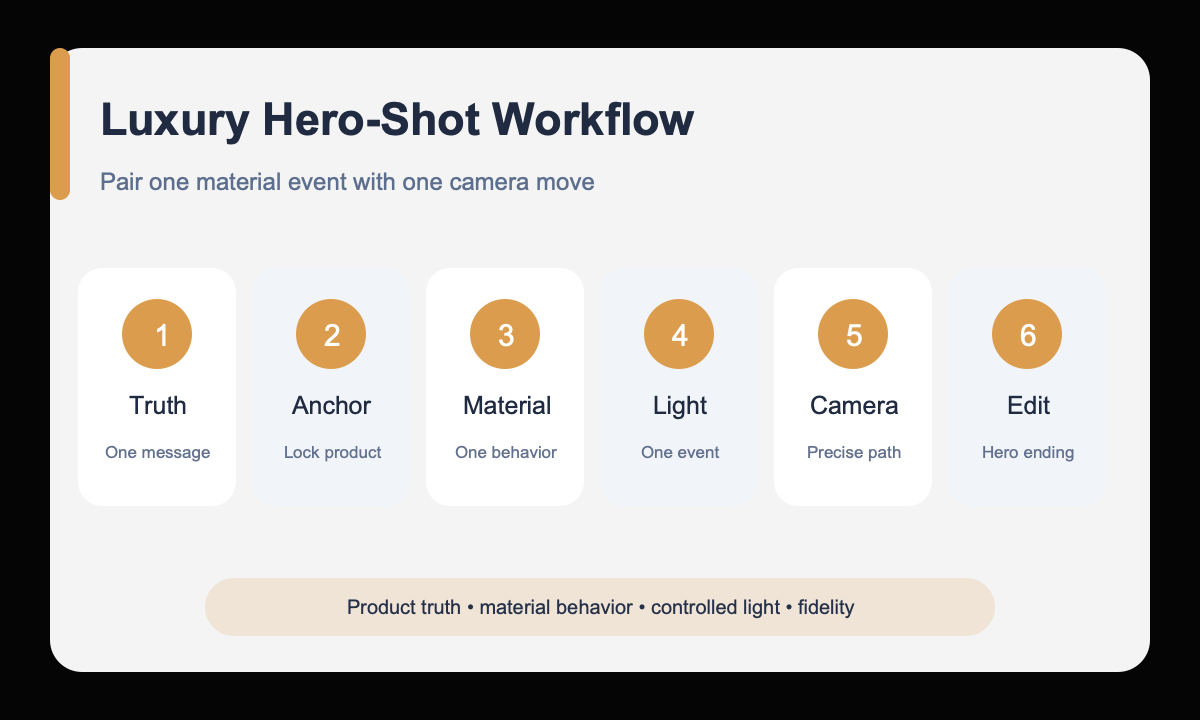
- Write the product truth the shot must communicate and remove any unsupported superlative or claim.
- Protect product geometry, material, color, controls, label placement, and scale from the reference.
- Choose one material behavior that reveals craftsmanship without changing the product.
- Pair one motivated lighting event with one slow camera path.
- Define an edit-ready opening and a stable hero ending with intentional copy space.
- Review product fidelity and physical behavior frame by frame, then assemble approved shots in an editor.
Example prompt variants
- Keep the exact watch case, dial, crown, strap, and metal finish; a narrow highlight travels across the bezel while the camera makes a slow macro arc; dark stone set; finish on a centered three-quarter hero frame.
- Keep the exact fragrance bottle, cap, glass tint, label zone, and proportions; soft dawn light grows through ribbed glass as the camera pushes in over pale travertine; finish with clean right-side copy space.
- Keep the exact headphones, hinge geometry, cushion texture, and graphite color; one controlled rotation reveals the brushed-metal yoke while a soft light gradient shifts; black studio, stable front hero ending.
Quality checklist
- Product silhouette, controls, labels, material boundaries, and scale stay anchored.
- Reflection, liquid, fabric, condensation, and mechanical motion obey believable physics.
- The light event and camera move reveal one product truth rather than decorative complexity.
- Opening and ending frames support a deliberate edit and approved copy placement.
- No new claim, feature, certification, price, logo, or product variant was invented.
Mistakes to avoid
- Using luxury, cinematic, and premium as substitutes for a shot design.
- Combining multiple material effects and camera moves in one short clip.
- Letting reflective surfaces, labels, or small controls drift between frames.
- Publishing a beautiful concept before checking every represented product feature.
Related AIBase pages
- Create a polished shot with Veo 3.1 Pro
- Follow the cinematic video workflow
- Prototype product shots with Veo 3.1 Fast
Practical next step
Open the most relevant AIBase generator, run one narrow prompt first, and save the best result before adding more constraints. The fastest way to improve output quality is to compare one variable at a time: subject, camera, background, lighting, then final polish.