
Nano Banana Pro Watercolor Paint Supply Campaign Prompts That Protect Product Truth
Place approved paint sets into expressive campaign scenes while preserving exact pans, tubes, quantities, pigments, labels, and material claims.

Quick answer
Start with sharp references for the exact paint set. Use Nano Banana Pro to build one expressive but bounded studio scene, while preserving pan count, tube count, color order, package quantity, label zones, brush details, and actual pigment behavior. Keep lightfastness, toxicity, mixing, age rating, and certification claims in editable copy backed by the manufacturer—not inside generated pixels.
Who this guide is for
Art supply brands, craft retailers, independent makers, and education shops producing product-page heroes, seasonal campaigns, and social creative from approved product references.
Recommended model
| Use case | Recommended model | Why |
|---|---|---|
| This workflow | Nano Banana Pro | It is suited to high-fidelity reference-led product scenes when the prompt treats product structure, labels, and set contents as protected invariants. |
AIBase is an independent creative platform. Model names are shown only to identify supported underlying technologies and workflow choices.
Prompt template
Use the uploaded authorized references for the exact [watercolor pan set / tube set / brush kit]. Create one [campaign format] for [audience] in a [studio / classroom / plein-air / gift] setting. Preserve exact item count, pan or tube arrangement, color order, visible label shapes, cap forms, brush ferrules and handles, package window, dimensions, finish, and approved color relationships. Scene may include [limited props], [light direction], [surface], and a [copy-safe zone]. No new paint color, invented pigment name, readable label text, certification, age rating, safety claim, extra tool, hand, artwork attribution, word, number, logo, or watermark.
Step-by-step workflow
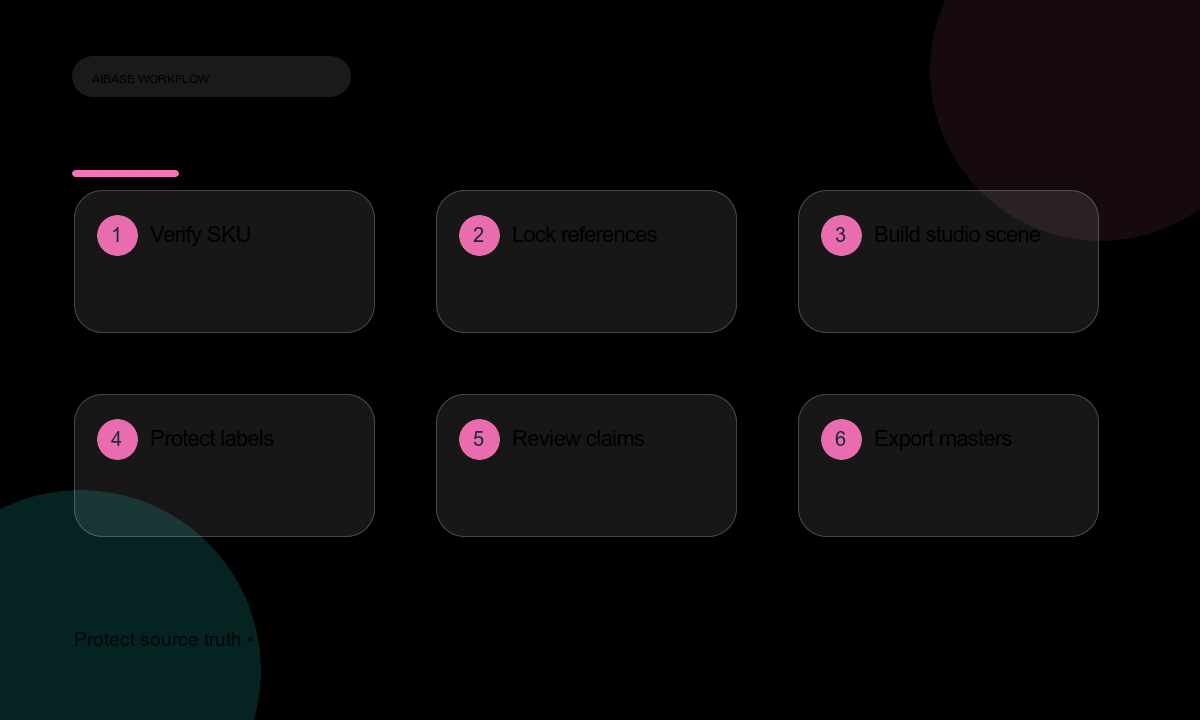
- Freeze the SKU truth sheet: set contents, color names and order, quantity, size, materials, age guidance, certifications, and regional restrictions.
- Capture or collect sharp approved references for the closed set, open pan layout, tube label zone, packaging, and brush details.
- Choose one campaign concept and define the audience, channel, crop, prop list, palette, and copy-safe area.
- Generate the scene with product invariants repeated explicitly; keep labels as unreadable but structurally accurate shapes.
- Compare against references for count, arrangement, scale, cap profile, brush handle, package window, and color order.
- Composite real product copy, pigment names, safety symbols, certifications, price, and CTA in editable layers.
- Review claims with the manufacturer or listing owner, then export channel-specific masters and record approvals.
Example prompt variants
- Approved 24-pan travel set on a warm oak desk beside one clean jar of brushes; preserve pan count, color sequence, thumb rings, lid, and package window; no readable text or new color.
- Three authorized tubes and one reference brush on a cool gray studio surface, soft north light, right copy space; preserve cap shape, crimp, tube scale, and label zones as unreadable forms.
- Gift-ready flat-lay of the exact approved starter kit on neutral paper with one empty ribbon-free copy zone; preserve item count, box window, brush profile, and all package edges.
Quality checklist
- Pan count, tube count, color order, package contents, dimensions, and brush details match the exact SKU.
- Label geometry remains plausible while all regulatory and product-specific text stays outside generated pixels.
- No invented pigment, certification, age rating, safety claim, artist endorsement, or extra tool appears.
- Paint and paper behavior looks physically plausible for the stated medium.
- Price, contents, restrictions, pigment names, and CTA are editable and reviewed against the live listing.
Mistakes to avoid
- Letting the model add attractive extra pans, tubes, or brushes that are not included in the SKU.
- Rendering readable pigment names or safety certifications the product cannot support.
- Replacing an unusual pigment behavior with a generic saturated rainbow.
- Presenting generated artwork as evidence of a specific artist’s results or skill.
Related AIBase pages
Practical next step
Open the most relevant AIBase generator, run one narrow prompt first, and save the best result before adding more constraints. The fastest way to improve output quality is to compare one variable at a time: subject, camera, background, lighting, then final polish.