
Veo 3.1 Fast Product Restock Video Prompts
Create short product-restock videos with Veo 3.1 Fast using current inventory facts, one clear reveal per shot, controlled packshots, editable offer copy, and channel-ready crops.
Quick answer
Verify that the exact SKU, variant, region, channel, quantity status, launch time, and landing page are current before generating anything. Make one short text-free reveal per clip, keep the real product as an approved packshot or composite, and add back-in-stock copy, price, CTA, and urgency language as editable layers that can be withdrawn when inventory changes.
Who this guide is for
Ecommerce operators, lifecycle marketers, social teams, retail brands, and agencies announcing replenished colors, sizes, bundles, limited production runs, or returning seasonal items.
Recommended model
| Use case | Recommended model | Why |
|---|---|---|
| This workflow | Veo 3.1 Fast for rapid short-form concept clips | A Fast workflow supports quick testing of simple reveal beats and channel crops when all inventory facts, product assets, and offer text stay in the publishing system. |
AIBase is an independent creative platform. Model names are shown only to identify supported underlying technologies and workflow choices.
Prompt template
Create one text-free [4-6]-second product-restock reveal for [placement and audience]. Verified product context guides the scene only: [category, approved color palette, use setting]. Subject [generic placeholder or authorized reference-led product]. Action [one event: carton opens / shelf light rises / product slides into frame / cover lifts]. Camera [one move], lighting [direction], final frame with clear [left/right/center] copy-safe zone. Preserve reference product silhouette, color, material, packaging structure, item count, labels as unreadable shapes, and realistic contact. No text, back-in-stock message, price, quantity, countdown, urgency badge, logo mutation, fake barcode, readable label, extra SKU, unsupported availability, impossible motion, watermark, or second action.
Step-by-step workflow
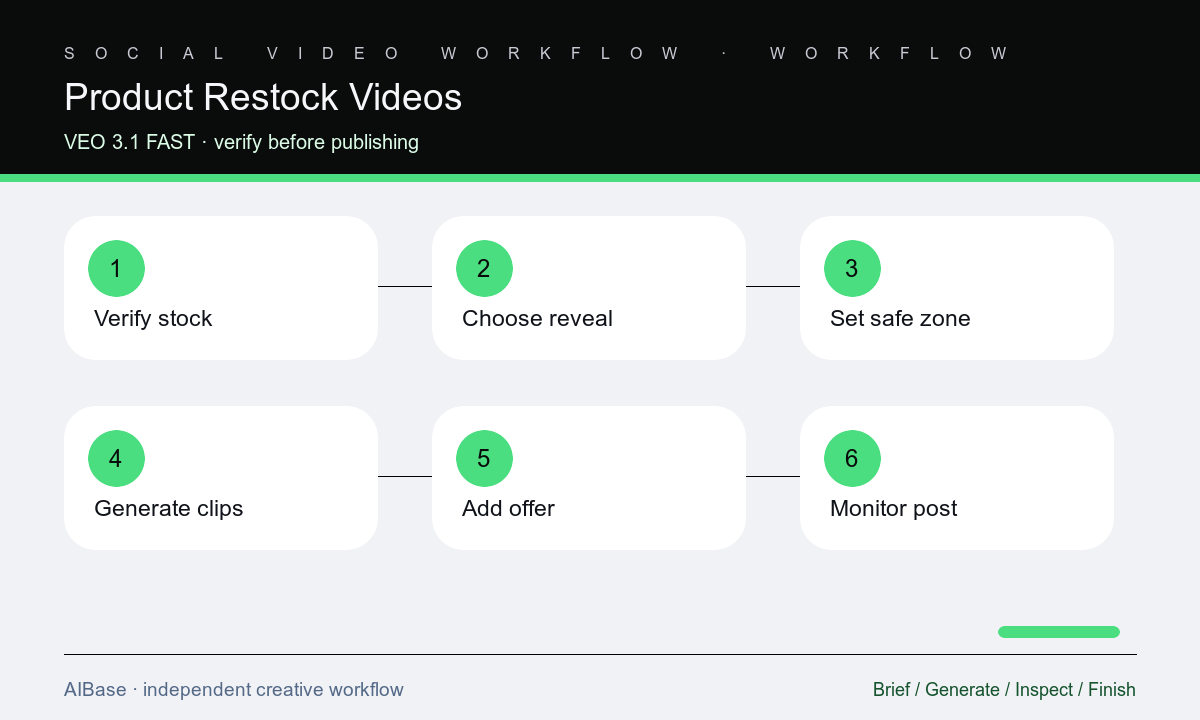
- Confirm the exact SKU and variant, sellable inventory, region, channel allocation, publication window, customer eligibility, price, promotion, limits, and live destination.
- Choose one reveal beat that fits the product and can be understood without generated copy, then define duration, aspect ratio, copy-safe zone, and clean end frame.
- Use an approved product reference or a generic placeholder, separating product truth from the scene and leaving inventory language, logo, price, and CTA for compositing.
- Generate several short clips that vary only the reveal action or camera move, keeping product count, packaging, scale, physics, light, and background stable.
- Inspect the full clip and end frame for SKU drift, labels, ports, colors, item count, collisions, shadows, crop, and enough hold time for readable overlays.
- Composite current approved assets, link to the verified variant, schedule against inventory operations, and pause or replace the post when availability changes.
Example prompt variants
- Five-second vertical restock reveal: one unbranded shipping carton opens once to reveal the approved sneaker packshot position, slow overhead push, neutral studio floor, stable box geometry, final upper copy zone, no text, quantity, size, or duplicated shoes.
- Four-second square clip: the authorized bottle slides gently into its marked shelf position and stops, fixed camera, soft side light, preserve bottle shape, liquid color, cap, label zones, shadow, one unit only, and a clean left copy zone.
- Six-second landscape restock concept: a fabric cover lifts once from the approved keyboard silhouette, subtle lateral camera move, preserve key layout, material, color, cable, desk contact, blank screen background, and final right copy zone.
Quality checklist
- SKU, variant, inventory status, region, channel, price, promotion, limits, timing, and landing-page selection match current operations data.
- Product silhouette, dimensions, color, material, package, labels, included-item count, shadows, contacts, and motion remain stable and physically plausible.
- Each clip uses one reveal and one camera move, reaches a clean end frame, and leaves enough stable time and contrast for editable copy.
- Back-in-stock language, urgency, quantities, price, logo, CTA, terms, and accessibility text remain approved layers that can be updated or withdrawn.
- The publishing owner has a monitoring, pause, correction, and customer-service path for inventory changes after the post goes live.
Mistakes to avoid
- Generating the announcement before inventory is sellable in the promoted region, variant, channel, and customer segment.
- Baking quantities, countdowns, prices, discount claims, or back-in-stock words into the video where operations cannot update them.
- Using a dramatic multi-product reveal that duplicates the SKU, changes packaging, invents variants, or suggests more inventory than exists.
- Leaving a successful restock post active after the linked variant sells out, changes price, or moves to a different destination.
Related AIBase pages
Practical next step
Open the most relevant AIBase generator, run one narrow prompt first, and save the best result before adding more constraints. The fastest way to improve output quality is to compare one variable at a time: subject, camera, background, lighting, then final polish.