
Veo 3.1 Fast Flash Sale Video Prompts for Ecommerce
Create flash-sale video backgrounds with Veo 3.1 Fast using modular motion beats, product-safe frames, editable offer copy, urgency controls, and destination-page checks.
Quick answer
Use Veo 3.1 Fast to make short text-free motion plates, product holds, and transitions—not the price, countdown, discount, terms, or CTA. Build a three-beat edit with generous stable copy zones, composite approved product imagery and offer text in the editor, and verify the finished video against the live promotion immediately before launch.
Who this guide is for
Ecommerce teams, performance marketers, DTC brands, retailers, and agencies producing limited-time sale ads, launch windows, inventory events, and channel-specific cutdowns on short timelines.
Recommended model
| Use case | Recommended model | Why |
|---|---|---|
| This workflow | Veo 3.1 Fast for rapid text-free sale motion plates | Fast iteration fits modular performance creative where teams need multiple hooks and crops, while factual offer details remain editable and independently verified. |
AIBase is an independent creative platform. Model names are shown only to identify supported underlying technologies and workflow choices.
Prompt template
Create a text-free [duration] ecommerce flash-sale motion plate for [product category and audience]. Beat 1 hook: [one visual event]. Beat 2 product-safe hold: [clean composition] with an empty high-contrast copy zone in [region]. Beat 3 CTA-safe end frame: [stable simple arrangement]. Camera: [one restrained move]. Palette: [approved colors]. Motion should feel urgent but readable, with clean edit points and no rapid flashing. Do not generate product packaging unless supplied as an approved reference. No text, letters, numbers, prices, percentages, countdown, clock, badge, logo, claim, terms, CTA, fake interface, customer, extra product, watermark, strobe, or unsupported scarcity cue.
Step-by-step workflow
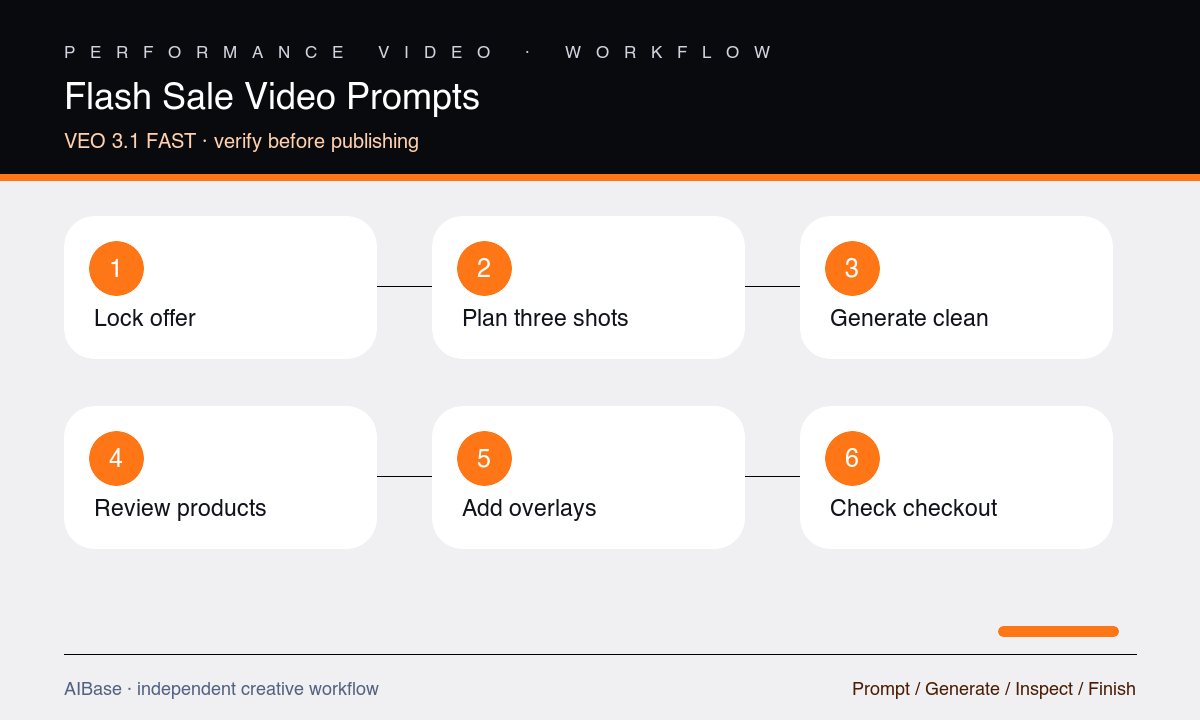
- Verify the offer source of truth: eligible products, price, discount, start and end times with time zone, inventory language, exclusions, terms, destination URL, and approval owner.
- Storyboard three modular beats—hook, product hold, and CTA end frame—with exact duration, crop, copy zones, and accessibility-safe motion limits.
- Generate text-free plates and transitions separately, keeping the camera simple and reserving enough stable frames for readable editable copy.
- Composite approved product packshots, logo, price, discount, dates, CTA, and terms in the editor rather than relying on generated text or packaging.
- Create vertical, square, and landscape assemblies from the same verified offer sheet, then check interface-safe zones, pacing, captions, contrast, and flashing.
- Recheck the final export and landing page immediately before scheduling, and retire or update every asset when the offer or inventory state changes.
Example prompt variants
- Six-second vertical beauty-sale plate with one coral ribbon shape sweeping into a clean cream product stage, locked two-second center hold, then ribbon exits to reveal a stable upper copy zone, no products, text, numbers, or glitter.
- Five-second square home-goods sale background with modular paper panels sliding once to frame an approved product cutout area, warm neutral palette, stable center hold and lower CTA band, no price, badge, clock, or furniture.
- Six-second landscape electronics promotion plate with a single cobalt light path tracing around an empty product-safe rectangle, slow push, clean right copy zone, stable final frame, no device, interface, text, percentage, or sparks.
Quality checklist
- The hook, product hold, and CTA frame each have one job, clean edit points, sufficient dwell time, and readable safe zones in the target crop.
- Approved products, logo, offer copy, dates, time zone, CTA, exclusions, and terms remain editable and match the live destination page.
- Generated pixels contain no fake price, percentage, countdown, scarcity claim, product, package, logo, text, interface, badge, or customer result.
- Motion has no strobe, rapid flash, illegible pacing, edge jitter, unwanted particles, warped geometry, or unsafe platform crop.
- Every scheduled variant has an owner, expiry plan, and final preflight check against current inventory and promotion status.
Mistakes to avoid
- Putting discount percentages, prices, countdowns, dates, terms, and CTA text into the generation prompt where they can become wrong or uneditable.
- Using frantic cuts, flashing color, and constant camera motion as a substitute for a clear offer and readable product hold.
- Letting props or synthetic packaging imply included items, inventory, product features, or a sale scope that the landing page does not support.
- Scheduling a correct video early but failing to recheck changed prices, exclusions, stock, dates, time zones, and destination links before launch.
Related AIBase pages
- Open Veo 3.1 Fast
- Create a Veo Fast social ad storyboard
- Build ecommerce sale banner backgrounds
- Create fast UGC ad concepts
Practical next step
Open the most relevant AIBase generator, run one narrow prompt first, and save the best result before adding more constraints. The fastest way to improve output quality is to compare one variable at a time: subject, camera, background, lighting, then final polish.