
Veo 3.1 Pro Science Center Brand Film Prompts
Plan cinematic science-center films while keeping exhibits, research, educators, visitors, accessibility, sponsors, dates, and learning claims factual.
Quick answer
Film real galleries, educators, exhibits, demonstrations, access features, and visitors when the brand story depends on them. Use Veo 3.1 Pro only for clearly illustrative, text-free atmospheric plates such as abstract light, scale, curiosity, or transition moments. Do not generate a plausible exhibit, scientific result, visitor reaction, lab, animal, artifact, accessibility feature, sponsor, or building and present it as part of the institution.
Who this guide is for
Science centers, discovery museums, planetariums, education nonprofits, traveling exhibitions, visitor bureaus, and agencies planning a manifesto film, season trailer, membership campaign, or donor piece.
Recommended model
| Use case | Recommended model | Why |
|---|---|---|
| This workflow | Veo 3.1 Pro for cinematic abstract plates inside an evidence-led edit | Cinematic generation can support mood and transitions, while institution-specific exhibits, people, claims, facilities, and visitor information stay grounded in approved footage and sources. |
AIBase is an independent creative platform. Model names are shown only to identify supported underlying technologies and workflow choices.
Prompt template
Create one [4-7 second] clearly illustrative text-free cinematic plate for a science-center brand film. Story job [curiosity threshold / scale transition / chapter breath / end-card atmosphere]. Abstract subject [light moving through blank translucent layers / particles organizing without forming data / shadow crossing an unmarked geometric surface]. Motion [one], camera [one], lens and crop [specific], palette [specific], stable edit handles. No real or plausible exhibit, experiment, laboratory, educator, child, visitor, animal, planet image, artifact, building, accessibility feature, sponsor, scientific diagram, result, discovery, word, number, logo, quotation, sound, or watermark.
Step-by-step workflow
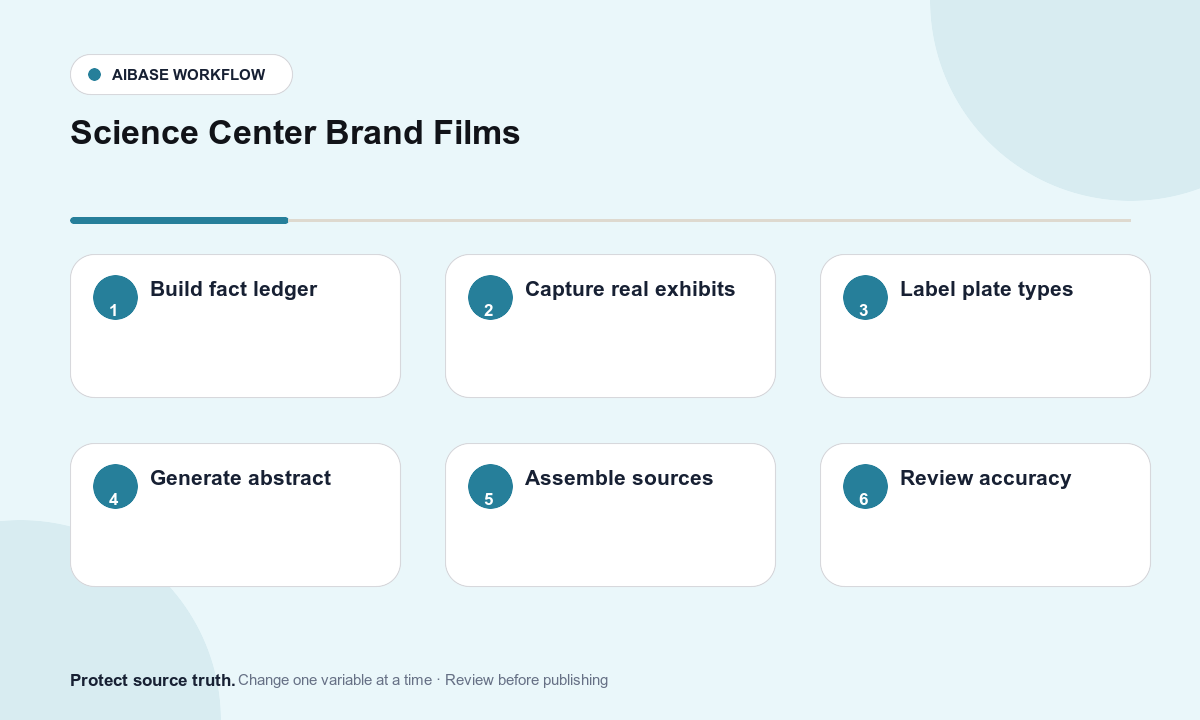
- Build a dated fact ledger for exhibits, programs, educators, research partners, learning objectives, visitor guidance, access, safety, tickets, hours, location, sponsors, evaluation evidence, and usage rights.
- Capture authorized real footage of galleries, approved exhibits, staff demonstrations, exterior, access features, and consented visitors; log exhibit and person releases shot by shot.
- Separate documentary evidence from illustrative atmosphere in the storyboard and label every generated plate before editing.
- Generate only abstract connective plates with one motion, one camera choice, no scientific representation, and clean handles for transition and captions.
- Assemble verified footage, narration, captions, audio description, sources, sponsor credits, visitor details, access information, disclosure, and CTA in the edit.
- Review science accuracy, child privacy, consent, exhibit rights, cultural material, animal welfare, safety, accessibility, sponsor placement, dates, tickets, localization, and correction workflow.
Example prompt variants
- Six-second curiosity opener: soft white light travels through three blank translucent layers and reveals a dark open field, one slow push, no exhibit, instrument, atom, planet, data, or sound.
- Four-second chapter transition: small neutral particles drift into a simple arc then disperse, locked camera, no constellation, molecule, statistic, discovery, letter, number, or logo.
- Five-second end-card plate: a warm pool of light expands across an unmarked blue surface and holds around a clean central title zone, no building, visitor, exhibit, sponsor, or text.
Quality checklist
- Exhibits, programs, people, partners, facilities, dates, hours, tickets, access, safety, learning goals, evaluation, and sponsor facts match current approved sources.
- Documentary footage is authentic, licensed, correctly identified, and not mixed with generated material in a misleading way.
- Generated plates remain abstract and do not depict a fake experiment, result, exhibit, lab, visitor, educator, animal, building, or access feature.
- Children, visitors, staff, cultural material, animals, safety, captions, audio description, sensory guidance, sponsor rules, and disclosure receive specialist review.
- Fact ledger, footage log, releases, prompts, generated labels, edit decisions, approvals, expiry, corrections, and withdrawal remain traceable.
Mistakes to avoid
- Generating a spectacular interactive exhibit or experiment and presenting it as available at the science center.
- Using excited synthetic children or visitors as proof of engagement, learning, inclusion, or community impact.
- Turning decorative particles, planets, or diagrams into inaccurate science or an implied research breakthrough.
- Letting cinematic mood replace current hours, ticket rules, age guidance, access information, safety context, sponsor approval, or sources.
Related AIBase pages
Practical next step
Open the most relevant AIBase generator, run one narrow prompt first, and save the best result before adding more constraints. The fastest way to improve output quality is to compare one variable at a time: subject, camera, background, lighting, then final polish.