
Veo 3.1 Pro vs Seedance 2.0 for Cinematic Product Ads: A Matched Workflow Test
Compare Veo 3.1 Pro and Seedance 2.0 for cinematic product ads using matched briefs, source conditions, shot classes, attempts, fidelity scoring, correction cost, and honest routing.
Quick answer
Test by shot class, not one highlight reel. Give both workflows the same approved product truth, neutral brief, duration, aspect ratio, attempt budget, correction, and scorecard; also run a source-conditioned lane because Seedance image-to-video and Veo Pro text-led planning may solve different jobs. Route each shot to the simplest workflow that passes fidelity and production thresholds.
Who this guide is for
Ecommerce brands, creative directors, agencies, studios, and performance teams choosing a workflow for pack reveals, material macros, product-in-scene shots, camera moves, liquid or particle events, and cinematic social cutdowns.
Recommended model
| Use case | Recommended model | Why |
|---|---|---|
| This workflow | Choose Veo 3.1 Pro or Seedance 2.0 per matched shot-class evidence | The meaningful decision is whether a specific text-led or reference-led route reaches required product fidelity, cinematic control, usable-candidate rate, and correction cost for each shot. |
AIBase is an independent creative platform. Model names are shown only to identify supported underlying technologies and workflow choices.
Prompt template
MATCHED CINEMATIC PRODUCT-AD TEST. Campaign job: [one shot class]. Product truth: [approved silhouette, dimensions, materials, colors, components, label, logo, reflections, and prohibited claims]. Scene: [environment]. Subject action: [one event]. Camera: [one path]. Lighting: [direction]. Duration and crop: [same settings]. Start and end: [states]. Protect: [critical details]. Do not invent, redesign, relabel, duplicate, bend, change color or material, add text, claim, person, feature, accessory, or extra product. Run the same neutral brief, duration, crop, attempt budget, correction instruction, time capture, and scorecard in Veo 3.1 Pro and Seedance 2.0; where a reference is required, use the same approved source condition and score that lane separately.
Step-by-step workflow
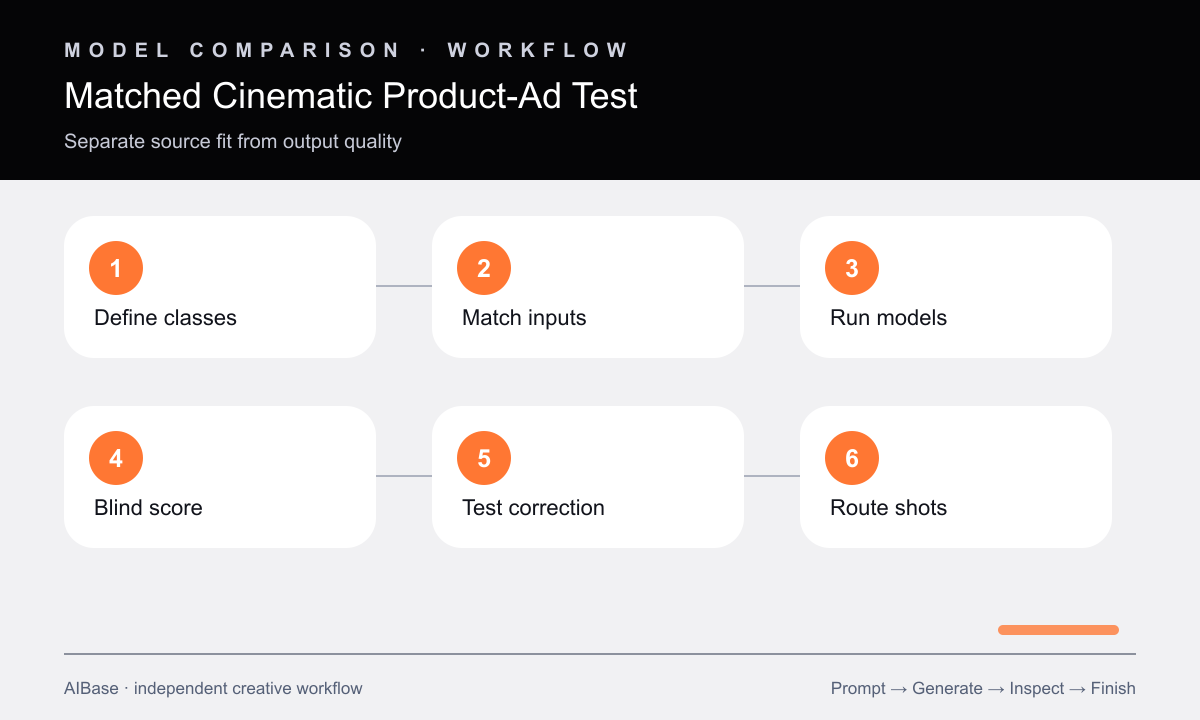
- Define shot classes and pass thresholds before testing: atmosphere plate, pack hold, material macro, product-in-scene, camera move, human interaction, and complex physical event.
- Prepare one product truth sheet, approved reference set, neutral prompt, duration, ratio, attempt budget, time log, correction instruction, and weighted rubric.
- Separate matched text-led tests from matched reference-led tests so source availability and model quality are not confused.
- Run equal attempts in both workflows and avoid giving one model extra prompt detail, editing, or favorable source material.
- Blind-score product fidelity, action, camera, physics, temporal stability, composition, artifacts, editability, correction, time, and cost.
- Route each shot class to the simplest passing workflow, document a real-footage fallback, and retest when inputs change.
Example prompt variants
- Matched pack-hold test: approved matte-black speaker centered on a dark plinth, four-second slow push, narrow warm rim light, exact grille, buttons, feet, proportions, logo zone, reflections, and stable final frame.
- Matched material-macro test: close pass across an approved cream leather bag surface, preserve grain, stitching count and path, edge paint, hardware color, panel geometry, and one controlled left-to-right light movement.
- Matched product-in-scene test: approved insulated bottle on a trail-side rock at dawn, subtle grass motion and slow lateral camera slide, preserve cap, body ratio, finish, label zone, color, contact shadow, and no invented outdoor claim.
Quality checklist
- Both workflows receive matched briefs, settings, attempts, corrections, time capture, product truth, and same-condition references.
- The scorecard separates source fit from output quality and weights fidelity, motion, camera, physics, stability, editability, time, and cost.
- Reviewers inspect anonymized full-size first, middle, and final frames instead of choosing the most cinematic thumbnail.
- Geometry, materials, labels, logos, colors, reflections, components, claims, people, physical events, and pack frames remain verified.
- The routing table is specific to shot class and includes compositing, approved stills, manual VFX, or real footage when needed.
Mistakes to avoid
- Comparing a polished Veo text-to-video storyboard with a strong Seedance product reference and attributing the difference to the model.
- Picking the most dramatic camera or particle effect while the product bends, label shimmers, material changes, or final hold fails.
- Giving one workflow more attempts, a model-specific correction, extra editing time, or a cleaner source without recording it.
- Publishing a universal winner when pack holds, macros, physical events, human shots, and atmosphere plates differ.
Related AIBase pages
- Open Veo 3.1 Pro
- Open Seedance 2.0 image-to-video
- Plan a Veo Pro cinematic workflow
- Learn Seedance camera movement prompts
Practical next step
Open the most relevant AIBase generator, run one narrow prompt first, and save the best result before adding more constraints. The fastest way to improve output quality is to compare one variable at a time: subject, camera, background, lighting, then final polish.