
GPT Image 2 Google Display Ad Background Prompts for Responsive Crops
Create Google Display ad background concepts with GPT Image 2 prompts for responsive crops, copy-safe zones, product assembly, honest offers, and fast creative testing.
Quick answer
Generate a flexible background layer, not a finished banner. Put one focal visual near the shared safe center, keep the perimeter simple enough for square, landscape, and portrait crops, and add the approved product, logo, headline, CTA, price, and disclosures later as editable campaign elements.
Who this guide is for
Performance marketers, ecommerce teams, agencies, SaaS companies, and founders producing responsive display concepts, remarketing variations, seasonal banners, and audience-specific creative tests.
Recommended model
| Use case | Recommended model | Why |
|---|---|---|
| This workflow | GPT Image 2 | A bounded text-to-image workflow is useful for exploring visual hooks, scenes, palettes, and crop-resilient backgrounds before verified campaign elements are assembled outside the generated image. |
AIBase is an independent creative platform. Model names are shown only to identify supported underlying technologies and workflow choices.
Prompt template
Create a text-free background concept for a responsive Google Display campaign about [one truthful message] for [audience]. Visual hook: [specific scene or metaphor]. Build around a shared central safe zone that works in 1:1, 1.91:1, and 4:5 crops. Place the main visual anchor in [center-left/center-right], keep [opposite region] low-detail for editable copy, and keep nonessential props away from the crop edges. Palette: [brand-compatible colors]. Lighting/mood: [direction]. No text, letters, numbers, logo, CTA, price, discount, rating, interface, claim, certification, customer identity, exact product rendering without a verified reference, border, or watermark.
Step-by-step workflow
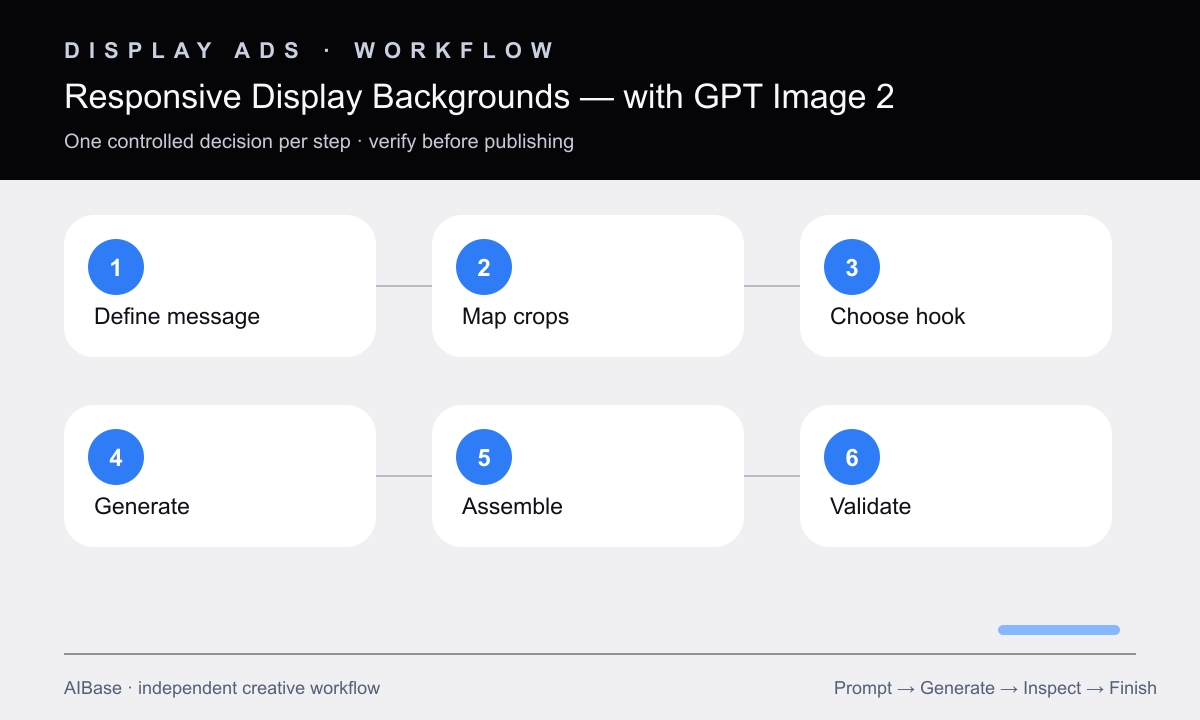
- Write one audience, one funnel stage, one verified message, one destination page, and one measurable creative hypothesis before making imagery.
- Overlay the actual square, landscape, and portrait crop boxes on a master canvas and identify their shared safe center plus copy-safe region.
- Choose one visual hook per concept—product context, use moment, material study, or simple metaphor—and cap supporting props at two.
- Generate text-free background directions with the same anchor and palette, varying only the hook so the test has one meaningful variable.
- Composite approved product pixels, brand assets, copy, CTA, offer, terms, and required disclosures in an editable ad file for each final size.
- Validate crop survival, first-glance meaning, legibility, file requirements, landing-page message match, policy risk, and tracking before launch.
Example prompt variants
- Responsive project-management campaign background, one neat stack of blank modular cards becoming a clear path, editorial tabletop lighting, visual anchor center-right, calm navy center-left copy zone, no interface or text.
- Responsive insulated-bottle remarketing background, abstract dawn trail layers and one neutral rock platform, product will be composited center-left, quiet sky on right for copy, no bottle, logo, claim, or people.
- Responsive home-organizing campaign background, warm entryway with one empty shelf and restrained natural props, focal architecture in shared center, open cream wall on left, no product, labels, or offer text.
Quality checklist
- The central meaning and focal anchor survive every required crop without relying on small edge details.
- The copy-safe region is low-detail and gives real headline, CTA, logo, and disclosures enough contrast and breathing room.
- Generated pixels contain no invented product, interface, price, rating, result, testimonial, certification, deadline, or brand mark.
- Final assembled variants use approved product and copy assets and match the message and visual expectations of the landing page.
- Each test changes one documented visual hypothesis and is exported to the platform’s current size, weight, and policy requirements.
Mistakes to avoid
- Generating one landscape banner and letting automatic crops remove the subject or copy space.
- Baking headlines, buttons, prices, and logos into generated pixels that cannot be edited or reviewed reliably.
- Filling every edge with props, texture, and light effects until responsive variants become unreadable.
- Judging a background in isolation instead of checking the assembled ad, landing-page continuity, and truthful offer details.
Related AIBase pages
- Open GPT Image 2
- Create ad creative prompt templates
- Plan LinkedIn ad visuals
- Compare GPT Image 2 and Seedream ad concepts
Practical next step
Open the most relevant AIBase generator, run one narrow prompt first, and save the best result before adding more constraints. The fastest way to improve output quality is to compare one variable at a time: subject, camera, background, lighting, then final polish.