
HappyHorse Memorial Portrait Animation Prompts for Gentle, Consent-Aware Motion
Animate memorial portraits with HappyHorse using minimal motion, family approval, identity protection, historical fidelity, and clear boundaries against invented speech or events.
Quick answer
Get permission from the rights holder and meaningful agreement from close family before animating a deceased person. Use the original portrait as the identity and history source, then request only tiny breathing, one natural blink, or slight fabric movement. Do not invent speech, lip-sync, voice, smile changes, gestures, reunion scenes, messages, or events. Preview privately and give family reviewers an easy veto before any sharing.
Who this guide is for
Families, archivists, memorial editors, and heritage storytellers considering a restrained private remembrance clip from an authorized portrait or family photograph.
Recommended model
| Use case | Recommended model | Why |
|---|---|---|
| This workflow | HappyHorse image-to-video for minimal portrait motion after explicit family approval | The workflow is centered on subtle source-led animation, but the model choice is secondary to consent, dignity, identity fidelity, private review, and stopping when motion feels wrong. |
AIBase is an independent creative platform. Model names are shown only to identify supported underlying technologies and workflow choices.
Prompt template
Animate this authorized memorial portrait for a private, respectful remembrance. Preserve the person's exact facial identity, age, expression, gaze, head angle, hairstyle, skin texture, clothing, jewelry, hands, posture, background, period details, grain, damage, color, lighting, and crop. Add only [one natural blink / barely visible breathing / tiny existing fabric movement] over [3-4 seconds], locked camera, no expression change, and a stable final frame matching the source. Do not make the person speak, lip-sync, smile, turn, wave, look at camera, embrace anyone, perform a new gesture, regain youth or health, change clothing or setting, add a person, repair history, invent an event, add text, voice, music, or watermark.
Step-by-step workflow
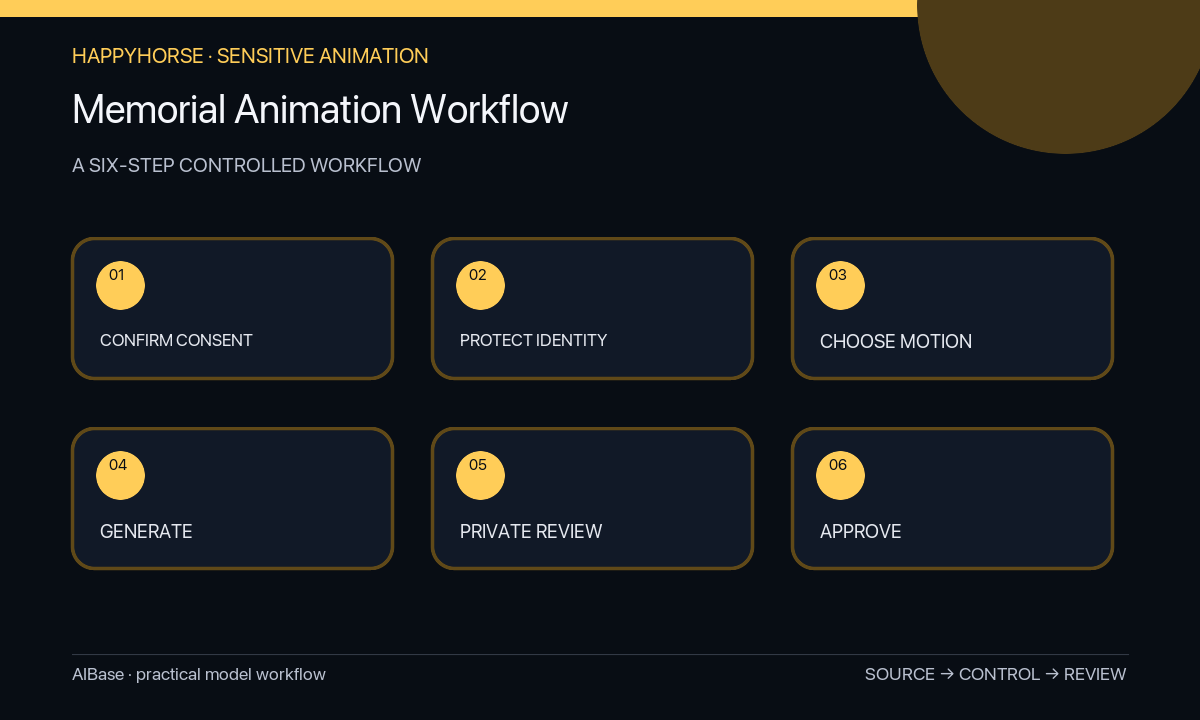
- Identify the image rights holder, the person represented, close family reviewers, intended audience, cultural or religious considerations, private-versus-public use, and a clear veto and deletion process.
- Keep the original file untouched and document identity, date, location, relationships, clothing, objects, damage, and uncertain details without guessing or restoration by default.
- Choose the least expressive motion that serves the remembrance, preferably one blink or subtle breathing, and reject speech, lip-sync, new emotion, gesture, camera move, or scene reconstruction.
- Generate one short locked-camera draft, preserving the source crop and ending on a frame that can return cleanly to the still image.
- Inspect every frame for face shape, eyes, teeth, age, expression, gaze, hair, hands, clothing, jewelry, background, period cues, unwanted repair, uncanny motion, and emotional tone.
- Share privately with designated family reviewers, honor any discomfort without debate, record the approval and audience, label animation clearly when shared, and provide a removal path.
Example prompt variants
- Three-second authorized studio portrait, one slow natural blink only, preserve exact face, age, neutral expression, gaze, hairstyle, jacket, pin, painted backdrop, film grain, scratches, crop, and no mouth or head movement.
- Four-second authorized seated family portrait focused on one deceased relative, barely visible breathing only while every person remains otherwise still, preserve identities, hand positions, clothing, furniture, damage, and no interaction or smile change.
- Three-second authorized outdoor portrait, tiny movement only in the already lifted coat edge, preserve face, posture, hat, flowers, landscape, weather, color cast, grain, and no blink, gesture, camera move, or environmental change.
Quality checklist
- Rights, family approval, cultural context, intended audience, disclosure, veto, storage, and removal expectations are documented before generation.
- Identity, age, expression, gaze, anatomy, clothing, objects, background, period details, damage, grain, color, crop, and history match the source.
- Motion is minimal, physically plausible, emotionally restrained, and does not invent speech, intent, emotion, interaction, health, or events.
- Private reviewers can stop publication or request deletion easily, and no objection is treated as a request for more iteration.
- The final clip is clearly identified as animated when context could lead viewers to believe it is original footage.
Mistakes to avoid
- Treating possession of a photo as sufficient permission for a sensitive memorial animation.
- Making the person speak, smile, wave, hug, turn, deliver a message, or reenact an event they never performed on camera.
- Using restoration, youthfulness, health changes, colorization, or background replacement without separate explicit approval.
- Publishing publicly before private family review or leaving no clear disclosure, veto, storage limit, or removal path.
Related AIBase pages
- Open HappyHorse
- Animate vintage portraits
- Restore an old photo before animation
- Use the general portrait animation guide
Practical next step
Open the most relevant AIBase generator, run one narrow prompt first, and save the best result before adding more constraints. The fastest way to improve output quality is to compare one variable at a time: subject, camera, background, lighting, then final polish.