
HappyHorse Pet Photo Animation Prompts for Natural Motion
Animate a pet photo with HappyHorse using identity anchors, subtle species-appropriate motion, a restrained camera, stable anatomy, and a clear ending pose.
Quick answer
Use a sharp pet portrait and ask for one small, species-appropriate behavior: a blink, ear turn, breath, head tilt, or tail movement. Protect markings, eye color, muzzle, body shape, collar, leg count, and background, then reject any clip showing discomfort or anatomical drift.
Who this guide is for
Pet owners, shelters, veterinary or grooming teams, and social creators making gentle tribute clips, adoption-post concepts, profile animations, and short pet-content inserts from a still photo.
Recommended model
| Use case | Recommended model | Why |
|---|---|---|
| This workflow | HappyHorse in image-to-video mode | The reference-led video workflow can use the pet photo as the identity anchor while a narrowly scoped prompt adds subtle motion and preserves the original composition. |
AIBase is an independent creative platform. Model names are shown only to identify supported underlying technologies and workflow choices.
Prompt template
Use the uploaded pet photo as the exact identity and composition reference. Keep [species/breed cues], [coat markings and color], [eye color], [muzzle/ear shape], [body proportions], [collar or accessory], [leg count], and [background] unchanged. Animate only [one subtle natural behavior]. Camera [locked or one slow move]. Preserve calm breathing, stable anatomy, fur continuity, and source lighting. End on [original or clearly described calm pose]. No talking, dancing, human gesture, distress, aggressive behavior, extra limb, changing markings, warped face, new accessory, cut, text, or watermark.
Step-by-step workflow
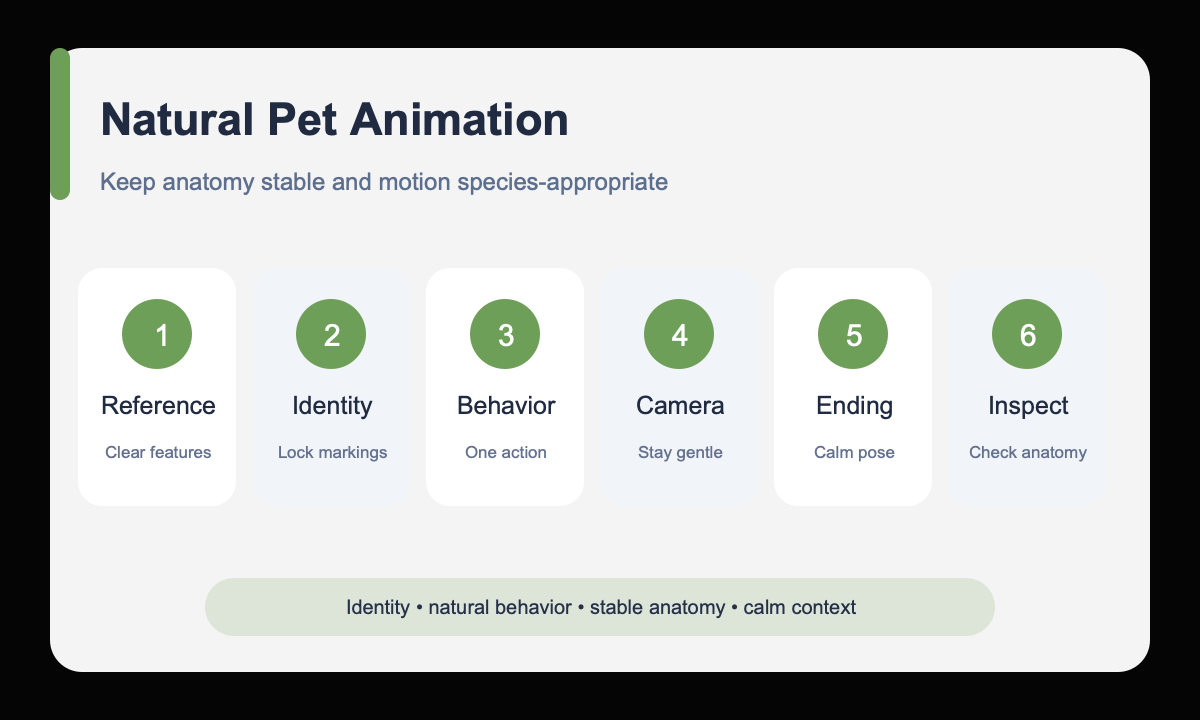
- Choose a well-lit source where the eyes, muzzle, ears, limbs, and distinctive markings are visible.
- Write an identity block for coat pattern, eye color, ear shape, proportions, collar, and background.
- Select one small behavior appropriate to the animal and visible pose.
- Keep the camera locked or use one very slow move so attention stays on identity and comfort.
- Define a calm ending pose close to the source composition.
- Inspect eyes, teeth, tongue, paws, limbs, fur markings, collar, and behavior frame by frame.
Example prompt variants
- Keep the exact tabby markings, green eyes, white chin, red collar, seated pose, and window background; one slow blink followed by a small ear turn toward the light; locked camera; finish facing forward.
- Keep the exact golden retriever face, coat color, blue bandana, front paws, and park background; subtle breathing and one gentle head tilt; very slow push-in; calm closed mouth; return near the original pose.
- Keep the exact gray rabbit ear shape, nose marking, body proportions, and woven mat; one small nose twitch and brief ear adjustment; locked camera, soft daylight, no body movement.
Quality checklist
- Coat pattern, eye color, muzzle, ears, proportions, collar, and background match the source.
- Eyes, teeth, tongue, paws, limbs, and fur remain anatomically stable.
- The behavior is subtle, species-appropriate, and does not suggest stress or discomfort.
- Camera and lighting remain restrained with no distracting scene changes.
- The clip ends on a calm, usable frame and respects the intended context.
Mistakes to avoid
- Requesting speech, dance, or a complex human-like performance from one portrait.
- Using a source that hides key markings, paws, muzzle, or ear boundaries.
- Combining head turn, walking, tail action, camera orbit, and scene change.
- Publishing a cute thumbnail without checking anatomy and behavior frame by frame.
Related AIBase pages
- Animate a pet photo with HappyHorse
- Read the HappyHorse image-to-video guide
- Use subtle portrait animation prompts
Practical next step
Open the most relevant AIBase generator, run one narrow prompt first, and save the best result before adding more constraints. The fastest way to improve output quality is to compare one variable at a time: subject, camera, background, lighting, then final polish.