
Seedance 2.0 Real Estate Listing Photo-to-Video Prompts for Room Tours
Animate authorized real estate listing photos with Seedance 2.0 using restrained camera moves, protected room geometry, shot order, and truthful review.
Quick answer
Animate one verified listing photo per shot with a slow, physically plausible move and explicit instructions to preserve walls, windows, doors, furniture, views, and finishes. Keep each clip short, reject any geometry drift, and assemble the tour with factual captions and agent-approved disclosures in post.
Who this guide is for
Real estate agents, property marketers, hospitality teams, photographers, and editors creating short listing reels, room transitions, amenity teasers, and pre-production motion studies from authorized photos.
Recommended model
| Use case | Recommended model | Why |
|---|---|---|
| This workflow | Seedance 2.0 image-to-video | A reference-image workflow can anchor each shot to an existing room photograph while the prompt concentrates on restrained camera motion, light continuity, and a stable end frame. |
AIBase is an independent creative platform. Model names are shown only to identify supported underlying technologies and workflow choices.
Prompt template
Use the uploaded authorized listing photo as the exact visual source. Preserve the room geometry, wall and ceiling lines, windows, doors, built-ins, furniture, fixtures, finishes, exterior view, and visible condition. Create a [duration]-second [ratio] shot with one motion only: [slow push-in, gentle lateral slide, or subtle tilt]. Keep verticals straight, parallax physically plausible, light stable, and the final frame clean. Do not add, remove, enlarge, renovate, stage, relight, or alter any property feature; no people, text, logos, watermark, or impossible camera path.
Step-by-step workflow
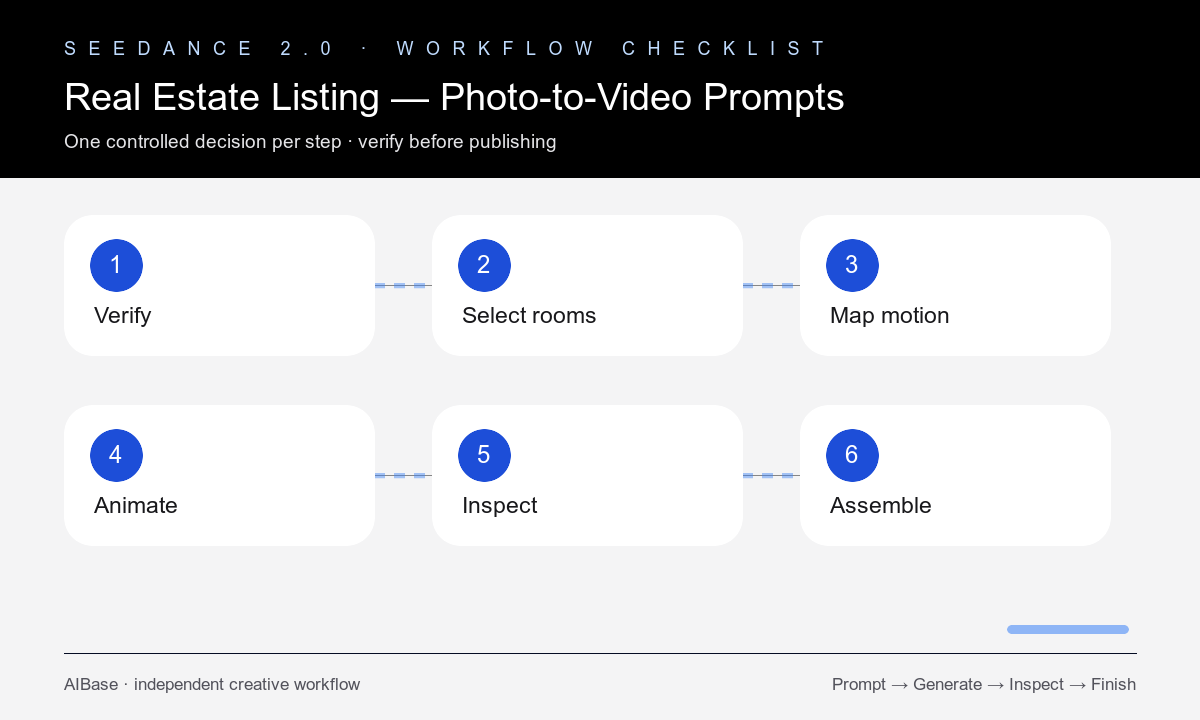
- Confirm image rights and listing accuracy, then collect the approved photo set, room names, feature notes, ordering rules, and required disclosures.
- Choose five to eight visually distinct photos and assign one job to each: exterior, arrival, main living area, kitchen, primary room, detail, amenity, or ending.
- Map one restrained move to each source based on visible depth; avoid asking a single flat photograph to reveal unseen areas.
- Generate short clips independently with geometry, fixtures, views, and condition listed as protected constraints in every prompt.
- Inspect straight lines, room proportions, door and window openings, furniture, reflections, exterior views, and the last frame against the source.
- Assemble only approved clips, add factual live captions and licensed audio in post, and complete agent, owner, and local advertising review before publishing.
Example prompt variants
- Six-second 9:16 living-room shot from the approved photo, very slow push-in toward the window, preserve every wall line, opening, furnishing, view, and finish, no reveal beyond source.
- Five-second 16:9 kitchen shot, gentle lateral slide following the countertop, keep cabinets, handles, appliances, island dimensions, reflections, and daylight unchanged.
- Six-second vertical exterior shot, subtle upward tilt from entry to roofline only within the supplied frame, preserve landscaping, facade, windows, neighboring context, and sky conditions.
Quality checklist
- Every room, feature, finish, furnishing, view, and visible condition matches the approved source photograph.
- Camera motion is slow, singular, physically plausible, and does not reveal invented space beyond the frame.
- Walls, ceilings, verticals, windows, doors, cabinets, counters, mirrors, and reflections remain stable.
- Clip order accurately represents the property and captions do not imply an unavailable feature, scale, or renovation.
- Rights, brokerage rules, disclosures, audio licensing, and final listing accuracy have been reviewed before release.
Mistakes to avoid
- Requesting a full room orbit from one photograph and forcing the model to invent unseen geometry.
- Combining camera motion with virtual staging, renovation, weather replacement, or lighting changes.
- Using a dramatic warped clip because it feels cinematic even though the property is misrepresented.
- Embedding generated room names, prices, dimensions, or claims inside the video instead of adding verified copy in post.
Related AIBase pages
- Open Seedance 2.0
- Read the Seedance image-to-video guide
- Use Seedance camera movement prompts
- Compare a cinematic real estate workflow
Practical next step
Open the most relevant AIBase generator, run one narrow prompt first, and save the best result before adding more constraints. The fastest way to improve output quality is to compare one variable at a time: subject, camera, background, lighting, then final polish.