
Wan 2.7 Packaging Reveal Video Prompts From a Product Image
Turn an approved packaging image into a short reveal with Wan 2.7 using locked pack geometry, one reveal mechanism, restrained camera motion, stable labels, and clean end holds.
Quick answer
Start with a clean approved packaging image and choose one reveal mechanism: sleeve slide, lid lift, door open, light sweep, or camera move. Protect the package shape, folds, closures, materials, label zones, colors, contents, and count, and ask for a stable final hold. If the source does not show the inside or moving structure, do not ask the model to invent it.
Who this guide is for
Ecommerce brands, packaging designers, launch teams, subscription-box businesses, and agencies creating short pack teasers, retail display loops, social transitions, and motion previsualization.
Recommended model
| Use case | Recommended model | Why |
|---|---|---|
| This workflow | Wan 2.7 image-to-video | A short reference-led workflow is a practical fit for one controlled packaging motion and a stable product hold when the source clearly supports the requested movement. |
AIBase is an independent creative platform. Model names are shown only to identify supported underlying technologies and workflow choices.
Prompt template
Animate the uploaded authorized package image as the exact first frame. Preserve the exact package dimensions and proportions, silhouette, panels, folds, corners, seams, sleeve, lid, closure, insert, visible contents, item count, label and logo zones, typography appearance, color, material texture, finish, reflections, wear state, background, light, shadow, camera height, and crop. Reveal mechanism: [one visible mechanism supported by the reference] moves [direction, distance, and pace]. Camera: [locked/slow push]. Duration: [3-5 seconds]. Finish with a stable [one-second] product hold. Do not invent hidden contents, hinges, openings, labels, text, accessories, hands, particles, extra packages, or product features; do not bend, inflate, melt, resize, relight, recolor, or redesign the package.
Step-by-step workflow
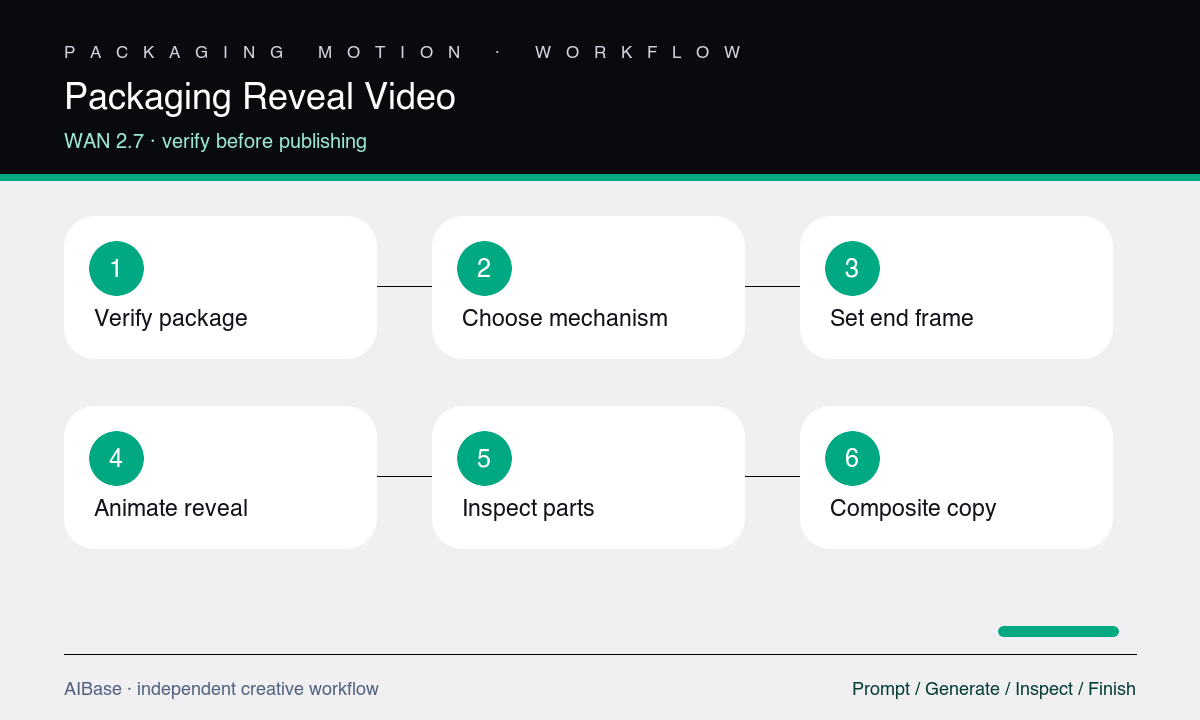
- Confirm the package and contents are approved, then record dimensions, panel structure, folds, openings, inserts, item count, materials, finishes, colors, labels, and visible mechanisms.
- Choose one reveal that the source can support; use a light pass or camera move when an interior, rear panel, hinge, or hidden content is not documented.
- Write protected package details before motion, set a short duration, and request a locked camera or one small move with a clear final hold.
- Generate a simple test and inspect the package throughout the motion rather than evaluating only the first and final thumbnails.
- Check edges, folds, closures, labels, contents, counts, reflections, contact shadow, newly revealed areas, and the stability of the final hold.
- Add approved typography, logo, CTA, sound, and transitions in the editor, or replace the product with an approved packshot composite when fidelity drifts.
Example prompt variants
- Four-second locked image-to-video shot of an approved rigid gift box, outer sleeve slides left by one box width while the inner box remains still, preserve all edges, proportions, paper texture, color, label zone, shadow, and one-second final hold.
- Three-second slow push toward an approved sealed skincare carton while one narrow highlight travels across the foil finish, no opening, preserve exact folds, corners, label appearance, colors, reflections, background, and stable final frame.
- Five-second approved subscription-box shot with the documented hinged lid lifting only to the angle shown in the reference set, preserve hinge line, insert, exact visible item count, dividers, print zones, materials, lighting, and final overhead hold.
Quality checklist
- Package geometry, proportions, panels, folds, corners, closures, inserts, contents, item count, colors, materials, finishes, and label zones stay consistent.
- The reveal follows a visible or documented mechanism with plausible rigidity, hinge or sliding motion, contact, shadow, and occlusion.
- No hidden content, accessory, label, claim, logo, text, compartment, hinge, or product feature appears without approved source evidence.
- Camera and package motion remain separate and restrained, and the final hold is stable enough for editing and verification.
- The assembled video uses approved copy and product assets and matches the current purchasable package and included contents.
Mistakes to avoid
- Asking a single front-facing box photo to open, rotate, and reveal a detailed interior the source never showed.
- Combining sleeve movement, lid lift, product rise, particles, orbit, and dramatic relighting into one short reveal.
- Accepting a smooth animation while folds, panel sizes, labels, contents, colors, or item counts change between frames.
- Treating generated packaging motion as proof of a real opening mechanism, included contents, durability, or retail configuration.
Related AIBase pages
- Open Wan 2.7 image-to-video
- Create product rotation videos
- Create unboxing concepts with Seedance
- Create packaging mockup images
Practical next step
Open the most relevant AIBase generator, run one narrow prompt first, and save the best result before adding more constraints. The fastest way to improve output quality is to compare one variable at a time: subject, camera, background, lighting, then final polish.