
Best AI Image Workflow for Ecommerce Product Detail Pages
Route PDP image tasks across concepts, bounded edits, high-fidelity scenes, exact compositing, and optional motion while keeping SKU facts consistent.
Quick answer
Start with a SKU truth sheet and a gallery map, then route each image by factual risk. Use Seedream 5.0 Lite or GPT Image 2 for text-free scene concepts, Nano Banana 2 for small source-preserving edits, Nano Banana Pro for high-fidelity lifestyle exploration, and compositing or real photography for exact packshots, labels, dimensions, interfaces, contents, and proof. Add short video only after the still gallery is consistent.
Who this guide is for
Ecommerce managers, catalog teams, DTC brands, marketplace operators, designers, agencies, and product marketers building or refreshing a product detail page image gallery.
Recommended model
| Use case | Recommended model | Why |
|---|---|---|
| This workflow | A routed workflow across Seedream 5.0 Lite, GPT Image 2, Nano Banana 2, Nano Banana Pro, and optional Seedance 2.0 or Veo 3.1 Fast | A PDP combines low-risk visual context with high-risk SKU facts, so no single model should own concepting, exact product representation, typography, comparison facts, and motion. |
AIBase is an independent creative platform. Model names are shown only to identify supported underlying technologies and workflow choices.
Prompt template
PDP asset job: [text-free concept / bounded source edit / high-fidelity lifestyle plate / short motion plate]. SKU, audience, gallery slot, crop, and buyer question: [specific]. Approved inputs: [packshot, package artwork, dimensions, detail photo, UI capture, compliance copy]. Protect exactly: [silhouette, variant, material, controls, labels, contents, scale, camera, crop]. Generate only: [background, one bounded edit, or one motion event]. Composition: [product zone, detail zone, copy-safe zone]. Light/camera/motion: [one setup]. No generated logo, label, dimensions, ingredient, material claim, included item, feature icon, interface, price, rating, review, certification, warranty, comparison, CTA, legal line, unsupported behavior, watermark, or crucial element outside crop-safe areas. Return a plate for exact compositing and review.
Step-by-step workflow
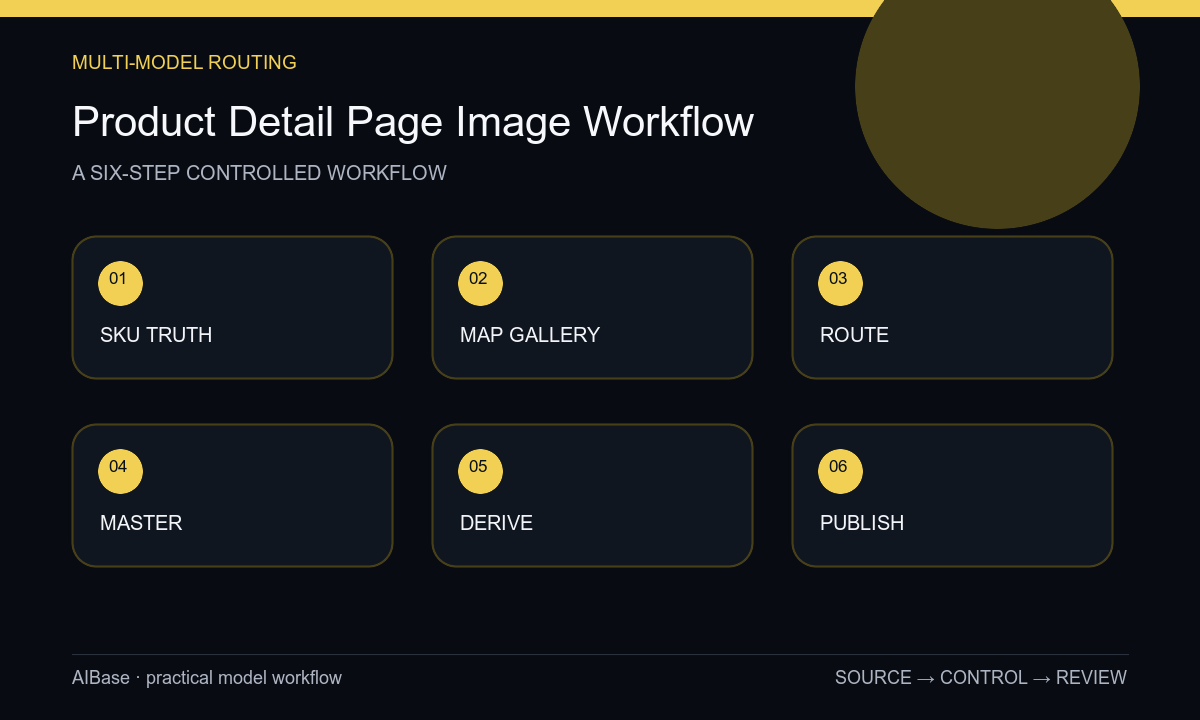
- Create a versioned SKU truth sheet covering variant, geometry, color, material, package, labels, contents, dimensions, features, claims, evidence, restrictions, destination, owners, and expiration conditions.
- Map the gallery by buyer question: primary packshot, scale, alternate angle, material detail, feature explanation, in-use context, included items, care or setup, comparison, and optional video.
- Assign concept backgrounds to fast text-to-image, narrow repairs to image-to-image, hero lifestyle exploration to a fidelity-focused model, and exact facts to real capture, approved artwork, UI export, or compositing.
- Build one controlled gallery master with the exact product, package, labels, copy, dimensions, icons, disclosures, and shared lighting and color references.
- Derive channel crops and optional short motion from the approved master rather than regenerating each placement, keeping one event and a stable product region per video shot.
- Run product, catalog, operations, legal, accessibility, localization, channel, image-performance, destination, and expiration checks, then monitor returns and questions for gallery gaps.
Example prompt variants
- Text-free PDP lifestyle background for a compact desk device, quiet walnut surface and warm-gray wall, realistic side light, exact packshot zone center-right and calm feature-copy zone left, no device replica, cable, screen, logo, or text.
- Bounded source edit using the authorized product packshot, remove only one dust speck on the plain background, preserve product silhouette, material, label, reflections, contact shadow, resolution, and every product pixel.
- Five-second PDP motion plate based on the approved composite, camera makes one slow push while a background highlight shifts subtly, exact product remains still, unobstructed and stable through the final second, no transformation, label rewrite, feature claim, or text.
Quality checklist
- Every gallery asset matches the same SKU, colorway, package, dimensions, materials, controls, labels, included items, features, and current destination page.
- Each slot answers one buyer question and has a named source, risk level, model or non-generative method, reviewer, fallback, and expiration rule.
- Products, labels, logos, dimensions, interfaces, copy, icons, prices, ratings, reviews, claims, certifications, warranties, and legal lines remain exact controlled layers.
- Gallery order, crops, zoom detail, color, whitespace, mobile readability, alt text, captions, file weight, and optional video playback work together.
- Truth sheet, prompts, outputs, composites, photography, approvals, localization, exports, experiments, corrections, and asset retirement remain traceable.
Mistakes to avoid
- Using one text-to-image prompt to generate the primary packshot, lifestyle scene, feature diagram, exact label, dimensions, and included accessories.
- Creating each gallery slot independently and allowing the SKU, color, material, package, lighting, or camera logic to change silently.
- Treating generated hands, scale cues, feature effects, comparisons, ratings, or before-and-after scenes as product evidence.
- Publishing an attractive gallery without product, catalog, legal, accessibility, localization, performance, destination, and expiration review.
Related AIBase pages
- Open all AI image models
- Plan ecommerce product photos
- Compare text-to-image and image-to-image
- Build marketplace listing videos
Practical next step
Open the most relevant AIBase generator, run one narrow prompt first, and save the best result before adding more constraints. The fastest way to improve output quality is to compare one variable at a time: subject, camera, background, lighting, then final polish.