
Best AI Model Workflow for a Product Launch Campaign
Route product-launch tasks across fast image concepts, exact image edits, high-fidelity hero scenes, quick social video, and cinematic film without sacrificing product truth.
Quick answer
Use Seedream 5.0 Lite or GPT Image 2 for fast text-free concept directions, Nano Banana 2 for bounded edits to authorized assets, Nano Banana Pro for higher-fidelity hero exploration, Veo 3.1 Fast for short social plates, and Veo 3.1 Pro for carefully storyboarded cinematic shots. Composite exact products, interfaces, logos, launch dates, prices, claims, and CTAs as approved layers. Route each asset by truth risk, not by one model leaderboard.
Who this guide is for
Product marketers, ecommerce leads, founders, creative directors, agencies, and launch operations teams coordinating store, email, paid social, organic, press, sales, and video assets.
Recommended model
| Use case | Recommended model | Why |
|---|---|---|
| This workflow | A routed workflow across Seedream 5.0 Lite, GPT Image 2, Nano Banana 2, Nano Banana Pro, Veo 3.1 Fast, and Veo 3.1 Pro | Launch work mixes low-risk concept exploration with high-risk product facts; assigning models by task and keeping factual layers controlled reduces drift while preserving iteration speed. |
AIBase is an independent creative platform. Model names are shown only to identify supported underlying technologies and workflow choices.
Prompt template
Launch asset stage: [text-free concept / bounded source edit / high-fidelity hero plate / fast social video plate / cinematic shot]. Audience, channel, crop, and objective: [specific]. Approved source inputs: [product packshot, design, UI, talent, location]. Protect exactly: [SKU geometry, controls, materials, colors, labels, identity, environment, crop]. Generate only: [background, one bounded edit, or one motion event]. Composition: [focal area and copy-safe zones]. Lighting/camera/motion: [one setup]. No generated logo, product text, interface, price, launch date, availability, review, rating, certification, performance claim, legal line, CTA, unsupported product behavior, watermark, or crucial element outside shared crop-safe zones. Return a plate for approved compositing and review.
Step-by-step workflow
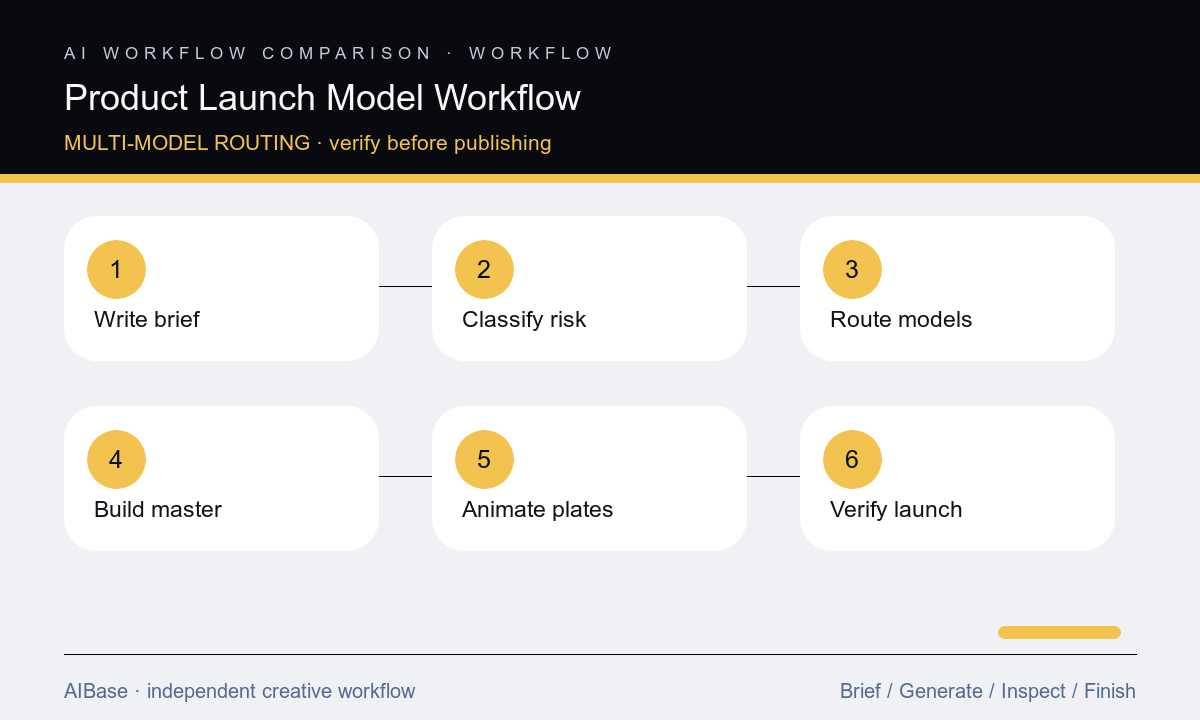
- Create one launch truth sheet covering product version, markets, audience, availability, inventory, dates, price, offer, claims, evidence, legal text, channels, crops, accessibility, owners, approvals, and stop conditions.
- Classify assets by truth risk: free concept backgrounds, bounded edits, exact product hero composites, UI demonstrations, short social motion, cinematic brand shots, and factual launch cards.
- Route low-risk concepts to fast image models, source-preserving edits to image-to-image, high-detail hero exploration to a fidelity-focused model, and exact products or UI to compositing and real capture.
- Build one controlled launch master with approved product, logo, copy, date, offer, CTA, claims, disclosures, and safe zones, then derive channel variants from that source.
- Generate video as separate short plates with one motion event each, using Fast for iteration and Pro for selected cinematic shots, then add factual overlays and exact product details in post.
- Run product, engineering, operations, inventory, legal, brand, accessibility, localization, channel, destination, and expiration checks; monitor the launch and pause assets when facts change.
Example prompt variants
- Text-free launch concept background for a compact home device, graphite and warm-white architectural planes, calm headline zone left, approved packshot zone right, shared mobile-safe center, no product replica, logo, date, feature icon, or text.
- Bounded image-to-image launch edit using the authorized product packshot, change only the neutral background to a deep blue studio sweep and add one soft edge light, preserve every product dimension, control, opening, label, color, reflection, shadow, and crop.
- Five-second launch motion plate around the approved composite, camera makes one subtle push-in while two background light bars brighten slowly, product remains perfectly still, stable copy zone and final frame, no product transformation, claim, interface, logo, or text.
Quality checklist
- Product version, SKU, geometry, materials, colors, controls, interface, packaging, price, date, availability, offer, market, and destination match the launch truth sheet.
- Each model is assigned a bounded task with clear source inputs, protected details, generated region, reviewer, fallback, and stop condition.
- Products, UI, logos, copy, dates, prices, CTAs, claims, ratings, certifications, legal lines, and disclosures remain approved editable or composited layers.
- Master and variants preserve hierarchy, copy zones, crop safety, contrast, localization room, captions, alt text, file weight, and channel specifications.
- Sources, prompts, outputs, composites, approvals, exports, experiment IDs, inventory monitoring, corrections, and asset expiration remain traceable.
Mistakes to avoid
- Choosing one model for every launch asset and forcing concept art, exact product, UI, copy, and motion through the same prompt.
- Letting generated pixels carry launch dates, prices, inventory, feature claims, reviews, certifications, or interface details that can change.
- Regenerating every channel placement independently and introducing silent differences in product version, message, offer, palette, or crop.
- Treating attractive output as launch-ready without product, engineering, operations, legal, accessibility, localization, destination, and expiration review.
Related AIBase pages
- Open all AI image models
- Compare AI video models for ecommerce
- Plan seasonal ecommerce campaigns
- Compare text-to-image and image-to-image
Practical next step
Open the most relevant AIBase generator, run one narrow prompt first, and save the best result before adding more constraints. The fastest way to improve output quality is to compare one variable at a time: subject, camera, background, lighting, then final polish.