
Best AI Image Workflow for Seasonal Ecommerce Campaigns
Choose a seasonal ecommerce image workflow across text-to-image concepts, image-to-image edits, approved product compositing, social variants, and image-to-video motion.
Quick answer
Use text-to-image to explore seasonal worlds without exact products, image-to-image to make bounded changes to authorized assets, and compositing to place approved packshots, logos, prices, offers, and legal copy. Create channel variants from the controlled master, then use image-to-video only for simple motion beats. The best workflow changes by asset risk, not by one universal model ranking.
Who this guide is for
Ecommerce leads, merchandisers, performance teams, founders, and agencies planning holiday, back-to-school, summer, gifting, launch, or limited-time campaigns across store, email, paid social, and organic channels.
Recommended model
| Use case | Recommended model | Why |
|---|---|---|
| This workflow | Seedream 5.0 Lite or GPT Image 2 for concepts, Nano Banana 2 for bounded edits, Veo 3.1 Fast for optional motion | Separating concept freedom, source preservation, exact product compositing, and motion reduces the chance that one generative step silently changes the SKU or campaign facts. |
AIBase is an independent creative platform. Model names are shown only to identify supported underlying technologies and workflow choices.
Prompt template
Campaign stage: [concept background / bounded source edit / motion]. Season and audience: [specific occasion without stereotypes]. Channel and crop: [placement, ratio, safe areas]. Approved palette and visual cue: [colors, material, one seasonal object]. If concept: create a text-free background with focal area [region] and calm copy zone [region], no exact product. If edit: use the uploaded authorized asset as exact truth and change only [background/prop/light], preserving [SKU, person, place, geometry, color, labels, shadows, crop]. If motion: animate one [4-6]-second event with one camera move and stable end frame. In every stage, no generated logo, headline, price, discount, countdown, rating, review, certification, readable packaging, unsupported availability or claim, stereotype, watermark, or crucial element outside shared crop-safe zones.
Step-by-step workflow
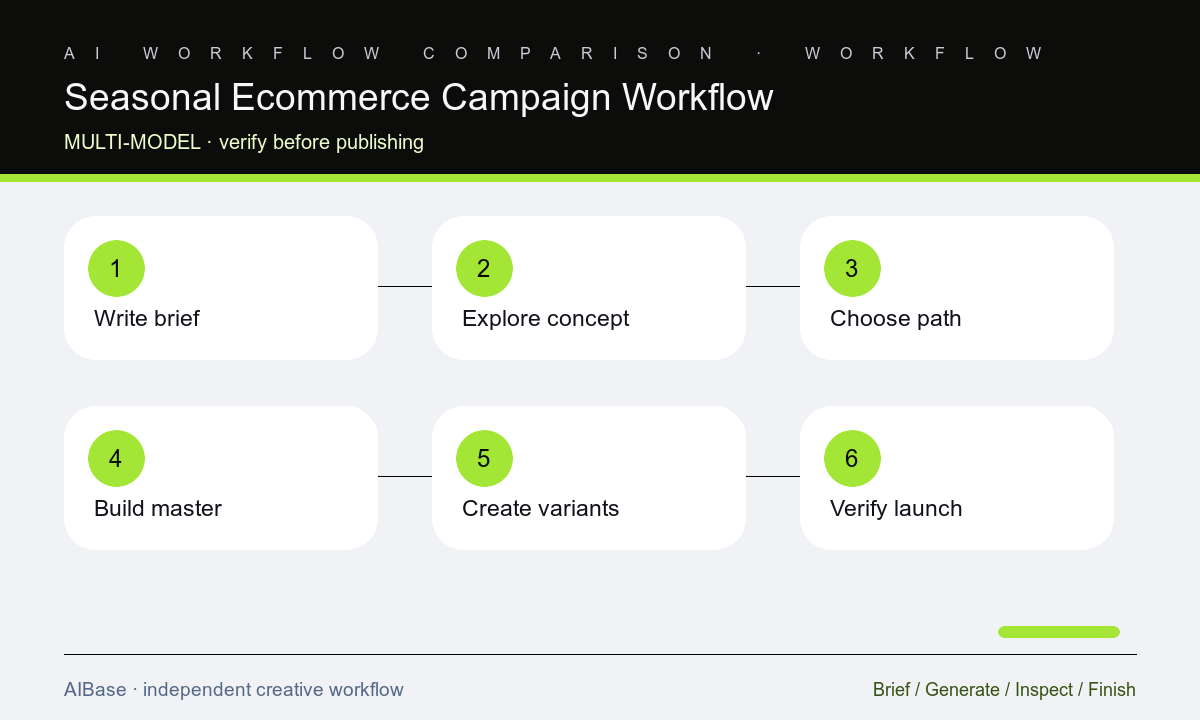
- Write one campaign fact sheet for audience, occasion, markets, live SKUs, inventory, prices, promotion, dates, exclusions, claims, channels, crops, accessibility, owners, and stop conditions.
- Explore three text-free seasonal concepts using generic cues, then reject directions that depend on stereotypes, invented products, unsupported scarcity, or culturally inaccurate symbols.
- Choose the production path per asset: text-to-image for backgrounds, image-to-image for bounded edits, or direct compositing when exact product identity leaves no safe generative boundary.
- Build one controlled master with approved packshots, logo, copy, offer, CTA, terms, and safe zones, then derive channel variants without regenerating factual layers.
- Animate only approved masters or isolated backgrounds with one small motion beat, keeping product, offer, labels, crop, and end frame stable for overlays.
- Run product, inventory, legal, brand, cultural, accessibility, performance, and destination checks, then monitor dates and stock so expired assets are paused or replaced.
Example prompt variants
- Text-to-image concept for a winter desk-organization campaign: text-free paper layers and warm window-light pattern, calm navy copy zone left, product zone right, shared mobile-safe center, no snow stereotype, product, logo, discount, or text.
- Image-to-image seasonal edit: use the authorized skincare bottle packshot as exact source, change only the neutral background to a soft spring color field with one paper-leaf shadow, preserve bottle, liquid, cap, label, logo, color, reflection, crop, and grounding shadow.
- Motion extension: animate only two paper shapes drifting slowly behind the approved composite for five seconds, camera locked, preserve product and copy-safe region, stable final frame, no new objects, particles, text, or product movement.
Quality checklist
- Audience, occasion, markets, live SKUs, variants, inventory, prices, promotion, dates, exclusions, claims, and destination match the approved campaign fact sheet.
- The chosen generation path matches the asset’s tolerance for concept freedom, source fidelity, product accuracy, identity, rights, revision, and withdrawal.
- Products, labels, logos, copy, prices, discounts, dates, CTAs, terms, ratings, reviews, certifications, and claims remain approved editable layers.
- Master and variants preserve hierarchy, copy zones, crop safety, contrast, alt-text plan, file weight, product-grid fit, and culturally appropriate seasonal cues.
- Source assets, prompts, model route, edit boundaries, approvals, exports, experiment results, inventory monitoring, and stop conditions remain traceable.
Mistakes to avoid
- Using one model and one prompt for concept, exact product, headline, offer, channel crops, and motion because it appears faster at the draft stage.
- Building seasonal urgency around inventory, dates, prices, discounts, or scarcity that operations cannot guarantee throughout the campaign.
- Regenerating every placement separately and introducing silent changes to the SKU, palette, message, offer, crop, or cultural cue.
- Approving attractive creative without checking rights, product truth, legal copy, accessibility, cultural context, destination match, expiration, and measured performance.
Related AIBase pages
- Open all AI image models
- Compare text-to-image and image-to-image
- Choose a video model for ecommerce ads
- Use social media prompt templates
Practical next step
Open the most relevant AIBase generator, run one narrow prompt first, and save the best result before adding more constraints. The fastest way to improve output quality is to compare one variable at a time: subject, camera, background, lighting, then final polish.