
Best AI Workflow for Franchise Training Launch Creative
Route franchise-training heroes, equipment scenes, module backgrounds, instructor intros, and procedure clips across AIBase-supported models while protecting operations and legal facts.
Quick answer
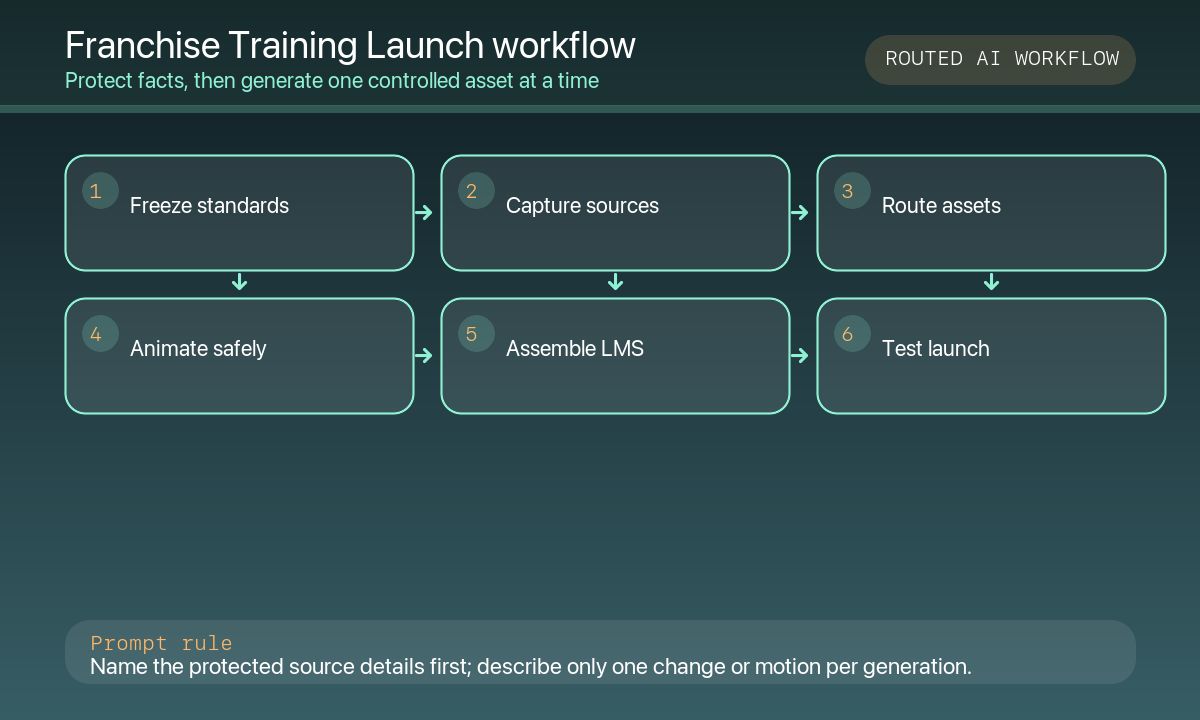
First freeze the operations truth pack: brand standards, training objectives, lesson modules, equipment lists, procedures, safety rules, roles, territory facts, legal disclosures, and localization. Then route assets: GPT Image 2 for text-free concept heroes, Nano Banana Pro for authorized equipment or product scenes, Seedream 5.0 Lite for module backgrounds, HappyHorse for consented instructor-headshot intros, Seedance 2 for one source-led procedure motion, and Veo 3.1 Fast for generic transitions. Keep screenshots, quizzes, policies, captions, certifications, and CTAs editable and authoritative.
Who this guide is for
Franchise operations teams, training managers, L&D designers, franchise consultants, and agencies launching a multi-location operations program across web, LMS, social, and in-store screens.
Recommended model
| Use case | Recommended model | Why |
|---|---|---|
| This workflow | A routed AIBase-supported stack chosen by training asset type | Training launch content mixes brand imagination, exact equipment fidelity, fast module families, human introductions, and procedure evidence; routing each job to the right control reduces factual drift. |
AIBase is an independent creative platform. Model names are shown only to identify supported underlying technologies and workflow choices.
Prompt template
Franchise-training asset job: [text-free launch hero / authorized equipment scene / module background / instructor intro / source-led procedure motion / generic transition]. Audience and module: [specific]. Ratio and channel: [specific]. Protected zones: [title / lesson number / duration / screenshot / transcript / CTA]. When references are used, preserve exact equipment, product, fixture, uniform, sign, workspace, procedure stage, and instructor identity. No invented location, franchisee, staff member, result, revenue claim, certification, safety rule, policy, date, word, number, logo, voice, or watermark.
Step-by-step workflow
- Freeze curriculum objectives, module order, duration, roles, equipment, procedures, safety rules, compliance requirements, brand standards, and legal disclosures.
- Capture authorized locations, equipment, signage, uniforms, procedure stages, screenshots, and consented instructor portraits.
- Route launch heroes and abstract concepts to GPT Image 2; route exact equipment or workspace scenes to Nano Banana Pro.
- Use Seedream 5.0 Lite for consistent text-free module backgrounds and HappyHorse only for consented instructor-headshot intros.
- Use Seedance 2 for one bounded motion in an approved procedure still and Veo 3.1 Fast for generic transitions—not proof of correct operations.
- Assemble real footage, screenshots, captions, transcripts, quizzes, policies, certifications, support links, tracking, and CTAs in editable LMS masters.
- Test localization, accessibility, mobile playback, completion tracking, version control, franchisee review, legal approval, and rollback.
Example prompt variants
- GPT Image 2: text-free franchise-training launch hero with modular service-counter forms and a clean center title zone, no brand location, equipment claim, person, word, or logo.
- Nano Banana Pro: place only the approved espresso machine and cleaning tools on the authorized back-counter reference, preserve model, finish, hoses, quantity and scale, no invented procedure or safety claim.
- HappyHorse: preserve the consented instructor’s face, uniform, pose and neutral background; add one natural blink and subtle breathing for five seconds, locked camera, no speaking mouth or synthetic voice.
- Seedance 2: animate only the existing gloved hand closing one approved equipment latch over four seconds; preserve machine, tools, hand, camera and workshop light; no hidden safety step or result.
Quality checklist
- Curriculum, procedures, safety rules, compliance, brand standards, territory facts, and legal disclosures are current and approved.
- Every equipment, product, uniform, location, procedure stage, and instructor matches authorized source media and consent.
- Generated pixels contain no fake franchisee, staff member, location, certification, outcome, revenue claim, policy, or safety rule.
- Screenshots, captions, transcripts, quizzes, support links, and CTAs remain editable, accessible, and localized.
- Prompts, sources, releases, approvals, versions, analytics, expiry, and rollback are traceable.
Mistakes to avoid
- Generating a generic restaurant, salon, garage, or shop interior as if it were an approved franchise location.
- Using synthetic procedure video as evidence of correct operations, safety training, or certification.
- Animating an instructor without consent or adding a synthetic voice to their likeness.
- Locking policy, legal, pricing, or safety text into generated images where corrections are difficult.
Related AIBase pages
- Open all image models
- Open all video models
- Create trade-show booth backgrounds
- Animate founder portraits
Practical next step
Open the most relevant AIBase generator, run one narrow prompt first, and save the best result before adding more constraints. The fastest way to improve output quality is to compare one variable at a time: subject, camera, background, lighting, then final polish.