
Best AI Workflow for Seasonal Lookbook Launch Creative
Route apparel cleanup, reference-led editorial scenes, crop-safe backgrounds, and short motion while keeping garments, talent, prices, availability, and sustainability claims truthful.
Quick answer
Start with a versioned collection truth sheet: exact SKUs, variants, colors, materials, fit notes, included pieces, sample differences, prices, currencies, inventory, release dates, regions, talent and photographer rights, and claim evidence. Use Nano Banana 2 for narrow cleanup, Nano Banana Pro for exact reference-led editorial scenes, GPT Image 2 or Seedream 5.0 Lite for text-free layout backgrounds, Seedance or Wan for one garment-led movement, Veo 3.1 Fast for generic transitions, and HappyHorse only for consented portrait micro-motion. Keep products, talent, copy, pricing, availability, and disclosures editable and traceable.
Who this guide is for
Fashion brands, boutiques, resale platforms, designers, catalog teams, stylists, and agencies launching a seasonal collection through digital lookbooks, landing pages, email, social, retail screens, and short video.
Recommended model
| Use case | Recommended model | Why |
|---|---|---|
| This workflow | A routed AIBase-supported stack chosen by lookbook asset job | Cleanup, exact garment staging, background families, fabric motion, generic video, and identity-led animation have different constraints; routing keeps collection and talent truth anchored. |
AIBase is an independent creative platform. Model names are shown only to identify supported underlying technologies and workflow choices.
Prompt template
Seasonal lookbook asset job: [localized garment cleanup / exact reference-led editorial scene / text-free layout background / source-led fabric motion / generic transition / consented portrait micro-motion]. Channel and ratio [specific]. Protected product, talent, copy, price, disclosure, and CTA zones [specific]. When references are used, preserve exact SKU, color, material, construction, fit appearance, styling, talent identity, skin, hair, pose, rights-approved context, and source-supported condition. No invented garment, colorway, accessory, body change, fit claim, material claim, price, stock, review, sustainability claim, location, event, word, number, logo, sound, or watermark.
Step-by-step workflow
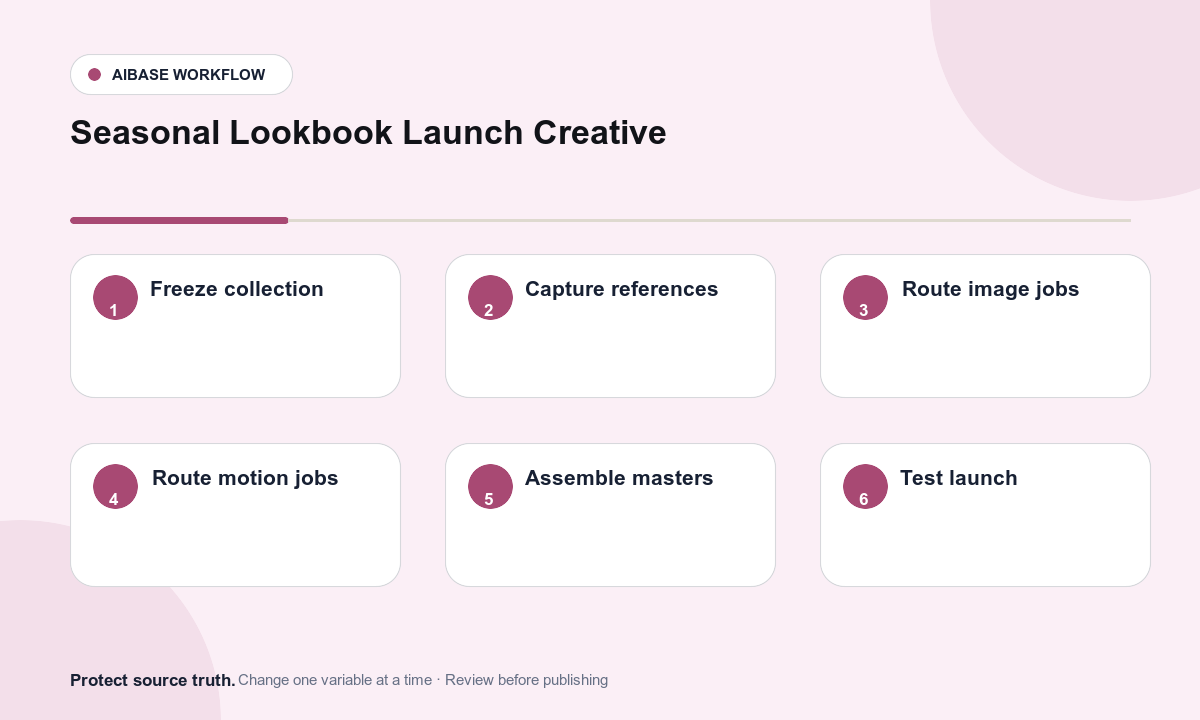
- Freeze the collection truth sheet: SKUs, colorways, materials, dimensions, fit and sample notes, included pieces, prices, currencies, inventory, dates, regions, claims, talent, photographer, location, and usage rights.
- Capture authorized garment front, back, detail, construction, color, scale, on-body, flat-lay, and motion references plus a talent consent matrix by channel and territory.
- Route dust, clip, backdrop, or color-spill cleanup to Nano Banana 2 and exact garment or accessory staging to Nano Banana Pro with strict product and identity locks.
- Use GPT Image 2 for text-free editorial layout concepts and Seedream 5.0 Lite for coordinated web, email, social, story, and retail-screen background families.
- Use Seedance 2 or Wan 2.7 for one source-supported fabric, hem, zip, clasp, or camera action; use Veo 3.1 Fast for generic transitions and HappyHorse only for approved portrait micro-motion.
- Assemble real garment plates, talent, product names, fit notes, materials, prices, availability, claims, credits, alt text, disclosures, and CTA in editable masters.
- Test identity, fit representation, product accuracy, mobile crops, color, inventory feeds, price and locale, rights territories, captions, accessibility, links, analytics, expiry, and rollback.
Example prompt variants
- Nano Banana 2 cleanup: remove only the two documented styling clips outside the approved linen jacket silhouette, preserve fit, seams, weave, wrinkles, color, talent-free mannequin, and shadow.
- Nano Banana Pro editorial scene: use the approved dress and talent references, preserve exact identity, body, pose, garment cut, print scale, hem, styling, and color in a restrained studio set with empty left copy zone.
- Seedream 5.0 Lite family: coordinated text-free 16:9 lookbook cover, 4:5 social, 9:16 story, and 3:1 email backgrounds with protected garment and copy zones, no people, clothes, text, or marks.
- Wan 2.7 motion: animate one approved handbag clasp turn and a two-centimeter documented flap lift, preserve product, hand-free frame, hardware, leather, interior boundary, and camera.
Quality checklist
- SKU, variant, color, material, construction, fit notes, included pieces, price, inventory, dates, region, and claims match current approved data.
- Talent identity, apparent age, body, skin, hair, pose, clothing, consent scope, photographer, location, and territory remain source-faithful.
- Generated content contains no invented garment, colorway, accessory, body change, fit improvement, material performance, review, stock, price, or sustainability proof.
- Product names, fit notes, prices, availability, claims, credits, disclosure, alt text, captions, links, and CTA remain editable and localizable.
- Truth sheet, references, consent matrix, prompts, outputs, approvals, publication, expiry, corrections, and rollback remain traceable.
Mistakes to avoid
- Generating missing SKUs, colorways, accessories, model shots, or locations and presenting them as part of the available collection.
- Changing a model’s body, skin, age, face, pose, or garment fit to create a more idealized campaign image.
- Using wind, stretch, water, activity, or close-up texture to imply performance, comfort, composition, or sustainability without evidence.
- Launching beautiful visuals before verifying prices, stock, release dates, regional rights, talent consent, mobile crops, accessibility, links, and expiry.
Related AIBase pages
- Open all AI image models
- Open all AI video models
- Create fashion lookbook motion
- Compare text-to-image and image-to-image for social ads
Practical next step
Open the most relevant AIBase generator, run one narrow prompt first, and save the best result before adding more constraints. The fastest way to improve output quality is to compare one variable at a time: subject, camera, background, lighting, then final polish.