
Text-to-Image vs Image-to-Image for Social Media Ads
Choose text-to-image or image-to-image for social media ads based on concept freedom, product fidelity, source rights, variant speed, compositing needs, and approval risk.
Quick answer
Use text-to-image for broad concept exploration when no exact person, product, place, or asset must survive. Use image-to-image when an authorized source must remain recognizable and the edit can be bounded. For most commerce ads, the reliable hybrid is text-to-image for background directions, image-to-image for controlled edits, and approved product, logo, copy, price, and CTA composited afterward.
Who this guide is for
Performance marketers, ecommerce teams, founders, social designers, and agencies deciding how to produce ad concepts, product variants, seasonal refreshes, and platform crops without losing brand or offer truth.
Recommended model
| Use case | Recommended model | Why |
|---|---|---|
| This workflow | Seedream 5.0 Lite or GPT Image 2 for text-to-image concepts; Nano Banana 2 for bounded image-to-image edits | The useful distinction is not a universal winner but whether the job starts from a creative brief or an authoritative source whose identity and details must be protected. |
AIBase is an independent creative platform. Model names are shown only to identify supported underlying technologies and workflow choices.
Prompt template
Ad job: [concept exploration / bounded source edit]. Audience and placement: [who, platform, aspect ratio]. Verified offer: [used only to guide concept; copy added later]. If text-to-image: create a text-free [scene/metaphor/background] with focal subject in [region] and calm copy zone in [region]. If image-to-image: use the uploaded authorized source as exact truth and change only [bounded region or property], preserving [identity, SKU, geometry, labels, color, material, background facts, crop]. Visual direction [palette, light, mood]. In both paths: no text, logo, price, discount, CTA, badge, rating, testimonial, readable packaging, fake UI, unsupported product feature, claim, watermark, or crucial detail near crop edges.
Step-by-step workflow
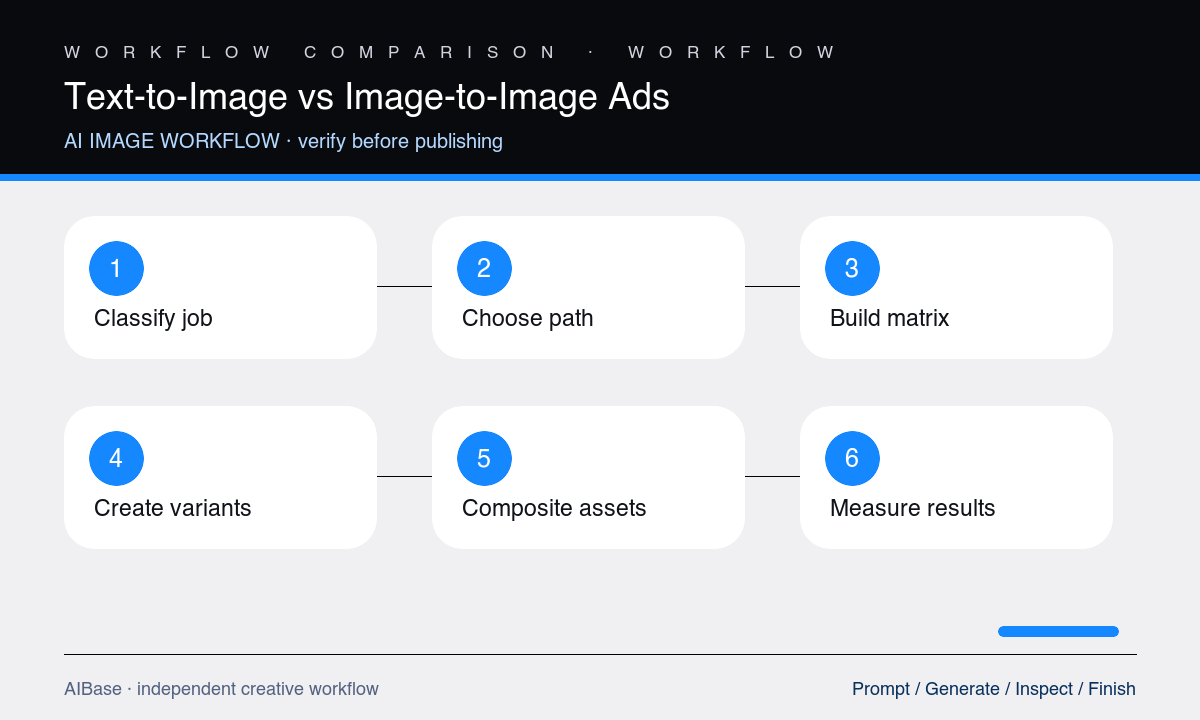
- Classify the job by its non-negotiable truth: pure concept, exact product, identifiable person, real place, approved campaign asset, or a mix of these.
- Choose text-to-image for freedom, image-to-image for bounded preservation, or a hybrid when background exploration and exact foreground assets have different risk levels.
- Create a small test matrix with the same audience, message, crop, palette, and copy zone so the two paths can be compared fairly.
- Reject candidates for identity, SKU, rights, factual, or crop failures before comparing visual appeal, then composite approved product, logo, copy, price, CTA, and legal lines.
- Run brand, product, legal, accessibility, and destination-page checks, keeping source files, prompts, model route, edit boundaries, and approvals traceable.
- Measure each concept by placement-level outcomes and production cost, then keep the winning workflow for that job type rather than declaring one method universally best.
Example prompt variants
- Text-to-image concept: square productivity-app ad background with a calm modular path emerging from visual clutter, focal system right, dark left copy zone, brand-safe navy and coral, no interface, text, chart, logo, or performance claim.
- Image-to-image edit: use the authorized bottle packshot as exact source, replace only the plain background with a soft summer color field and one realistic surface shadow, preserve bottle, cap, liquid, label, logo, color, crop, and no generated copy.
- Hybrid carousel: generate three text-free editorial backgrounds with the same right-side product zone, then composite the approved packshot and editable headline, price, CTA, and terms consistently across all slides.
Quality checklist
- The selected path matches the job’s need for creative freedom, source fidelity, identity protection, SKU accuracy, rights traceability, and revision speed.
- Text-to-image concepts avoid fake products, people, places, interfaces, proof, and claims; image-to-image edits stay within explicit protected boundaries.
- Approved products, people, logos, copy, prices, CTAs, terms, labels, ratings, and testimonials remain controlled or editable assets.
- Variants are compared with equal message, audience, format, palette, copy zone, review criteria, and destination so the test is interpretable.
- Source rights, prompts, model choice, edit history, approvals, alt text, disclosure, and placement results are retained for future iteration.
Mistakes to avoid
- Using text-to-image for an exact SKU and expecting packaging, labels, proportions, or color to remain commercially accurate.
- Using image-to-image for open-ended concept exploration until repeated edits degrade the source and create accidental product changes.
- Comparing outputs produced with different messages, crops, copy zones, review standards, or levels of human compositing.
- Choosing the prettiest frame without checking rights, identity, product truth, offer accuracy, accessibility, destination match, and measured ad performance.
Related AIBase pages
- Open all AI image models
- Use social media image prompt templates
- Compare image workflows for product photos
- Compare Nano Banana 2 and Seedream
Practical next step
Open the most relevant AIBase generator, run one narrow prompt first, and save the best result before adding more constraints. The fastest way to improve output quality is to compare one variable at a time: subject, camera, background, lighting, then final polish.