
Best AI Workflow for Wholesale Line Sheet Launch Creative
Route packshot cleanup, reference-led scenes, background families, and buyer-facing motion while keeping SKUs, terms, pricing, inventory, and order details authoritative.
Quick answer
Freeze the wholesale source of truth first: SKU, variant, pack size, case pack, materials, dimensions, wholesale and suggested retail price, currency, minimum order, lead time, inventory window, territory, shipping, returns, payment, contact, and effective date. Use Nano Banana 2 for narrow packshot cleanup, Nano Banana Pro for exact reference-led collection scenes, GPT Image 2 or Seedream 5.0 Lite for text-free layouts, and Seedance, Wan, or Veo for carefully bounded buyer-facing motion. Keep every product fact, price, term, order field, and availability state editable and connected to authoritative data.
Who this guide is for
Independent brands, wholesale teams, showrooms, distributors, sales representatives, and agencies launching a seasonal line sheet, digital catalog, buyer portal, email, and market-week creative.
Recommended model
| Use case | Recommended model | Why |
|---|---|---|
| This workflow | A routed AIBase-supported stack chosen by wholesale asset job | Packshot repair, high-fidelity product staging, ratio backgrounds, and short motion need different controls, while buyer decisions depend on verified catalog and commercial data. |
AIBase is an independent creative platform. Model names are shown only to identify supported underlying technologies and workflow choices.
Prompt template
Wholesale launch asset job: [masked packshot cleanup / reference-led collection scene / text-free line-sheet background / crop-safe email banner / bounded product motion / generic buyer hook]. Collection and audience: [specific]. Ratio and channel: [PDF / portal / email / social / showroom]. Product composite, SKU, price, terms, order, date, disclosure, and CTA zones: [specific]. When references are used, preserve exact SKU, variant, color, material, scale, included quantity, package, label, and source-supported condition. No invented product, assortment, pack size, price, margin, minimum, lead time, inventory, territory, retailer, order, certification, claim, word, number, logo, sound, or watermark.
Step-by-step workflow
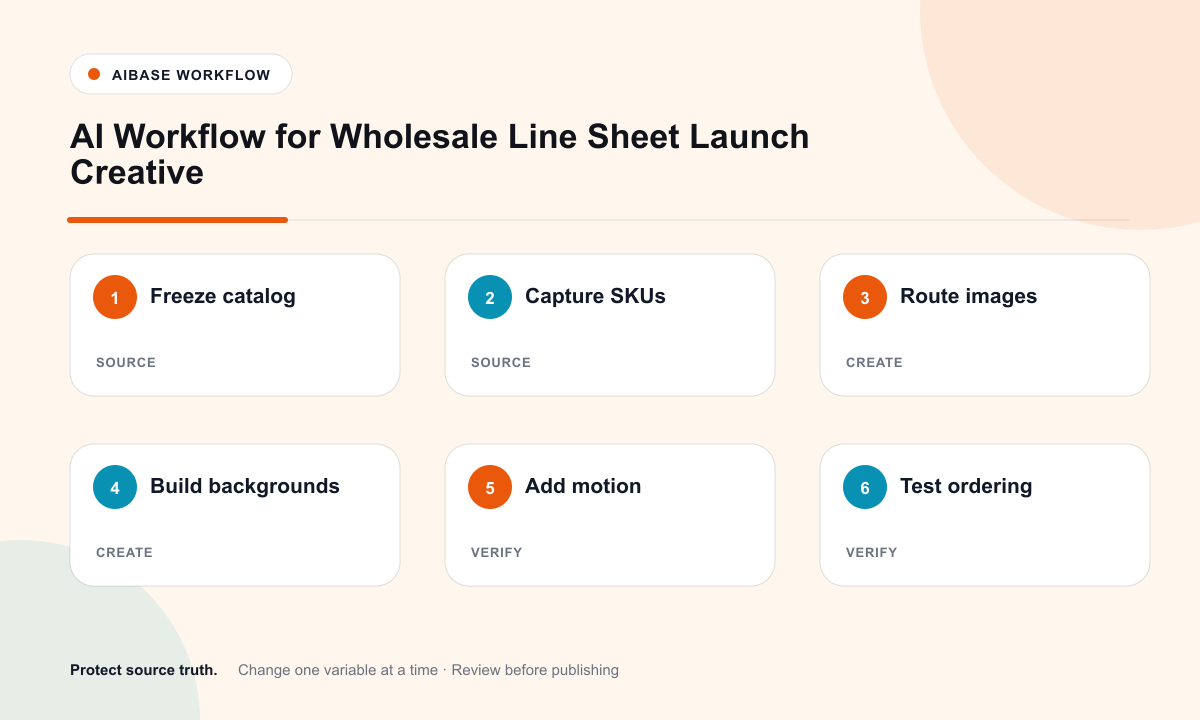
- Freeze the versioned wholesale catalog: SKUs, variants, dimensions, materials, case packs, costs, wholesale and suggested prices, currencies, minimums, lead times, inventory windows, territories, terms, shipping, returns, contacts, and effective dates.
- Capture authorized front, side, detail, packaging, color, scale, grouped assortment, and motion-ready references for every sellable SKU and revision.
- Route narrow dust, line, glare, or backdrop cleanup to Nano Banana 2 and exact collection or material scene concepts to Nano Banana Pro.
- Use GPT Image 2 for text-free editorial layout concepts and Seedream 5.0 Lite for coordinated PDF, portal, email, social, and showroom background families.
- Use Seedance 2 or Wan 2.7 for one source-led product action and Veo 3.1 Fast only for generic buyer-facing hooks or transitions without fake stores, buyers, or orders.
- Assemble real packshots, SKU data, prices, terms, ordering instructions, accessibility copy, disclosures, contacts, and CTA in editable data-linked templates.
- Test PDF links, portal permissions, mobile tables, print color, currency and locale, pack calculations, inventory sync, order form, expiry, analytics, buyer review, and rollback.
Example prompt variants
- Nano Banana 2 cleanup: remove only the visible support line above the approved handbag packshot; preserve exact handle, seams, hardware, color, label, scale, and shadow.
- Nano Banana Pro collection scene: arrange only the six approved ceramic SKUs in the supplied assortment order, preserve quantity, relative scale, glaze, profiles, packaging state, and empty right buyer-copy zone.
- Seedream 5.0 Lite background family: coordinated text-free A4 portrait, 16:9 portal, email header, and square social backgrounds with protected packshot and pricing-table zones, no products or text.
- Wan 2.7 motion: animate one approved textile swatch unfolding halfway and holding, preserve weave, color, edge, dimensions, camera, and no performance or included-item claim.
Quality checklist
- SKU, variant, color, materials, dimensions, case pack, prices, currency, minimums, lead time, inventory, territories, terms, shipping, returns, contact, and effective date match authoritative data.
- Every visible product, quantity, package, label, color, scale, condition, and included item matches the approved sellable assortment.
- Generated backgrounds and motion contain no fake buyer, retailer, order, stock, margin, price, term, deadline, certification, review, or commercial result.
- Packshots, tables, prices, terms, ordering instructions, links, disclosures, contacts, and CTA remain editable, accessible, localizable, and data-linked.
- Catalog version, sources, prompts, outputs, approvals, market files, buyer access, expiry, corrections, and rollback remain traceable.
Mistakes to avoid
- Generating plausible products or colorways to fill assortment gaps before they are sellable.
- Baking prices, minimums, lead times, pack sizes, inventory, or terms into backgrounds that cannot update with catalog data.
- Using a staged retailer, buyer meeting, purchase order, bestseller cue, or sold-out state as fake commercial proof.
- Sending the line sheet without testing PDF links, mobile tables, permissions, currency, pack math, inventory sync, expiry, and order submission.
Related AIBase pages
- Open all AI image models
- Build an ecommerce product photo shot list
- Create marketplace secondary image layouts
Practical next step
Open the most relevant AIBase generator, run one narrow prompt first, and save the best result before adding more constraints. The fastest way to improve output quality is to compare one variable at a time: subject, camera, background, lighting, then final polish.