
Nano Banana 2 Prompts to Remove Fishing Line from Product Photos
Remove visible suspension line from ecommerce packshots while preserving product geometry, attachment points, reflections, shadows, and an honest presentation.
Quick answer
Mask only the visible fishing line, monofilament, or support wire and rebuild the covered background from adjacent verified pixels. Protect the product edge, suspension point, transparent surfaces, highlight paths, contact or cast shadows, camera, and crop. If the line physically supports a floating product, keep a plausible support cue or present the result as a styled composite rather than implying the product naturally floats.
Who this guide is for
Ecommerce studios, jewelry photographers, cosmetics teams, and marketplace sellers cleaning authorized suspended-product packshots.
Recommended model
| Use case | Recommended model | Why |
|---|---|---|
| This workflow | Nano Banana 2 image-to-image for a narrow support-line cleanup | A local edit can remove thin rigging while the source remains authoritative for product geometry, reflections, attachment points, and lighting. |
AIBase is an independent creative platform. Model names are shown only to identify supported underlying technologies and workflow choices.
Prompt template
Use the uploaded authorized product photo as the exact source. Remove only the visible [clear fishing line / dark support wire] running from [start point] to [end point]. Reconstruct the covered [background / surface reflection] from adjacent verified pixels. Preserve exact SKU, silhouette, edge, attachment point, material, transparent or reflective behavior, label, hardware, product position, scale, camera, crop, light, cast shadow, contact shadow, and all unmasked pixels. No product movement, floating implication, repaired damage, redesigned hardware, changed text, added support, global cleanup, watermark, or invented feature.
Step-by-step workflow
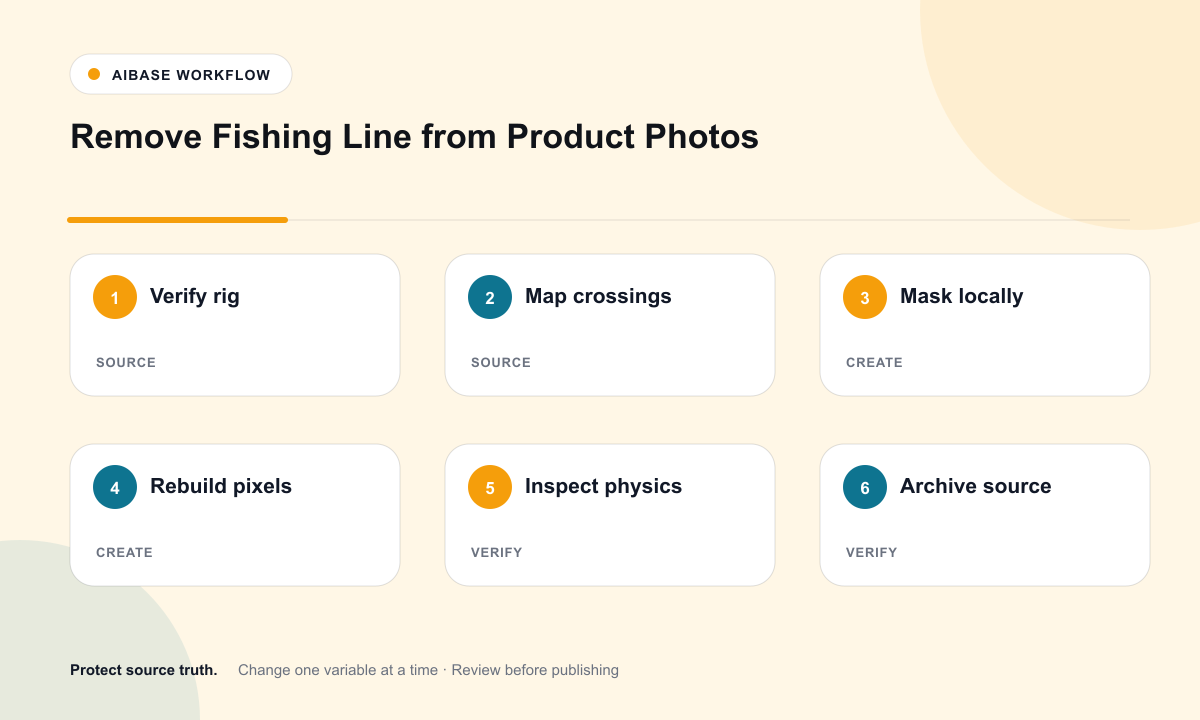
- Confirm the exact SKU, photo rights, suspension method, attachment point, intended channel, and whether the final image needs a styling disclosure.
- Inspect the line at full zoom and mark every crossing over product edges, transparent materials, highlights, shadows, and background texture.
- Split the job into separate masks for plain background, product edge, reflection, and shadow crossings instead of erasing the entire line at once.
- Run the simplest background segment first, then handle edge and reflection segments with explicit protected anchors.
- Compare source and result at 100% for clipped edges, repeated texture, missing attachment hardware, broken reflection paths, and impossible floating shadows.
- Export a reversible master, retain the rigged source and mask notes, and approve the styling implication before replacing the listing image.
Example prompt variants
- Remove only the single clear line above the approved perfume cap; rebuild the warm-gray sweep, preserve cap edge, glass highlight, label, bottle position, shadow, and camera.
- Remove the two thin support threads behind the authorized necklace pendant; preserve chain links, bail, metal reflections, stone setting, velvet texture, and pendant height.
- Remove only the dark wire crossing the left edge of the hanging tote; preserve handle seam, leather grain, edge paint, hardware, backdrop gradient, and believable supported pose.
Quality checklist
- SKU, product position, attachment point, silhouette, edge detail, label, hardware, and scale match the source.
- Background grain, gradients, transparent areas, reflections, highlights, and shadows continue naturally across every repaired segment.
- The product does not appear to float, lose a required component, or gain an unsupported feature after rig removal.
- Only documented line pixels changed; product condition and unrelated studio imperfections remain honest.
- Source, masks, prompt, before-after review, disclosure decision, approval, and export remain traceable.
Mistakes to avoid
- Using a broad remove-all-wires prompt that changes product edges, handles, chains, or labels.
- Erasing a real cable, strap, loop, or attachment component that is part of the item being sold.
- Removing the line but leaving a broken highlight, repeated background patch, or physically impossible shadow.
- Presenting a suspended composite as a functional product behavior without context.
Related AIBase pages
- Open Nano Banana 2 image editing
- Remove unwanted objects from photos
- Create transparent product backgrounds
Practical next step
Open the most relevant AIBase generator, run one narrow prompt first, and save the best result before adding more constraints. The fastest way to improve output quality is to compare one variable at a time: subject, camera, background, lighting, then final polish.