
Seedance 2 Pour-Over Coffee Process Video Prompts from Real Photos
Animate a verified pour-over coffee setup with Seedance 2 while preserving the brewer, filter, grounds, water path, scale, hands, package, and preparation facts.
Quick answer
Start from an authorized frame with a real brewer, filter, coffee bed, kettle, vessel, and hand position. Animate one short, physically plausible water event—an initial stream, a small circular pass, or a brief drawdown cue—while locking all equipment, grounds, liquid level, scale, package, and camera. Use real footage for recipe timing, ratio, bloom, extraction, taste, temperature, origin, freshness, or barista-skill claims.
Who this guide is for
Coffee roasters, cafes, equipment makers, food creators, ecommerce teams, and social editors turning approved brewing stills into restrained process details, loops, tutorials, or campaign transitions.
Recommended model
| Use case | Recommended model | Why |
|---|---|---|
| This workflow | Seedance 2 image-to-video for one source-led brewing motion | A reference-first clip can keep the approved coffee setup recognizable while adding one modest hand or water movement instead of inventing an entire preparation sequence. |
AIBase is an independent creative platform. Model names are shown only to identify supported underlying technologies and workflow choices.
Prompt template
Animate the uploaded authorized pour-over coffee photo as the exact first frame. Preserve exact brewer, filter shape and fold, verified coffee-bed amount and surface, kettle, spout, hand identity and grip if present, scale, server, cup, package, labels, table, props, water already visible, liquid level, steam already visible, lighting, reflections, shadows, camera, crop, and background. Motion: one [thin initial stream / small circular pass / short drawdown cue] from [visible source] to [exact contact zone] for [3-5 seconds], physically plausible gravity and continuity, camera [locked / one slow push], stable ending. No extra hand, finger change, kettle deformation, floating water, changed grounds, foam, steam, spill, cup fill, package change, text, recipe, ratio, time, temperature, bloom, extraction, freshness, flavor, origin, or performance claim.
Step-by-step workflow
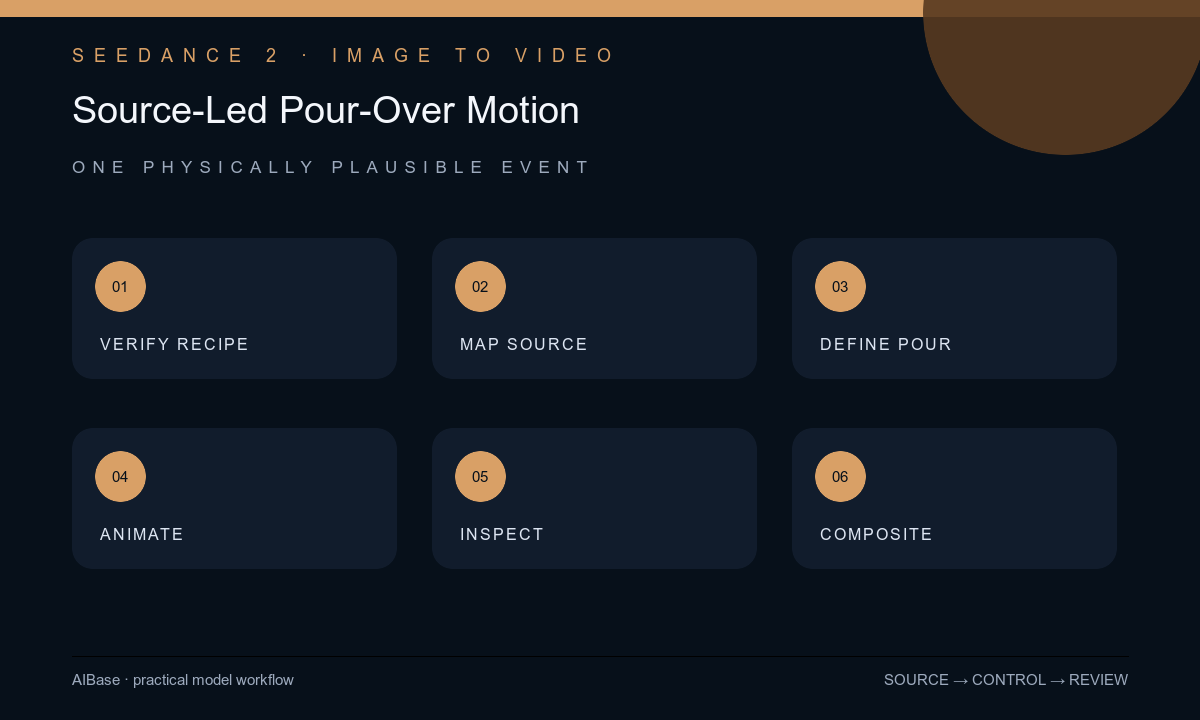
- Verify the photographed coffee, equipment, recipe, brand and package version, hand and location rights, food-safety review, and which preparation facts may appear in copy.
- Choose a frame with a visible water source and contact zone, then annotate protected equipment, hand, coffee bed, liquid level, scale reading, packaging, props, and camera.
- Select one bounded event and define its start, path, radius or distance, volume limit, stopping state, and whether the camera remains locked.
- Generate short variants without combining kettle lift, hand movement, circular pour, steam, drawdown, cup fill, package reveal, and camera orbit in one shot.
- Inspect frame by frame for hand anatomy, grip, kettle and spout geometry, water continuity, gravity, coffee-bed behavior, brewer, scale, liquid level, reflections, steam, label, and stable ending.
- Composite exact recipe, origin, equipment, captions, disclosure, and CTA in post; retain source, motion map, prompt, output, culinary approval, edit, and export.
Example prompt variants
- Four-second locked macro from the approved frame: one thin water stream descends from the visible gooseneck spout to the marked center of the existing coffee bed, preserve hand, grip, brewer, filter, grounds, scale, server, and no steam or circular movement.
- Three-second overhead source-led clip: the existing stream makes one small clockwise pass within the verified wet coffee area and stops, preserve kettle angle, filter edge, grounds amount, scale, cup, package, shadows, and no added foam or text.
- Five-second close detail of the approved brewer after the pour: only the already wet coffee surface settles slightly while the visible liquid level changes minimally, camera locked, preserve all equipment, grounds, reflections, props, and no recipe or taste implication.
Quality checklist
- Brewer, filter, grounds, kettle, spout, hand, grip, scale, server, cup, package, table, props, crop, and approved coffee setup remain exact.
- Water has one visible source, continuous geometry, plausible gravity, limited volume, correct contact, restrained coffee-bed response, and a stable stopping state.
- No hand, finger, equipment part, ground volume, liquid level, steam, foam, spill, label, reflection, or background object appears or mutates.
- The clip does not imply an unverified recipe, ratio, temperature, bloom, extraction, flavor, origin, freshness, speed, or equipment result.
- Source, recipe record, motion specification, prompt, frame review, approval, disclosure, edit, and export remain traceable.
Mistakes to avoid
- Requesting the full brewing ritual in one generation and allowing kettle, hands, water, grounds, scale, and cup level to drift.
- Animating a stream from an off-frame or malformed spout and accepting water that floats, forks, or creates volume from nowhere.
- Treating generated bloom, steam, drawdown speed, or cup color as evidence of freshness, extraction, taste, or recipe quality.
- Baking recipe text or package lettering into the video instead of compositing verified copy over reviewed footage.
Related AIBase pages
- Open Seedance 2
- Create bakery process videos
- Create pottery process videos
- Plan specialty coffee brand films
Practical next step
Open the most relevant AIBase generator, run one narrow prompt first, and save the best result before adding more constraints. The fastest way to improve output quality is to compare one variable at a time: subject, camera, background, lighting, then final polish.