
Seedance 2 Bakery Process Video Prompts from Product Photos
Turn authorized bakery product photos into short process-inspired clips while preserving the exact pastry, decoration, packaging, food safety, and brand truth.
Quick answer
Build the reel from separate three-to-six-second shots, each with one truthful action supported by the source: a light flour fall near an uncut loaf, a glaze settling on the photographed pastry, or a small camera move around finished packaging. Lock the exact item count, shape, crumb, icing, decoration, color, label, and setting. Use real footage for hands, cutting, oven work, recipe steps, or hygiene-sensitive claims.
Who this guide is for
Bakeries, pastry shops, cafe teams, food creators, agencies, and ecommerce sellers creating short social clips from authorized product photography when a full production shoot is not available.
Recommended model
| Use case | Recommended model | Why |
|---|---|---|
| This workflow | Seedance 2.0 image-to-video | A shot-based image-to-video workflow can add restrained camera and surface motion to finished-product references, while real operational steps and exact food facts stay outside generation. |
AIBase is an independent creative platform. Model names are shown only to identify supported underlying technologies and workflow choices.
Prompt template
Animate the uploaded authorized photo of [bakery item/package] as the exact first-frame reference. Preserve exact item count, size, silhouette, layers, crumb, crust, scoring, icing, glaze, filling visibility, toppings, decoration placement, color, doneness appearance, plate or tray, liner, packaging, label layout, logo position, background, light, shadow, crop, and food-contact state. Animate only [one small event] for [3-6 seconds]: [specific motion, direction, pace, and endpoint]. Camera [locked/one subtle move]. Finish with a stable product frame and caption-safe space. No item morph, new ingredient, changing topping count, impossible steam, self-cutting food, floating utensil, unsafe hand, oven action, rewritten label, invented allergen, health claim, freshness guarantee, text, transition, sound, or watermark.
Step-by-step workflow
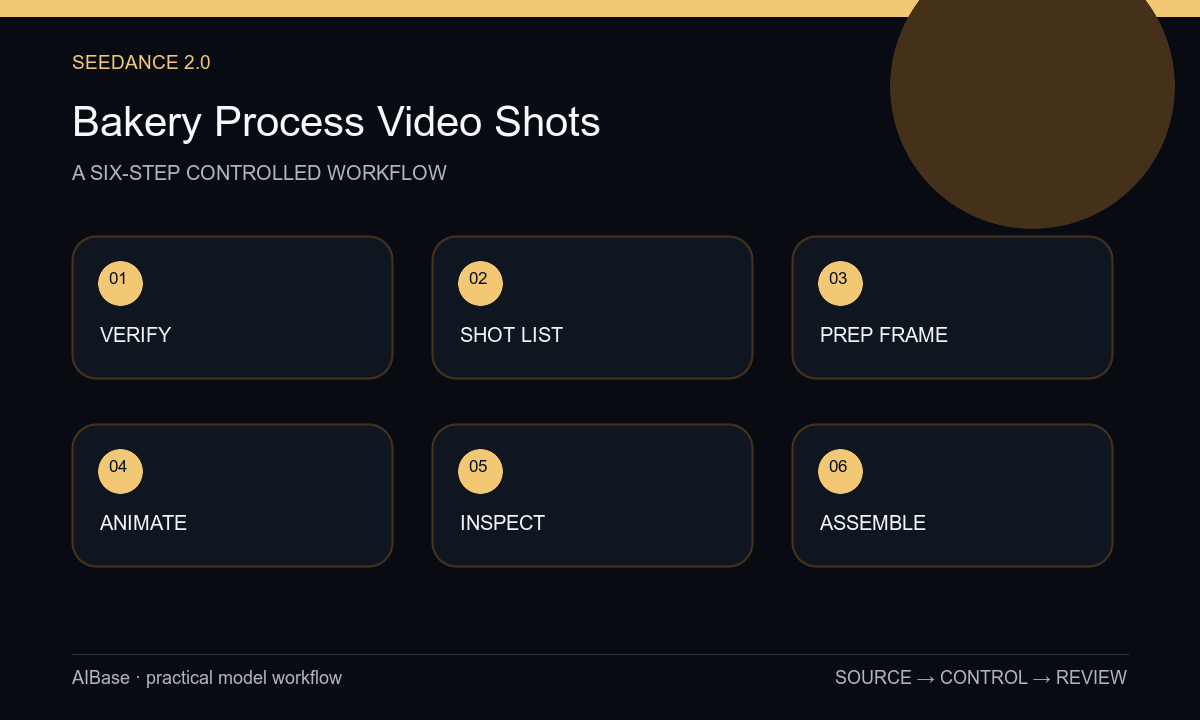
- Verify image rights, current recipe and decoration, ingredient and allergen facts, packaging version, food-safety boundaries, campaign message, and which steps require real footage.
- Break the story into independent jobs such as finished-item reveal, texture detail, packaging hold, atmosphere, and CTA plate; assign only one event to each generated shot.
- Prepare a clean high-resolution source with the complete pastry outline, stable surface contact, correct label, and room for the intended crop and caption.
- State all food and package locks before the motion cue, then generate short restrained variants with either a locked camera or one simple move.
- Inspect frame by frame for shape, layer, crumb, topping, icing, utensil, package, label, contact, steam, flicker, and endpoint drift.
- Assemble approved clips with real process footage where needed, then add exact menu name, price, allergen information, captions, sound, logo, and CTA in post.
Example prompt variants
- Four-second close shot of the exact approved croissant, locked camera, three fine flour particles drift behind it and settle on the board, preserve laminated layers, tips, color, crumbs, plate, shadow, and no flour on the pastry label area.
- Five-second subtle push toward the exact approved berry tart, one highlight travels gently across the existing glaze, preserve fruit count and positions, cream piping, crust, color, plate, background, and no melting or new garnish.
- Four-second packaging hold of the exact approved pastry box, camera slides a few centimeters right, preserve box geometry, window, item count, label artwork, ribbon, table, reflections, and stable final copy space; no opening or hand.
Quality checklist
- Item count, dimensions, silhouette, layers, crumb, crust, icing, fillings, topping count, decoration, color, and doneness appearance remain source-accurate.
- Plate, tray, liner, package, window, label, logo zone, utensils, surface contact, shadows, and background remain stable.
- Motion is one restrained event with plausible gravity, viscosity, heat, and endpoint behavior and no food or camera morph.
- No generated shot implies an ingredient, allergen status, freshness, handmade step, hygiene practice, nutrition benefit, or result that is not verified.
- Sources, prompts, outputs, real-footage boundaries, label copy, claims, captions, approvals, and channel exports remain traceable.
Mistakes to avoid
- Animating mixing, shaping, baking, glazing, cutting, and packaging in one clip and accepting continuity that never existed.
- Letting topping count, filling, crumb, icing, product size, or label text change because the camera move looks appealing.
- Using generated hands, ovens, knives, or food-contact actions as evidence of the bakery’s real process or hygiene standard.
- Adding freshness, ingredient, nutrition, allergen, handmade, or sourcing claims without operational and legal verification.
Related AIBase pages
- Open Seedance 2.0
- Control Seedance camera movement
- Animate handmade product processes
- Create restaurant menu motion
Practical next step
Open the most relevant AIBase generator, run one narrow prompt first, and save the best result before adding more constraints. The fastest way to improve output quality is to compare one variable at a time: subject, camera, background, lighting, then final polish.