
Seedance 2.0 vs Wan 2.7 for Product Image-to-Video
Compare Seedance 2.0 and Wan 2.7 for product image-to-video by testing the same reference, motion brief, duration, aspect ratio, identity anchors, and review scorecard.
Quick answer
There is no universal winner for every product. Run the same reference and normalized brief through both models, then score product fidelity, motion control, physical behavior, camera stability, editability, time, and cost for your specific placement. Choose from evidence produced by your SKU and shot—not model reputation alone.
Who this guide is for
Ecommerce, creative, and production teams choosing a model for product reveals, camera moves, lifestyle motion, social ads, and repeatable image-to-video batches.
Recommended model
| Use case | Recommended model | Why |
|---|---|---|
| This workflow | Test Seedance 2.0 and Wan 2.7 with the same product brief | Both appear in AIBase as product-capable image-to-video routes, while their useful differences only become actionable when the same reference, motion, output constraints, and scoring method are held constant. |
AIBase is an independent creative platform. Model names are shown only to identify supported underlying technologies and workflow choices.
Prompt template
Use the same uploaded product image and settings for both tests. Keep [silhouette, proportions, color, materials, controls, label zones, base contact, background anchors, crop, and light] unchanged. Shot purpose: [one product truth]. Animate only [one subject, prop, material, or camera motion]. Camera: [one path, height, speed]. Duration: [shared supported duration]. Aspect ratio: [shared ratio]. End on [stable edit point]. No redesign, extra item, invented feature, changing text, claim, geometry drift, floating contact, flicker, cut, transition, watermark, or second camera move.
Step-by-step workflow
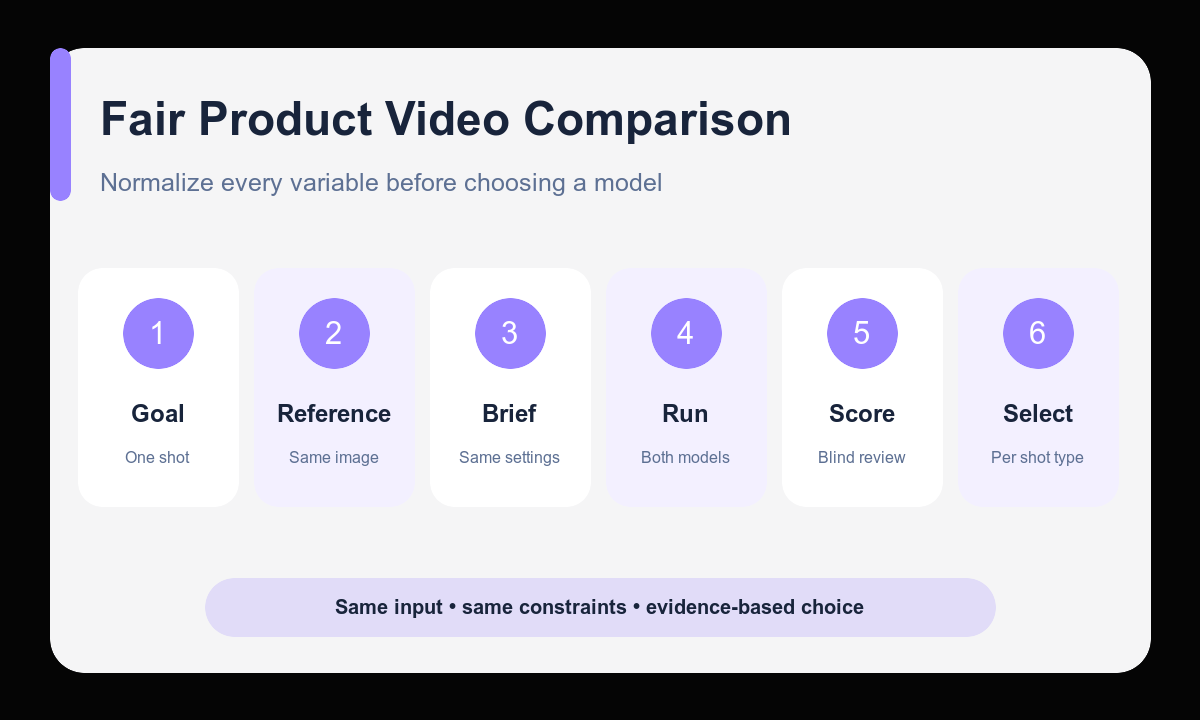
- Define one deliverable, product truth, placement, and pass-or-fail threshold.
- Choose a high-quality reference and write the same protected product anchors for both models.
- Normalize to a duration, aspect ratio, resolution target, prompt, and number of attempts available on both routes.
- Generate matched candidates in Seedance 2.0 and Wan 2.7 without changing the brief mid-test.
- Blind-score product fidelity, motion, physics, camera, edit point, artifacts, time, and cost.
- Select the model per shot type, document the winning settings, and rerun the test when the product or motion class changes.
Example prompt variants
- Matched test A: keep the exact fragrance bottle, cap, glass tint, label zone, stone surface, and light; one slow 30-degree camera arc; six seconds, 16:9, stable three-quarter ending.
- Matched test B: keep the exact sneaker panels, laces, sole, colors, pedestal, and crop; one controlled fabric ribbon passes behind the product while camera stays locked; six seconds, 9:16.
- Matched test C: keep the exact coffee pouch shape, seal, color blocks, print zones, cup, and tabletop; one small ribbon of steam rises from the cup; six seconds, square, clean upper copy zone.
Quality checklist
- Both models receive the same source, anchors, motion, duration, ratio, target resolution, and attempt budget.
- The scorecard weights product fidelity and truthful representation before decorative motion.
- Motion, physical behavior, camera stability, artifacts, and ending edit point are scored separately.
- Time and cost are recorded from the actual matched test rather than assumed.
- The chosen model is documented for this product and shot class, not declared a universal winner.
Mistakes to avoid
- Comparing a strong reference and precise prompt in one model with a weak setup in the other.
- Changing duration, ratio, motion complexity, or attempt count between candidates.
- Choosing the most dramatic clip despite product geometry or label drift.
- Publishing a broad best-model claim from one product, one prompt, or one successful generation.
Related AIBase pages
- Test the reference with Seedance 2.0
- Test the reference with Wan 2.7
- Read the Seedance product-photo workflow
- Read the Wan 2.7 image-to-video workflow
Practical next step
Open the most relevant AIBase generator, run one narrow prompt first, and save the best result before adding more constraints. The fastest way to improve output quality is to compare one variable at a time: subject, camera, background, lighting, then final polish.