
Seedream 5.0 Lite Holiday Email Header Background Prompts
Generate fast, text-free holiday email header backgrounds with product-safe zones, inclusive seasonal cues, mobile crops, and editable offers.

Quick answer
Use Seedream 5.0 Lite to explore several lightweight seasonal backgrounds, not to render the final offer. Define the holiday or winter context, audience, palette, one visual anchor, protected product and copy zones, and both desktop and mobile crops. Keep discounts, dates, shipping cutoffs, prices, gift claims, logos, legal terms, and CTA outside generated pixels. A strong header still works when images are blocked because the live email copy carries the message.
Who this guide is for
Ecommerce lifecycle teams, newsletters, small retailers, agencies, nonprofits, local businesses, and creators producing gift guides, shipping reminders, year-end notes, winter promotions, or culturally specific seasonal campaigns across desktop and mobile inboxes.
Recommended model
| Use case | Recommended model | Why |
|---|---|---|
| This workflow | Seedream 5.0 Lite for rapid text-free seasonal background variation | Fast concept iteration is useful when teams need to compare several restrained palettes and prop systems before assembling a live, accessible, offer-accurate email. |
AIBase is an independent creative platform. Model names are shown only to identify supported underlying technologies and workflow choices.
Prompt template
Create a text-free [desktop ratio] holiday email header background for [specific audience and campaign purpose]. Seasonal cue: [one culturally appropriate object/material/light pattern]. Main visual anchor in [region]; reserve [region] for approved product composite and [region] for live headline, offer, terms, and CTA. Ensure the central composition can crop to [mobile ratio]. Palette [colors], lighting [direction], maximum [number] props. No text, letters, numbers, discount, date, timer, shipping badge, price, coupon, product logo, religious symbol unless explicitly appropriate, person, gift guarantee, snow over product zone, interface, button, or watermark.
Step-by-step workflow
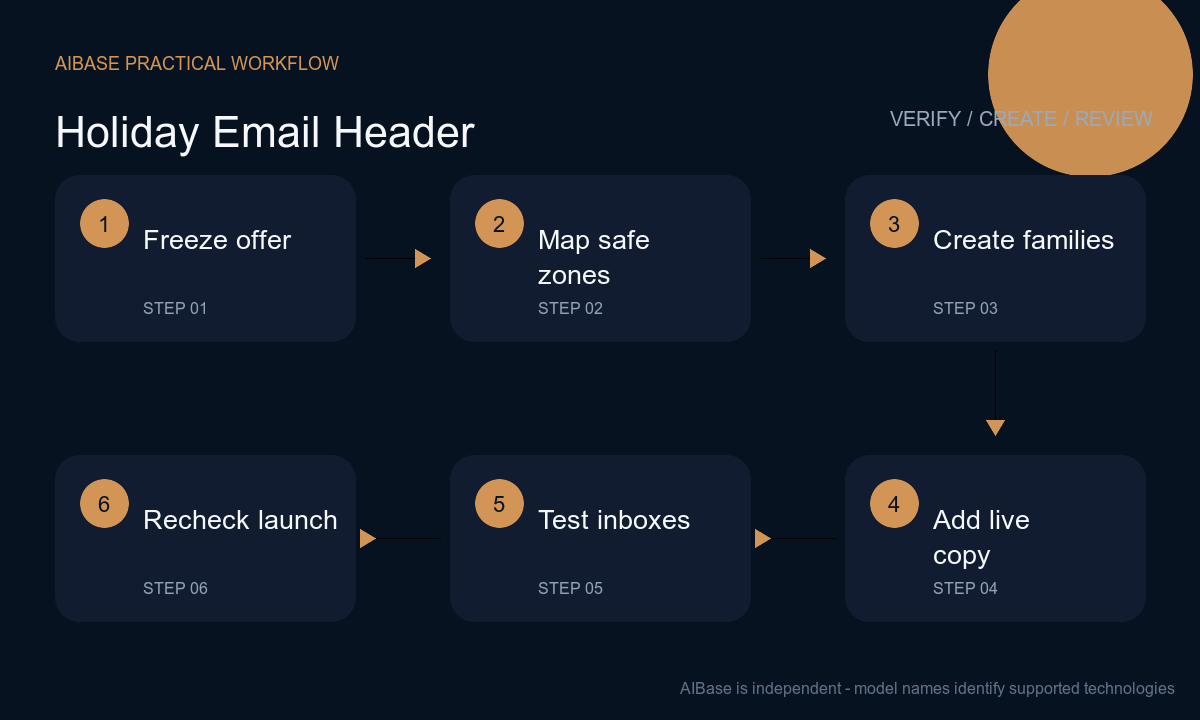
- Freeze campaign name, audience, markets, cultural context, offer, exclusions, inventory, prices, shipping cutoff, time zone, returns, gift services, destination, sender, accessibility requirements, and the owner who can stop scheduled sends.
- Sketch desktop and mobile safe zones for live headline, body preview, approved product photo, logo, offer, terms, CTA, and crop. Remember that many inboxes initially block images and some clients apply dark-mode adjustments.
- Generate distinct background families by changing one seasonal cue—paper folds, warm window light, ribbon geometry, winter botanicals, or abstract stars—while keeping each version text-free and low-detail behind copy.
- Composite real product photography and controlled brand assets. Build the headline, offer, dates, shipping note, terms, CTA, alt text, and fallback background color as live or editable content rather than baked-in imagery.
- Send proofs through major desktop and mobile clients with images on and off, dark mode, increased text size, slow connection, and screen-reader order. Check crop, contrast, file weight, alt text, preheader, links, and unsubscribe path.
- Reconfirm inventory, offer math, market eligibility, shipping dates, landing page, coupon behavior, tracking, localization, and suppression lists immediately before launch; pause or replace stale creative when facts change.
Example prompt variants
- Wide text-free winter gift-guide email background with folded cream paper, one deep-red ribbon arc and soft pine-shadow pattern, visual weight on right, calm warm-gray left copy zone, central mobile crop intact, no ornaments with logos, words, prices, boxes presented as real products, snow, person or religious symbol.
- Wide text-free year-end thank-you header with layered translucent amber and midnight-blue shapes like quiet window reflections, one small star-like paper cutout cluster, open center for live message, no fireworks, champagne, number, date, confetti text, customer portrait, badge or award.
- Wide text-free shipping-reminder background with three unbranded kraft parcels as abstract silhouettes along the lower edge, warm side light, large uncluttered top-left copy zone and safe vertical center crop, no carrier mark, label, address, cutoff date, guarantee, truck, map, clock, word or product claim.
Quality checklist
- Holiday, winter, year-end, or cultural cues are intentional for the audience and market, without defaulting to symbols that exclude or misrepresent recipients.
- Desktop, mobile, central crop, logo, product, headline, offer, terms, CTA, preheader, and fallback zones remain readable with images on, blocked, or darkened.
- Discount, dates, time zone, inventory, price, shipping, exclusions, returns, gift services, landing page, and coupon behavior match the approved campaign record.
- All generated pixels remain decorative: no pseudo-text, product substitution, fake label, carrier badge, timer, review, rating, guarantee, or unsupported gifting outcome.
- Background source, prompt, product rights, editable master, proof clients, accessibility review, approvals, scheduled versions, corrections, and retirement are traceable.
Mistakes to avoid
- Generating the entire email header with a discount, deadline, price and CTA baked into the image, making factual updates, localization, accessibility, and responsive cropping fragile.
- Filling every corner with snow, ribbons, lights, ornaments, parcels and confetti until the headline loses contrast and the mobile crop becomes an unreadable pile of props.
- Using Christmas-specific symbols for every market without confirming audience, cultural context, brand policy, language, legal holidays, and whether a neutral winter direction is more appropriate.
- Approving the visual but skipping live-client tests, so image blocking, dark mode, file weight, font scaling, link errors, alt text, or a stale shipping cutoff breaks the campaign.
Related AIBase pages
Practical next step
Open the most relevant AIBase generator, run one narrow prompt first, and save the best result before adding more constraints. The fastest way to improve output quality is to compare one variable at a time: subject, camera, background, lighting, then final polish.