
Veo 3.1 Fast SaaS Feature Announcement Video Prompts for Short Launch Clips
Storyboard short SaaS feature announcement clips with Veo 3.1 Fast using one verified benefit, modular shots, approved UI capture, editable copy, and launch checks.
Quick answer
Write one verified user problem, one demonstrable feature action, and one outcome the product team can substantiate. Use Veo 3.1 Fast for the visual hook and transition layer, then insert approved screen capture, headlines, logo, and CTA in an editor so the launch clip never invents interface behavior.
Who this guide is for
SaaS founders, product marketers, growth teams, developer tools, agencies, and social managers creating short launch posts, release-note teasers, paid-social tests, and event-screen loops.
Recommended model
| Use case | Recommended model | Why |
|---|---|---|
| This workflow | Veo 3.1 Fast for rapid visual-hook and transition drafts | Fast iteration helps teams test several compact launch storyboards, while factual UI behavior and copy remain better handled with approved product capture and editable assembly. |
AIBase is an independent creative platform. Model names are shown only to identify supported underlying technologies and workflow choices.
Prompt template
Create a [6-10]-second text-free visual layer for a SaaS feature announcement about [verified problem-to-outcome], aimed at [user]. Shot 1 [seconds]: [simple visual metaphor for problem]. Shot 2 [seconds]: [controlled transition toward order or result]. Shot 3 [seconds]: [clean frame with reserved area for approved UI capture and editable CTA]. Camera: [one move]. Palette: [brand-compatible]. End on a stable hold. No interface, dashboard, device text, code, data, chart values, notification, customer identity, logo, headline, CTA, claim, guarantee, app-store badge, competitor mark, watermark, or behavior presented as real product footage.
Step-by-step workflow
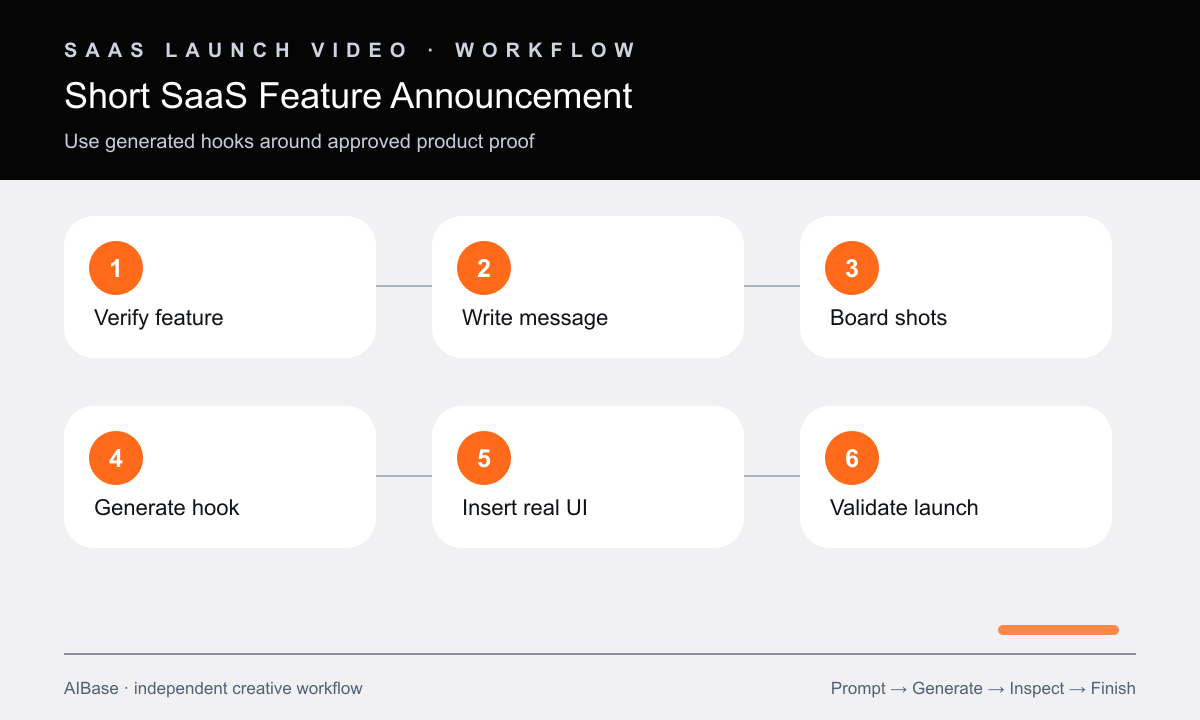
- Get product and legal approval for one feature name, release status, supported action, user outcome, availability, and any performance claim.
- Write a three-beat script—problem, feature proof, next step—and assign factual proof to approved screen capture rather than generative footage.
- Board each shot with one subject action, camera move, transition, duration, crop, and clean region for the later UI or copy layer.
- Generate text-free hook and transition clips, changing one variable per draft so the strongest concept is reproducible.
- Insert current approved UI capture, feature name, benefit, availability note, logo, CTA, captions, and sound in an editable timeline.
- Validate every interaction against the shipping product, check mobile legibility and mute playback, then link to the exact feature page.
Example prompt variants
- Eight-second project-planning launch layer: scattered neutral cards align into one clean path, smooth overhead camera drift, final right-side card area reserved for real UI capture, no interface, text, numbers, or logo.
- Six-second developer-tool feature teaser: tangled luminous lines resolve into one stable connection, slow push, dark technical palette, final centered frame with empty device window placeholder, no code, terminal text, metrics, or brand mark.
- Nine-second finance-workflow announcement layer: three blank document shapes move into one orderly approved-state stack, restrained side camera, final left copy zone and right UI zone, no currency, claims, names, signatures, or interface.
Quality checklist
- The script demonstrates one shipping feature and one substantiated outcome without implying broader automation, speed, security, or savings claims.
- Generated footage contains no invented UI, data, customer, integration, notification, code, chart, logo, text, or product behavior.
- Approved screen capture matches the current release, account state, permissions, labels, timing, and linked destination.
- Hook, UI proof, benefit, captions, CTA, and availability note remain legible in the real social crop and on mute.
- Product, brand, accessibility, and legal reviewers can update factual layers without regenerating the visual concept.
Mistakes to avoid
- Asking the model to generate a complete dashboard demo and treating plausible-looking interactions as product proof.
- Packing three features, two audiences, several metrics, and a pricing offer into one short announcement.
- Baking the feature name, CTA, release date, or claimed result into generated frames that cannot be corrected cleanly.
- Publishing before verifying captured UI, availability, permissions, captions, destination link, and promised outcome.
Related AIBase pages
- Open Veo 3.1 Fast
- Create a mobile app promo
- Use a short social ad storyboard
- Build GPT Image 2 LinkedIn ad visuals
Practical next step
Open the most relevant AIBase generator, run one narrow prompt first, and save the best result before adding more constraints. The fastest way to improve output quality is to compare one variable at a time: subject, camera, background, lighting, then final polish.