
Veo 3.1 Pro Skincare Launch Film Prompts for Premium Product Stories
Plan premium skincare launch films with Veo 3.1 Pro prompts that control packaging, texture, liquid motion, skin context, claims, shot continuity, and verified brand assembly.
Quick answer
Build the launch as a sequence of individually controlled shots: product introduction, verified material or texture detail, one truthful use context, and a clean end frame. Keep exact packaging and claims out of unconstrained generation; composite approved product pixels, copy, ingredient language, logos, and disclosures after the cinematic layers pass review.
Who this guide is for
Skincare founders, beauty brands, creative directors, agencies, ecommerce teams, photographers, retouchers, and editors developing launch mood films, hero loops, campaign storyboards, and preproduction briefs.
Recommended model
| Use case | Recommended model | Why |
|---|---|---|
| This workflow | Veo 3.1 Pro | A quality-oriented video workflow is useful for planned camera movement, controlled liquid and material behavior, macro lighting, and multi-shot visual continuity when the final brand-critical elements are assembled from approved sources. |
AIBase is an independent creative platform. Model names are shown only to identify supported underlying technologies and workflow choices.
Prompt template
Create one [duration] shot for a premium skincare launch film using the approved [product/reference frame] as the exact packaging and material anchor. SHOT JOB: [introduction/texture/use context/end frame]. Preserve verified bottle or jar silhouette, dimensions, cap or pump, material, fill color, label zone, product quantity, applicator, reflections, and scale. Camera: [one precise move]. Surface/environment: [specific]. Light: [key, fill, reflection behavior]. Animate only [one liquid, light, or camera action] with physically plausible viscosity and gravity. No invented label text, logo, ingredient, clinical result, before-and-after skin, pore removal, wrinkle removal, medical cue, impossible splash, extra container, changing fill level, distorted pump, hand anomaly, price, claim, certification, or watermark.
Step-by-step workflow
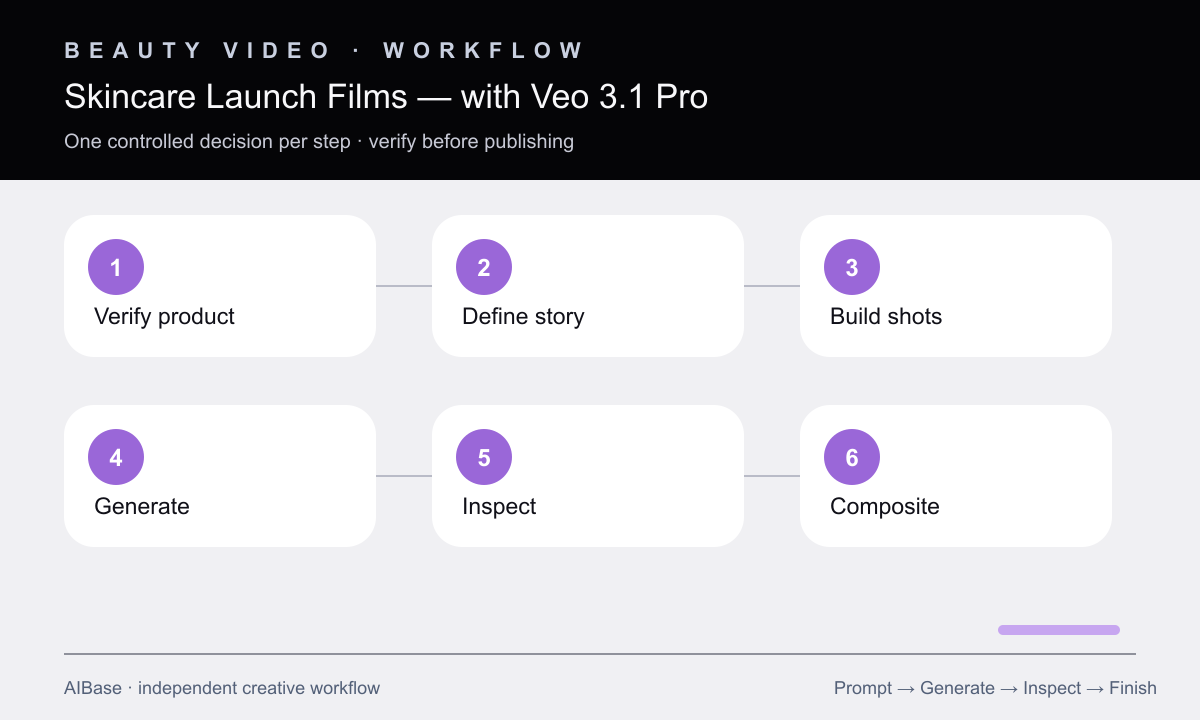
- Create an approved truth sheet for packaging, formula color and viscosity, fill level, applicator, permitted use, ingredients, claims, skin representation, and prohibited implications.
- Write a four-beat launch story and assign one visual job to each shot so product, texture, use context, and brand close are not combined in one unstable generation.
- Specify camera, lens feel, surface, light, reflection cards, action, duration, and clean start and end frames for every shot independently.
- Generate non-text cinematic layers and reference-led product motion, keeping exact labels, logos, claims, swatches, pack copy, and final skin retouching outside the model output.
- Inspect packaging geometry, pump and cap behavior, liquid physics, texture consistency, hands, nails, skin, reflections, color, fill level, continuity, and crop at full speed and frame by frame.
- Composite approved product and copy assets, complete color and beauty retouching, add licensed sound and captions, then run regulatory, rights, claims, accessibility, and disclosure review.
Example prompt variants
- Six-second product-introduction shot, verified frosted serum bottle rises into a narrow warm edge light on pale stone, slow controlled push-in, preserve exact cap, fill, label zone, glass diffusion, scale, and reflection.
- Five-second macro texture shot, one verified translucent gel ribbon folds slowly onto a clean glass surface under soft side light, physically plausible viscosity and gravity, no skin, ingredient symbol, sparkle, or claim.
- Six-second end-frame shot, approved jar remains still on a quiet ivory plinth while a soft reflected light travels once across the background, camera locked, broad right copy-safe area, no label invention or extra prop.
Quality checklist
- Packaging silhouette, closures, pumps, applicators, fill, color, materials, label zone, scale, and reflections match the approved truth sheet.
- Liquids, gels, creams, powders, droplets, and fabric move with plausible viscosity, gravity, contact, volume, and continuity.
- Skin and hands remain anatomically plausible and are not used to imply guaranteed, clinical, medical, or before-and-after results.
- Final logos, labels, ingredients, claims, prices, certifications, disclaimers, product pixels, and color-critical swatches come from approved editable assets.
- The assembled film passes frame-level artifact, shot continuity, crop, sound, caption, rights, claims, accessibility, and synthetic-content review.
Mistakes to avoid
- Generating a complete commercial in one prompt and losing packaging, liquid, hands, camera, and lighting continuity between beats.
- Using glowing ingredients, pore erasure, instant smoothing, or transformation imagery as unsupported efficacy evidence.
- Accepting extra pumps, changing caps, drifting labels, impossible droplets, altered fill levels, or plastic-looking glass.
- Publishing model-generated pack copy, claims, swatches, certification marks, or skin results without approved source verification.
Related AIBase pages
- Open Veo 3.1 Pro
- Create cosmetics campaign visuals
- Animate cosmetics texture details
- Plan luxury product commercials
Practical next step
Open the most relevant AIBase generator, run one narrow prompt first, and save the best result before adding more constraints. The fastest way to improve output quality is to compare one variable at a time: subject, camera, background, lighting, then final polish.