
Veo 3.1 Pro Tech Product Launch Video Prompts for Cinematic Reveal Shots
Plan cinematic tech-product reveal shots with Veo 3.1 Pro prompts that control one feature, materials, camera, lighting, product truth, and clean edit points.
Quick answer
Build a tech launch film as separate shot jobs: silhouette, material detail, one verified interaction, and a clean hero resolve. For each generation, describe one product truth, one motion, one camera path, and one lighting cue. Composite approved product renders and interface footage when exact hardware or software fidelity matters.
Who this guide is for
Product marketing teams, launch-film directors, hardware startups, agencies, motion designers, and editors developing cinematic reveals for verified devices, accessories, apps, and connected products.
Recommended model
| Use case | Recommended model | Why |
|---|---|---|
| This workflow | Veo 3.1 Pro | A higher-fidelity video route is appropriate for selected launch-film shots where controlled camera, light, material response, and cinematic finish matter more than broad rapid exploration. |
AIBase is an independent creative platform. Model names are shown only to identify supported underlying technologies and workflow choices.
Prompt template
Create one [duration] cinematic launch-film shot for a verified [tech product category]. SHOT JOB: [silhouette/detail/interaction/hero resolve]. PRODUCT TRUTH: [approved shape, dimensions, materials, ports, controls, parts, behavior]. ACTION: [one verified motion]. CAMERA: [one path with start and stop]. LIGHT: [one reveal cue]. ENVIRONMENT: [minimal set]. END FRAME: [stable edit point]. If exact SKU fidelity is not supplied, depict a generic unbranded category concept only. No invented feature, screen content, port, sensor, accessory, logo, text, claim, benchmark, impossible assembly, extra product, hand mutation, or watermark.
Step-by-step workflow
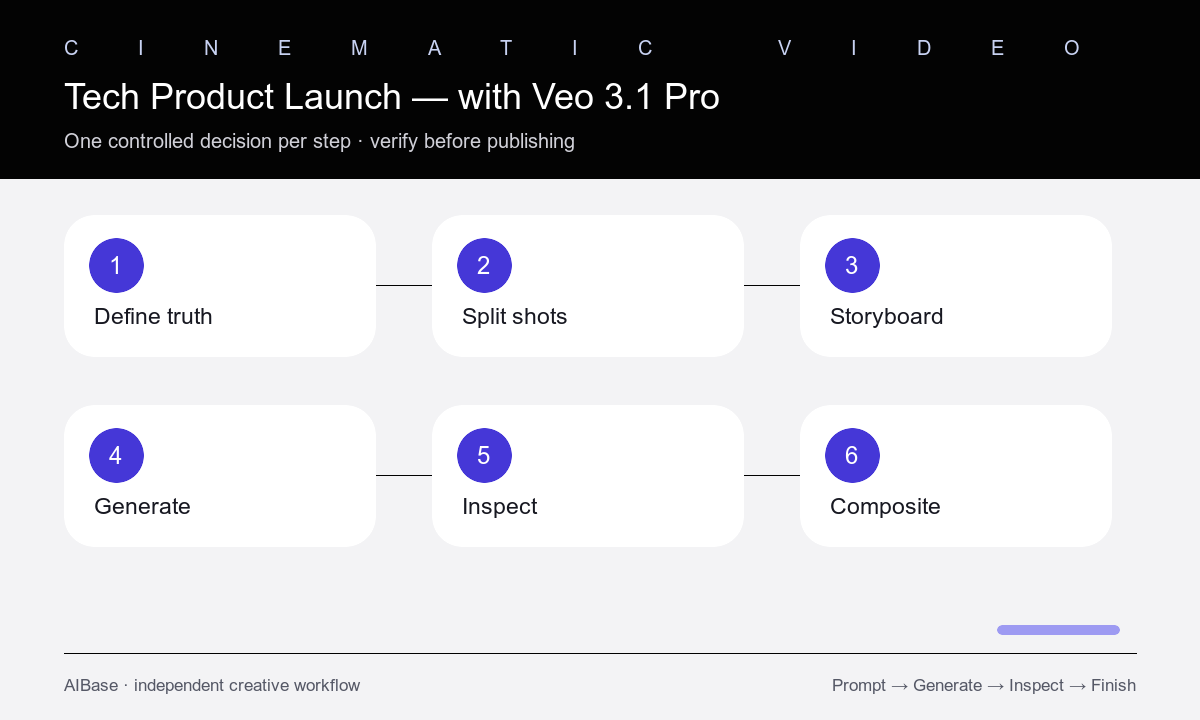
- Create a product-truth sheet from approved engineering renders, prototypes, interface recordings, dimensions, materials, parts, and allowed claims.
- Break the launch story into independent shot jobs so silhouette, texture, feature, use, and hero resolve are never overloaded into one generation.
- Storyboard the exact start frame, one action, camera path, light cue, duration, aspect ratio, and stable end frame for each shot.
- Use generic category concepts for early exploration, then switch to approved renders, plates, or compositing when the real SKU must be identifiable.
- Inspect geometry, materials, ports, buttons, screens, reflections, hands, contact, motion, camera, lighting continuity, and edit handles frame by frame.
- Composite real product and interface assets where necessary, then add verified copy, logo, sound design, music, claims, disclosures, and CTA in post.
Example prompt variants
- Eight-second 16:9 silhouette reveal for a generic compact audio device, dark studio, thin rim light travels once across a matte aluminum outline, very slow dolly in, no visible logo or controls, stable centered end frame.
- Six-second macro material shot of an approved wearable reference, preserve exact case and crown geometry, light moves once across brushed titanium and curved glass, camera slides five centimeters, no screen content, clean cut point.
- Eight-second hero resolve for a generic modular desk accessory, two verified components align once on a black pedestal, soft top light blooms gently, camera stops at three-quarter view, no magnetic-performance claim or text.
Quality checklist
- Each shot has one job, one action, one camera path, one light cue, and enough stable frames for editing.
- Hardware geometry, materials, seams, ports, controls, accessories, interface behavior, hands, and contact match approved product truth.
- No generic concept is presented as the exact SKU, final design, working prototype, measured performance, or available feature.
- Lighting, reflections, depth of field, camera speed, direction, scale, and motion continuity cut cleanly across the sequence.
- Final product pixels, interface footage, copy, logo, claims, music, sound, CTA, legal text, and disclosures are verified and editable.
Mistakes to avoid
- Trying to reveal the full product, demonstrate several features, show UI, add a user, and land a logo in one short shot.
- Letting a cinematic concept invent ports, sensors, screen content, accessories, assembly behavior, or performance.
- Using dramatic camera motion before the product geometry and one action remain stable.
- Treating generated prototype imagery as proof that the announced hardware or software exists and works as shown.
Related AIBase pages
- Open Veo 3.1 Pro
- Follow the cinematic Veo workflow
- Prototype product shots with Veo Fast
- Create luxury product shot prompts
Practical next step
Open the most relevant AIBase generator, run one narrow prompt first, and save the best result before adding more constraints. The fastest way to improve output quality is to compare one variable at a time: subject, camera, background, lighting, then final polish.