
Wan 2.7 Soap Foam Product Video Prompts from a Packshot
Animate restrained soap foam around an approved packshot while preserving packaging, bar shape, label text, texture, claims, and physically plausible liquid behavior.
Quick answer
Keep the approved soap or cleanser packshot static and animate one foam event around it: a small lather expansion, a few bubbles settling, or a slow rinse at the edge. Lock the bar, bottle, pump, cap, label, logo, color, embossing, and contact shadow. Add benefit claims and readable packaging from approved source layers, not generated frames.
Who this guide is for
Soap makers, bath and body brands, skincare retailers, ecommerce teams, and agencies producing short product loops for cleansers, bar soaps, hand wash, or campaign backgrounds.
Recommended model
| Use case | Recommended model | Why |
|---|---|---|
| This workflow | Wan 2.7 image-to-video | A focused product-motion prompt can create a compact foam beat from a reference image, provided packaging fidelity and cosmetic claims are protected in post-production. |
AIBase is an independent creative platform. Model names are shown only to identify supported underlying technologies and workflow choices.
Prompt template
Use the uploaded authorized [soap bar/cleanser bottle] image as the exact first frame and product reference. Preserve product count, silhouette, dimensions, corners, embossing, pump, cap, seams, label size, exact artwork layout, logo position, colors, material, surface texture, wetness state, reflections, contact shadow, background, crop, and camera. Animate only [one foam event] in [specific region] for [4-6 seconds]: bubbles [small/medium] with [slow behavior], physically attached to the surface and settling naturally. Camera [locked or one subtle move], stable final frame. No product morph, dissolved edge, swelling bar, changed pump, rewritten label, added ingredient, skin, hand, face, medical result, whitening effect, germ-kill visualization, purity or sustainability claim, excessive foam, floating bubble through packaging, text, transition, watermark, or sound.
Step-by-step workflow
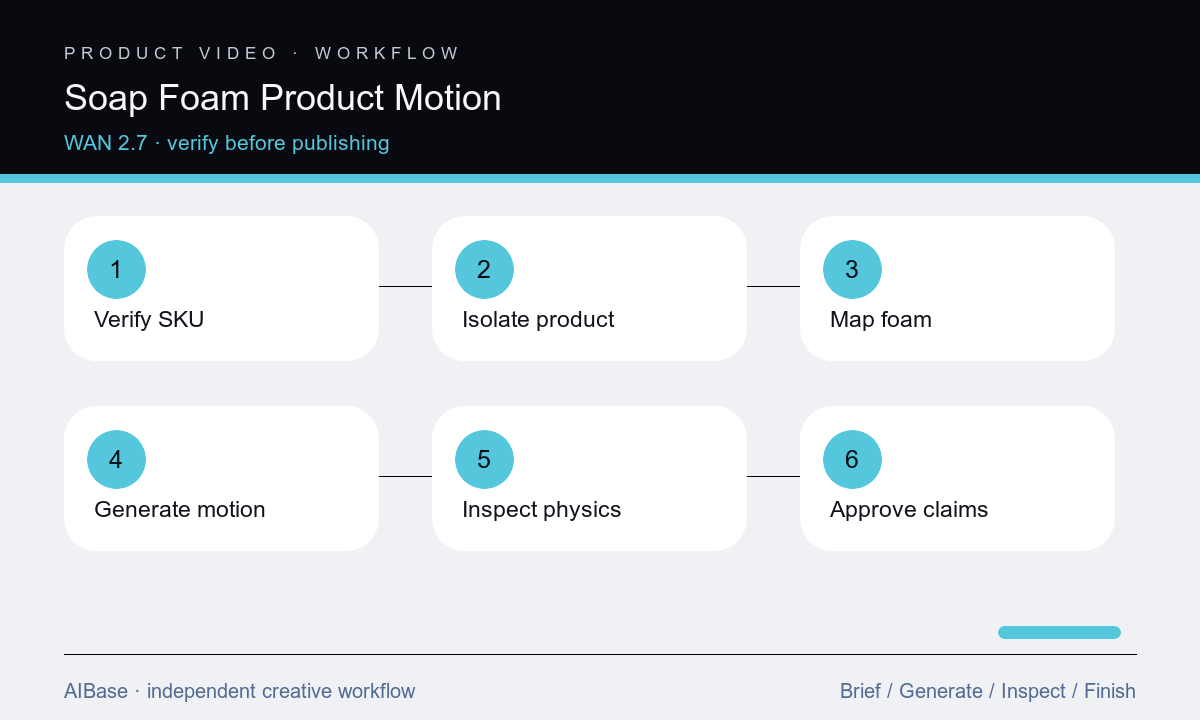
- Verify the exact SKU, formulation category, packaging artwork, embossing, color, texture, permitted wetness, foam behavior, claims, ingredients, and intended channel.
- Prepare a clean high-resolution source and decide whether the packshot should remain fully static while foam is generated as a separate plate for safer compositing.
- Map protected product edges, label, pump or cap, reflections, contact shadow, and a small foam region that will not obscure required packaging information.
- Prompt one foam action with explicit bubble scale, speed, attachment, gravity, camera, and endpoint; avoid hands, faces, cleansing demonstrations, or implied test results.
- Inspect frame by frame for product deformation, label drift, changing embossing, crawling reflections, foam penetration, unnatural expansion, popping cadence, and edge halos.
- Composite approved packaging and claim layers, add licensed sound and captions, then complete cosmetic, legal, product, accessibility, and channel review.
Example prompt variants
- Five-second locked macro of the exact approved embossed soap bar, a thin lather slowly expands along the lower front edge and settles, preserve bar dimensions, corners, embossing, color, texture, shadow, and dry upper surface; no hand or claim.
- Four-second product loop of the exact approved hand-wash bottle, three small bubbles rise through foam beside the unchanged base, bottle and pump remain still, preserve label artwork, liquid color, reflections, shadow, and clean background.
- Six-second close product shot of the exact approved facial cleanser tube, a narrow ribbon of foam rests on the surface in front and gently relaxes, subtle push-in, preserve tube, cap, crimp, label, color, highlight, and no skin demonstration.
Quality checklist
- The bar, bottle, tube, pump, cap, seams, embossing, label, logo, color, texture, reflections, count, and contact shadow remain source-accurate.
- Foam scale, attachment, moisture, gravity, expansion, popping, settling, and interaction with the surface are physically coherent and restrained.
- Readable packaging and claims remain exact, unobscured, and approved; generated motion does not imply medical, antibacterial, whitening, or environmental performance.
- Camera and background are stable with no crawling edges, floating product, foam penetration, changing wetness, halo, flicker, or abrupt loop point.
- Source, prompt, output, composite, claim evidence, soundtrack, captions, approvals, and final channel exports remain traceable.
Mistakes to avoid
- Requesting luxurious abundant foam and allowing it to hide the label, change the product, or imply performance the formula does not claim.
- Animating the soap bar itself until corners melt, embossing moves, the bar swells, or surface texture becomes liquid.
- Adding skin, hands, pores, bacteria, whitening, healing, or before-and-after imagery without the necessary evidence and review.
- Accepting a polished loop without inspecting the packshot boundary, label letters, foam physics, flicker, and endpoint frame by frame.
Related AIBase pages
- Open Wan 2.7
- Create water-splash product videos
- Animate beverage condensation
- Build skincare launch films
Practical next step
Open the most relevant AIBase generator, run one narrow prompt first, and save the best result before adding more constraints. The fastest way to improve output quality is to compare one variable at a time: subject, camera, background, lighting, then final polish.