
Wan 2.7 Beverage Condensation Video Prompts
Animate beverage-pack condensation with Wan 2.7 using plausible droplet growth, stable labels and fill levels, controlled cold cues, clean surfaces, and composited product claims.
Quick answer
Start with a clean authorized packshot and specify a small number of droplets that bead, merge, and travel downward under gravity. Protect the can or bottle, label, liquid color, fill level, cap, reflections, and contact shadow. Keep coldness as a visual cue rather than a performance claim, and composite readable packaging and promotional copy afterward.
Who this guide is for
Beverage brands, cafes, food-delivery teams, retail marketers, and product-video editors creating cold-can loops, bottle reveals, menu-board motion, or summer social ads.
Recommended model
| Use case | Recommended model | Why |
|---|---|---|
| This workflow | Wan 2.7 image-to-video | A reference-led motion pass can focus on one bounded surface behavior—condensation—while the photographed package provides the shape, color, and layout anchor. |
AIBase is an independent creative platform. Model names are shown only to identify supported underlying technologies and workflow choices.
Prompt template
Animate the uploaded authorized [can/bottle/cup] packshot as the exact first frame for [4-6 seconds]. Condensation behavior: [sparse/medium] clear droplets form gradually on the cold exterior; [one or two] nearby droplets merge and move slowly downward under gravity, leaving a subtle wet trail. Camera [locked or one slow move], lighting unchanged. Preserve package silhouette, proportions, material, color, seam, cap or tab, label layout, logo zone, readable areas as source pixels where possible, liquid color and fill level, ice count if present, reflections, highlights, contact shadow, background, crop, and orientation. No label mutation, extra product, frost explosion, fog cloud, leaking package, rising droplets, changing fill, carbonation claim, freshness claim, temperature number, text, watermark, splash, pour, hand, or second action.
Step-by-step workflow
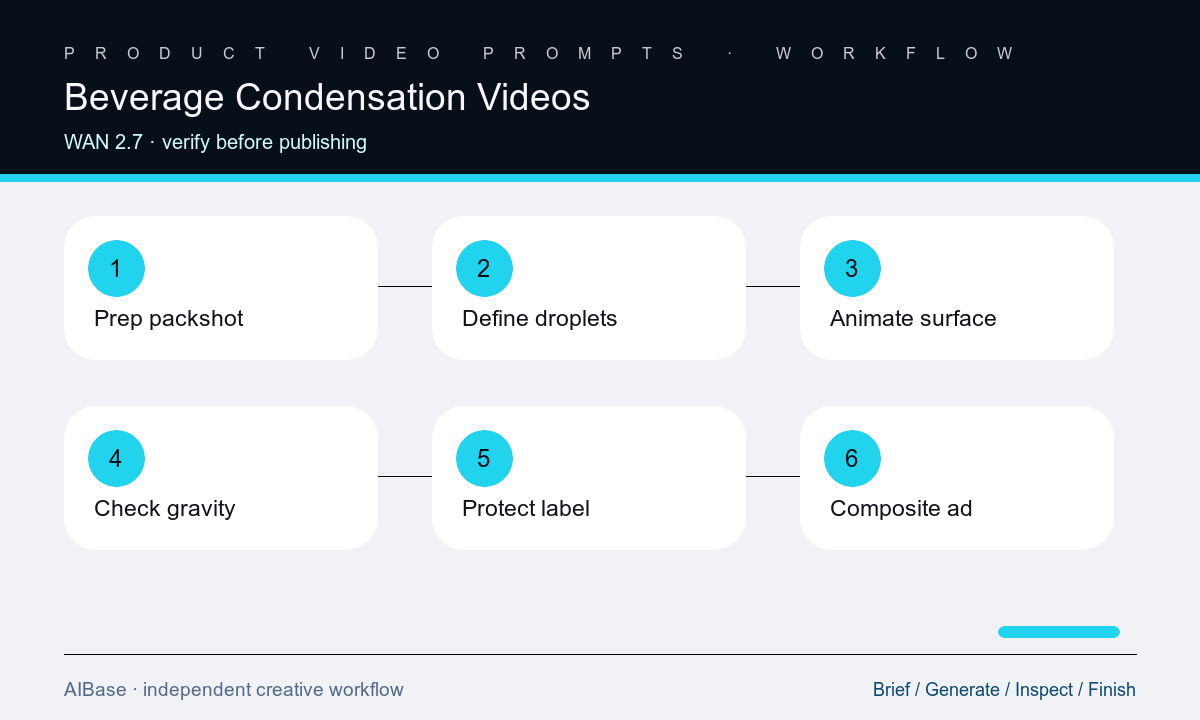
- Verify the exact package, variant, fill, serving depiction, label, claims, market, packshot rights, surface cleanliness, and whether condensation fits the real product presentation.
- Choose droplet density, initial size, merge count, downward path, trail length, duration, camera, crop, and end-frame hold based on the package material and lighting.
- Prepare a clean reference with accurate label geometry, highlights, fill level, cap or tab, contact shadow, and enough uncluttered background for moving droplets.
- Generate one condensation action with a locked camera first, adding a subtle camera move only after droplet direction, label stability, and package geometry are reliable.
- Inspect droplets frame by frame for scale, transparency, refraction, gravity, merging, trails, edge crossing, label distortion, seams, highlights, fill, and surface contact.
- Composite approved packshot details, logo, product name, temperature or refreshment copy, price, CTA, legal lines, captions, and sound in the final edit.
Example prompt variants
- Five-second locked macro of the authorized aluminum can: sparse clear droplets appear gradually, two merge and travel eight millimeters downward, preserve can cylinder, rim, tab, print layout, metallic highlight, base shadow, and no frost or splash.
- Six-second bottle hero with a subtle push-in: medium condensation on the clear exterior, one droplet path beside but not across the approved label, preserve cap, label edges, liquid hue, fill line, refraction, table reflection, and no leaking.
- Four-second menu-board loop of the approved cold cup: fine beads on the outer wall and one slow downward trail, locked camera, preserve lid, straw opening, cup print zones, drink color, ice count, background, and a clean right copy zone.
Quality checklist
- Package silhouette, seam, rim, cap or tab, material, color, label geometry, liquid hue, fill level, ice count, reflections, and contact shadow remain stable.
- Droplets have plausible scale, transparency, refraction, adhesion, merging, downward gravity, trail behavior, and interaction with package curvature.
- There is no rising water, interior leak, frost eruption, steam, fog cloud, splash, changing fill, duplicated package, or label-smearing path.
- Cold, fresh, carbonated, hydrating, natural, low-sugar, performance, and temperature claims are approved copy rather than inferred generated facts.
- Packshot, prompt, compositing boundary, current label, legal review, captions, sound, crop, and destination SKU remain traceable.
Mistakes to avoid
- Asking for ice-cold maximum condensation and getting oversized droplets, white frost, fog, leaking seams, or a package hidden by water.
- Letting droplets cross the label until letters, logos, barcodes, nutrition panels, or variant colors distort between frames.
- Combining condensation, splash, pour, can opening, hand pickup, camera orbit, and ice movement in one short generation.
- Using cold visual cues as proof of freshness, carbonation, hydration, ingredients, taste, serving temperature, or product performance.
Related AIBase pages
- Open Wan 2.7 image-to-video
- Create water-splash product videos
- Animate a beverage pour
- Compare product image-to-video models
Practical next step
Open the most relevant AIBase generator, run one narrow prompt first, and save the best result before adding more constraints. The fastest way to improve output quality is to compare one variable at a time: subject, camera, background, lighting, then final polish.